Realistic hair for avatar

I'm trying to use DAZ avatars in CLO (exported from DAZ Studio as an OBJ file). More specifically the Genesis 8 template. However, when exported to CLO, hair and eyelashes look fake since they loose their transparency. How do you get realistically looking hair for avatars in CLO?
Also, the eyes of the Genenis 8 seems to turn all white when imported to CLO. Have anyone been able to solve this problem?

-
CLO3D and MD use the opposite color for the alpha channel. This happens between some render engines with .png textures. Black and white values of (0,255) need to be swapped before you import on the alpha channel.
0 -
Hey Bestseller3D. You will find all your answers here:
https://www.youtube.com/watch?v=ft0DENLk8Og
Happy CLO'ing.
P
0 -
That video won't help Pablo - it doesn't go into the necessary depth of the vray shaders for hair and how to apply transparency for those shaders within the CLO3D type of vray shader engine. Nor go into the depth of difference between the DAZ i-ray shader engine. What you would be best doing is creating a shader for hair that works well for what ever render engine you decide to use for transparent hair. For example - DAZ uses the i-ray engine ( see description on differences - article link ) So it will look different simply because the way it works and shaders also differ. Chalk and cheese physics of light rays that are being processed.
When you view the 3D hair model in CLO3D in the 3D window (work in progress window) it uses their specific working mode render engine and shaders / materials are treated in a crude way, when you render in CLO3D it uses the v-ray render engine and the progressive render picks up materials and shaders (if they are present). When you render in DAZ it uses the i-ray render engine.
In all 3 cases there are 3 different render engines and use cases for rendering textures yielding 3 different results. One does not look like the other as they are each unique in how they treat the material/shaders. And therefore you must use a bespoke shader (not one common material) for the render engine you choose for the final image. If you use CLO3D then use a v-ray hair texture shader setup to that hair model. The DAZ hair shader one is perhaps what needs to be tweaked. And then remember what you see in the CLO3D work in progress mode for the hair may not look like the final hair shader until you render.
CLO3D render engine link.
Create a v-ray hair shader that you know works in CLO3D as a material and then drop that on your model or edit that texture maps and v-ray hair shader for your project. Drag and drop from one application to another assumes they are all compatible shaders and in this case they are all different !
Some reading >> External Hair shaders > v-ray
0 -
Hi ottoline. Well, I still believe it will help within the limitations of the materials in CLO. You are well aware that there is not much flexibility in that department.
I could be best doing many things. I believe you are best positioned to help with materials. I take that from the deep comments you generally bring to the forum.
I could help if you are up to the task and if CLO developers get involved too.
P0 -
I don't need help on how to use CLO3D Pablo, as that task is well managed internally without outside help. I am here in this forum to offer a DAZ/CLO3D user a specific perspective on why hair shaders don't always transport from one system to the next. It's fundamental CG application differences.
Bestseller3d > They are all as flexible (as) in the knowledge that all three render engines are different. The limitation is the shader overview: because they are all different approaches to materials, each has varying depth in terms of shader quality and that export formats into and out of CLO3D don't always include details that will transport shader artifacts. One cannot just drag and drop any texture/shader from one system (eg: DAZ) with it's shader setup (i-ray) and expect that it will work within CLO3D in both the viewing mode and the v-ray render mode without some indepth re-work on the hair shader/material/map for their project in that app. (tweaking what is missing or what needs to be added).

CLO3D work mode with DAZ bangs/hair planes for general assembly viewing. (a fast render low quality view - hair transparency channel flipped and slider set to zero )
A does not equal B in this instance and you MUST always check the alpha transparency mode for the incoming textures between systems as they may not be compatible dependent on the work-mode / render mode. CLO3D has the transparency slider in the work mode but that is limited in how it translates into the render mode for instance. If you require a beauty render then you are now shifting into the domain of render engine physics (render engine choice - internal or external) and how material shaders effect end results based on shader setup. That domain space requires a mind shift in how to approach the issue. Drag and drop from one system to the next becomes untenable for many material/shaders if the content in the shader is simply missing from the system the work originated from. A new fashion user does not always have a perspective on what the shader landscape looks like between systems so they could easily get the wrong impression that all materials should simply render and that CLO3D-vray is broken in some way.Or that they limit the quality of what they can squeeze out of the CLO3D v-ray render engine. And v-ray is a very good render engine (one of the best render engines on the market) so it certainly pays at a point like this, to take a dive into that shader space for items like hair/fur/skin.
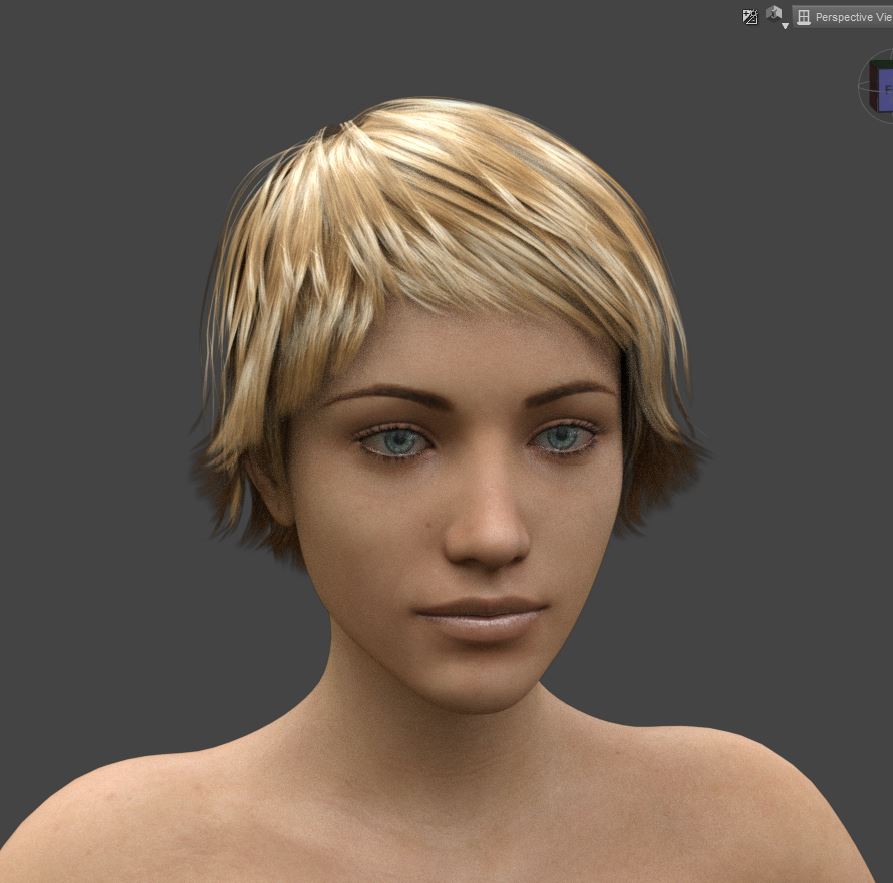
DAZ i-ray does not equal CLO3D v-ray as the shader setup is not exported with the model - only the hair texture (bangs/hair planes) maps.Therefore in CLO3D you need to do this shader setup work for your imported hair model.
It's about approach - this is where the user needs to stop and take a short look into an appropriate v-ray shader setup that is geared to the DAZ surface plane hair map (bangs) as that is a specific approach to faking hair, (as opposed to strand based groomed hair ) test a few samples in CLO3D and see what they aesthetically like and then apply that thinking (in future) into their library of CLO3D with a drag and drop materials shaders for when they do import a DAZ model. Do once , then rinse and repeat for every future hair-cut you drop from DAZ into CLO3D.
CLO3D hair /fur shader table setup - worth a quick read > Link . Then perhaps time to add an in vogue strategically placed winter fur hat !
0
댓글