Pattern drill holes

Does anyone know how to create drill holes on the 2D patterns? When I import my patterns, they are expressed as circles with a positive sign in the center (see screen capture below).
Thanks, Jeff

-
hi Jeffre yee, I think they don't convert them to hole on purpose, because they will break the mesh.
If you want, you can draw a small circle, zooming in the tool will snap to the cross so you can easily target the correct position, and then convert it to hole.
A PD of 5 is needed for small detail such as mm 5 diameter hole to be showed nicely.
For simulation these holes are non necessary at all, usually i real life they indicate where a sew stop or, for pleast, the distance from the margin, the end of a dart and so on.
Daniele.
2 -
Jeffrey, for CNC you don't need to put in an actual physical hole to the pattern piece. The DXF-AAMA/ASTM standard uses drafting references to denote some technical features of a clothing pattern > when exported the next device will place in a reference drill marker that will indicate that the CNC apply a drill hole into the pattern piece at that point. Like most CNC and 2D CAD drafting standards, symbol references and layers > are typically used > as small blocks of inserted drafting elements or external (XREFS) that the plotter will recognize as certain functions, eg: drill holes, button slits, notches, etc. So when you transfer your CAD file this is written into that datafile as that symbol on a layer that the next application will read as being that function within the drafted pattern piece. The symbol you see in CLO3D drafting is a special inserted XREF block that will apply the correct CNC function to that pattern when it is passed on in DXF-AAMA/ASTM format.
1 -
Thank you for responding danielemanassero and ottoline. Just a little back story, I am importing DXF-AAMA patterns that I have made and using CLO to render them. Even though there are a few occasions where I need to alter the original pattern piece (anything with complex folds) and grasping the rule that CLO sews in layers (if you don't abide by those rules you encounter simulation issues) I think the software is great and will only get better. Going back to my original question, I wanted to know if there was a tool to create drill hole references that a CNC cutting machine could recognize. CLO has a notch making tool so I figured it might have a drill hole making tool as well. Seems like it would be useful when exporting patterns out of CLO.
0 -
Jeffrey, when you import a DXF-AAMA/ASTM file any XREF symbol, can be edited using the trace (I) tool. You can window select the lines (purple) and delete them. If you place in a dart and export it, there should be a drill hole based on your next software's import process whereby you assign the drill hole and dart recognition for that import DXF-AAMA/ASTM process - which is down to how the operator sets up their import process into what-ever CAD software they use. eg: optitex, gerber, browzwear. A dart is a specific, functionary item within the DXF. That is that in CLO3D assembly a dart is generally a cut out so that it can be assembled, whereas in a production draft it is filled in.
To add symbols within CLO3D for example you can select a line and add a symbol. But in doing so on an imported DXF you may need to clean the number points on the paternline from the DXF import process. But this can be done easily by converting points between notches to a curve line. Select point > right click > convert to curve. Then you can inset a new pattern edge symbol.

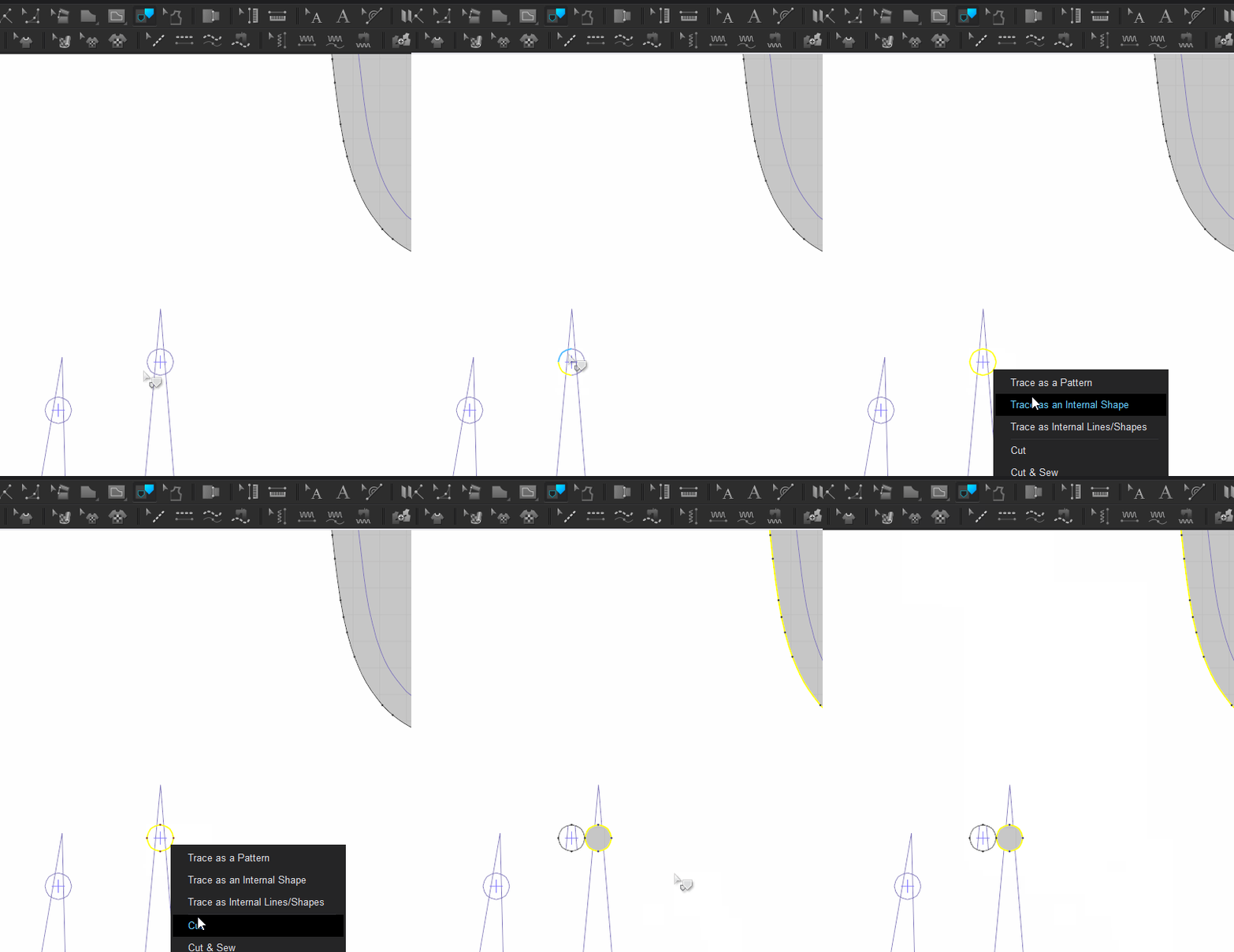
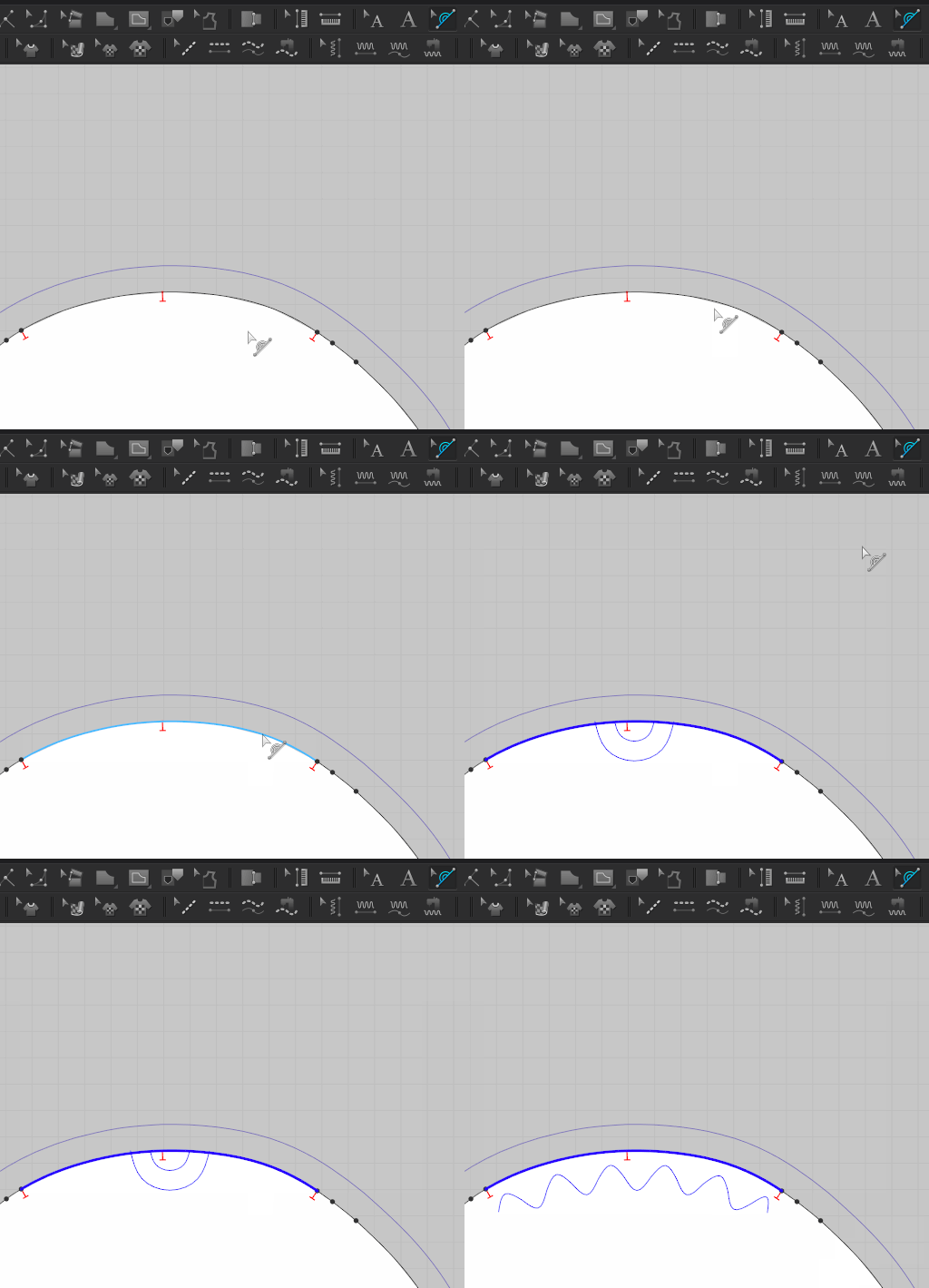
There is no need for them to be a hole as they are references. That are either annotated or set on import, between systems. A CLO3D dart for assembly is not the same as a dart for pattern production (eg: one has material removed for the 3D model simulation)
A drill hole by itself into another system can therefor be relegated to a symbol use as an XREF. How you set that xref for import into your next system is therefore a matter of how you set your next CAD translation.
1
評論