Grading Troubles - Grading input not showing on pattern

Hello,
I'm afraid I'm doing something stupid but cannot for the life of me figure out what. I've watched many tutorials on grading and nobody else seems to be encountering these issues. When I set my grade rules for a point or multiple points...they are not showing up on my actual pattern. See the below images. Lines are not being connected properly and most of my grading is invisible. Any idea what I'm doing wrong? and is anyone else experiencing this?
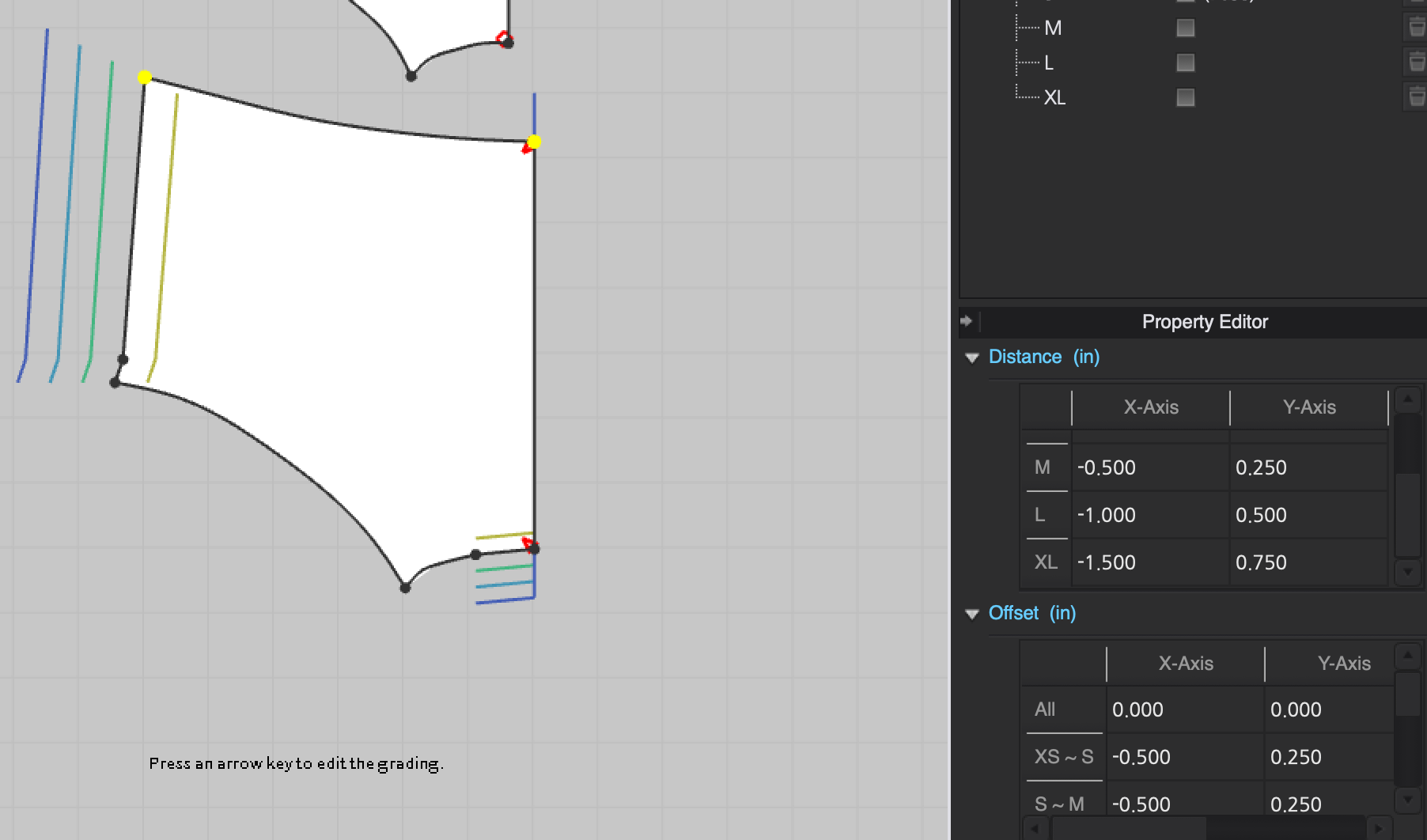
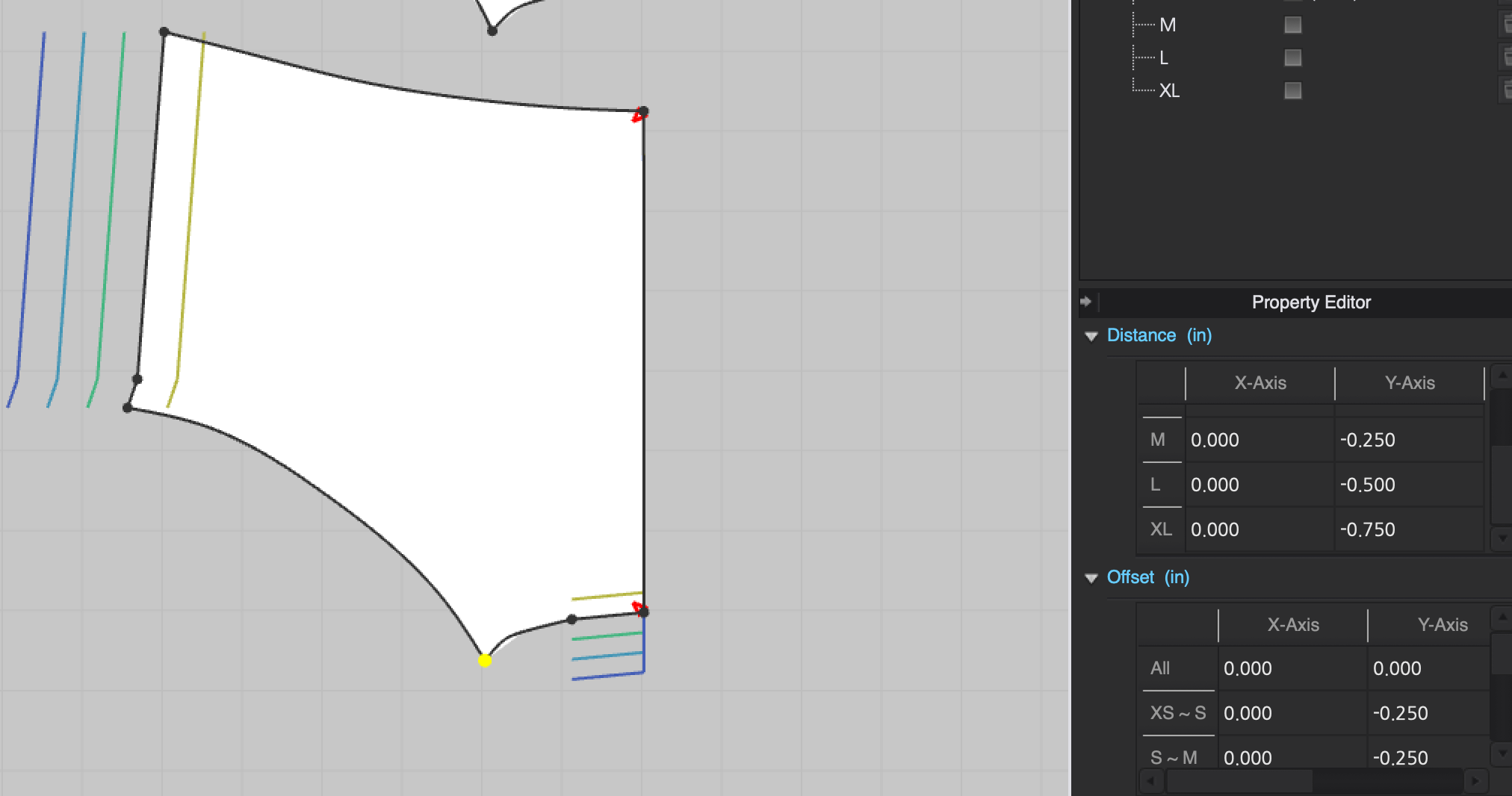
Hoping someone can help.
Best!
Lori
-
Hi Lori. Unfortuntaly I can't replicate the issue. Can you please share the file so I can try and open it here?
0 -
Hi Pablo, I tried attaching the actual dxf file but unfortunatly the forum is only allowing me to upload jpgs, gifs, or pngs. Would it be possible for me to send it to an email account?
0 -
Sure. pablo.quintana at forastyle.com
0 -
Thank you! Just sent. I cannot figure out what's going on and this issue is driving me mad. Thank you so much for taking the time to look into this.
0 -
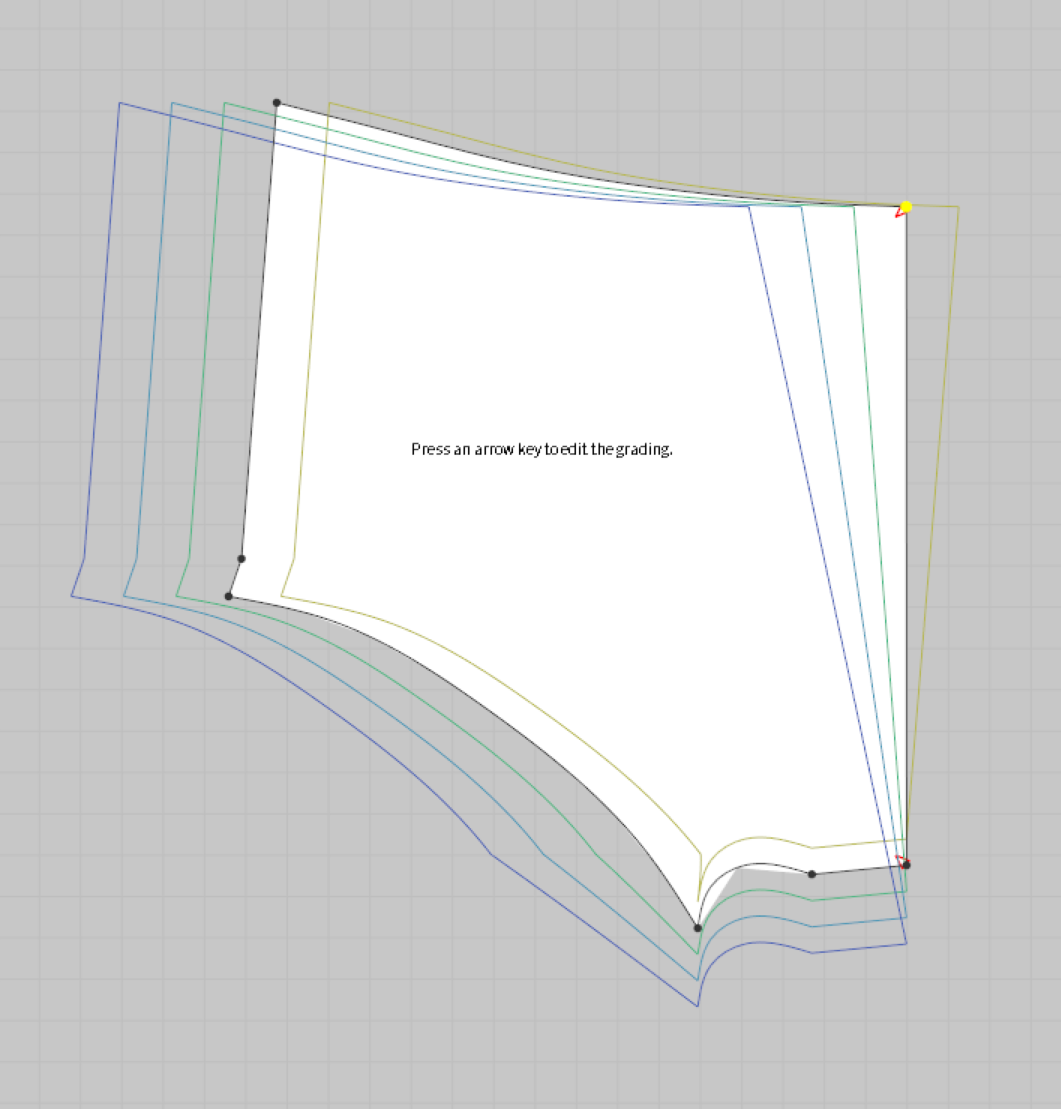
Lori, I checked the patterns, and the grading is not transferring cleanly, but the grading is showing normally in my computer. Are you grading the DXF files outside of CLO or inside CLO. In any case, I would grade them inside CLO if that is possible to avoid any import issues.
Try re-installing your CLO copy and see if that fixes the issue. I believe you are using Mac. I use Windows, maybe someone else can check them out in a Mac computer.
I'm sorry I couldn't help you further here.
 0
0 -
Before going through any lengthy re-install process, you should check a few items off your list. Are you using PC or MAC?
Depending on your graphics card type you may need to check that you have VBO's toggled on/off. See Setting > Graphic options > Use VBO's. When you change the VBO's toggle you need to restart CLO3D to test the results.
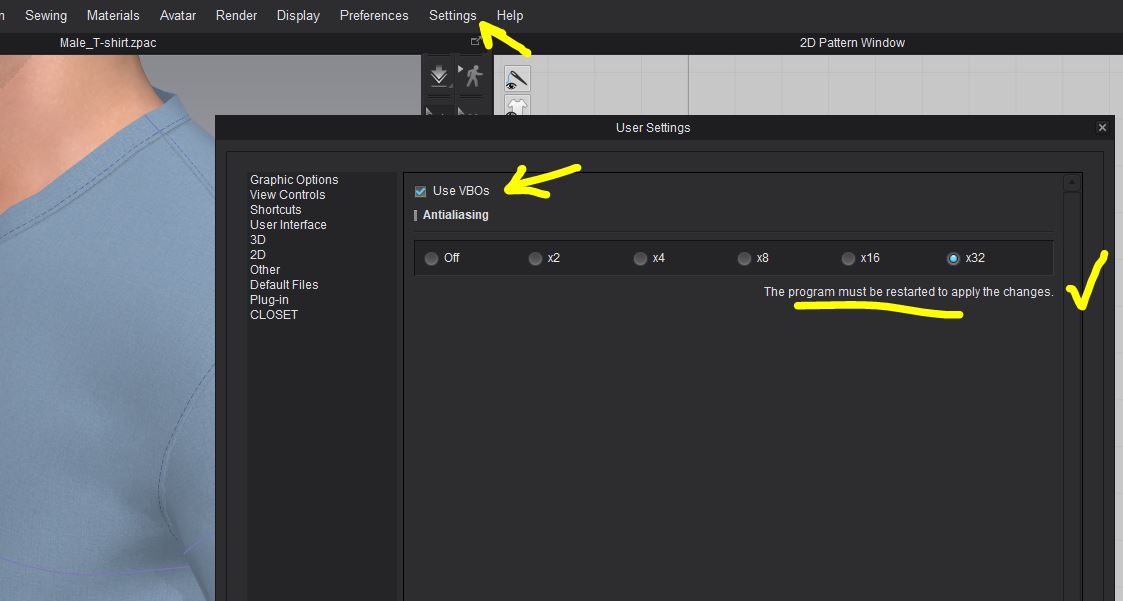
Check your latest video card drivers are up to date and that your screen is using your graphics card and not your main mother board video.
https://support.clo3d.com/hc/en-us/articles/115000307168-Computer-Specifications
0 -
Hi Pablo - It is good to know that the grading is showing up when you pull it up! I still can't figure out why it isn't working for me.
I have installed and am getting the same horrible results on all three of the below devices:
- New Macbook Pro
- MacOS
- And my husband's PC with Windows 10 AND Ryzn 5 2600 3.4 GHz 16 GB RAN.
I have tried uninstalling and reinstalling Clo.
I have restarted my device multiple times.
Ottoline, I tried updating the VBOs setting and re-started the program but nothing changed. Thank you for sending the supported device link! It looks like all the devices I have tried using it on are supported.Not sure where to go from here but I am willing to try any new suggestions anyone might have.
Thank you so much Pablo and Ottoline for your recommendations. Hoping to find a solution soon.
Best!
Lori0 -
Lori, have you tried grading a piece created from scratch within CLO? That will rule out if the import process of the DXF is the issue.
0 -
Hi Pablo, I recreated the pattern in Clo and it is grading perfectly, which is great!!
I have to say though, this is going to be a very time-consuming process if I need to re-create every pattern that a factory sends me in Clo before I can grade. I wonder what the disconnect is and why you didn't seem to have the issue when you pulled it up.
0 -
Lori, I can think of some alternatives you should test before, now that we know the issue is with the DXF import process.
1. Try exporting the DXF-AAMA files with a RUL table. That means that, instead of exporting with a nested grading (like the file you shared with me), you can ask whomever is exporting this, to make sure they use the DXF+RUL format, instead of the DXF nested format. Let's see how this works.
2. What CAD software are you using? Maybe I can think of other alternatives. You can try opening the files first in another CAD software and re-exporting from that third software program.
The reason is that almost any software company has their own interpretation of the DXF-AAMA standard, that is why sometimes it works and sometimes it doesn't.
One last test is to make sure you import your files with all the DXF import options disabled in CLO, and see how is working. It's hard for me to believe you won't get the same result by importing the same file into the same version of CLO.
 0
0 -
Just tried the latest install of CLO3D and no problem. Grades beautifully imports DXF no issues from gerber, optitex, browzwear, engineering CAD. I automate the process using batch processing tools. Typically I may have 500 of more garments to pass in one go over a couple of days, so manually doing that would be unproductive. You also need to check for garment curve integrity between systems for pattern pieces, as you can clean up the number of points and curve tolerance, that can be dropped to unacceptable levels that cause issues in grading smooth curves.
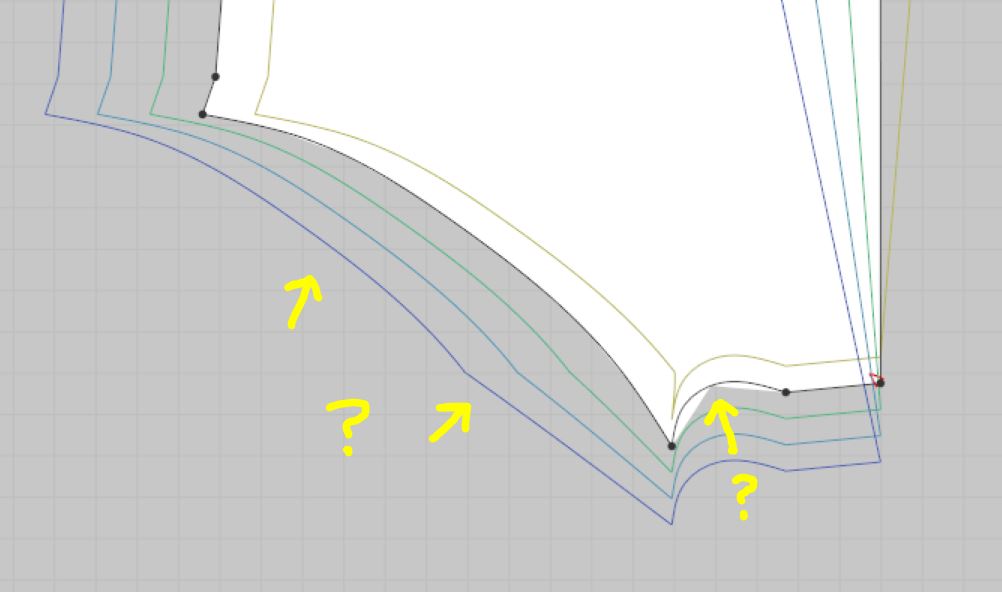
There appear to be curve point problems. Those curves look like they originated from the svg weighted handle format and not dxf? No pattern should grade like this, have the pattern piece curve points been dropped when translating the DXF pattern piece between systems - this should not happen. And you may need to check that the person exporting the file is not dropping out curve points when they translate the garment file - otherwise how can you trust the pattern shape is correct to the previous system? That means you need to specify how they do this. In optitex and gerber you can set that on export.What CAD system did this file come from?
Crucial if you don't want to get changes in pattern shape on import into CLO3D requiring lots of rework. Often not caught until it is too late and a sample is being made. So how they export is as important as how you will import, as that can mean you have to do it manually, check everything per item if they do not follow good procedure on export. Verse batch everything in one go, knowing it is consistently correct.
With file exchange it is usually a process of owner ship of the problem. I drive from a standpoint of ensuring the file being sent is good to pass on, that means I force them to send the files to settings that I dictate to them as good for their software. And have a process that they can remotely plug into online. That way I can be assured what I receive is kept to a good quality of compliance. Which means I have to provide an area online so they can quickly check and confirm they have met that checklist for their software. I make them sign off on that formally so it forms part of the contractual terms, and I support that effort by providing them all the settings I want the files to be set at - from their system. If they meet that, then I accept their files, if not I reject them, until they meet the process level I need.
DXF file transfer and batch interpolation is always a bespoke area of knowledge that requires you to set up that aspect within your company in an agnostic manner. MAC/PC/LINUX it should not matter.
For example: I generally have a section for that online where I specify all the file types and have test files that I get my manufacturing or CG partners to check for integrity on good transfer, with all the import/export settings for all known fashion CAD systems listed - before detailed work begins. And sign them off as trained on that exchange process. A kind of mini -audit to ensure a new batch of work is good to start and that is geared to each companies specific way of working. (I save the interpolation exchange setup so it can also be downloaded for their system setup). That way you can quickly fault check if it's A) CAD software B) Hardware C) Operating system D) Operator error. Or a new operator which happens in manufacturing with regularity. The last one is easy to resolve as you can simply point to online help, but the other 3 requires the operator to have been trained in CAD drafting at some professional level so they can check it remotely at their end. I often find it's simple things like the wrong driver setup and that they have done things like not using their HD graphic card properly instead running of their motherboard graphic card - which will cause things like this with linetypes and rasterization of line quality.
Hard to gauge your knowledge level > have you been certified as a CAD operator? If so on what system (gerber, optitex, browzwear, other) did you train? Then maybe I can point you to that area to check onlinje - I am familiar with most CAD systems and their support systems.
For example: optitex has a test DXF file interpolation support that you can run to check out the linestyles, font characters, etc. Chinese characters will cause grading RUL DXF import issues unless you add in the Chinese character set to your operating system. A common error by most dealing with files coming from Asia. Easily resolved when you know the provenance (chronology of the file ownership).
Maybe give a little more information about where the file came from, OS system and prior software it was exported from, and then maybe I can pinpoint what to look at in more detail.
0
댓글