Difference between stress map and strain map

I want to know difference between stress map and strain map.
As I understand, strain map shows how the texture is strained by external reason(ex. cloth is smaller than avatar in the case of tight fitting cloth).
Then how about stress map? It's said that 아바타가 패턴에 미치는 영향력을 계산한 것(meaning calculate how pattern is influenced by avatar).
It might mean...it shows red color when avatar is bigger than the pattern simply?
Could you explain more about this?
-
Hi r901207 and ottoline,
Thank you for sharing your questions, please let me clarify the features of Stress Map and Strain Map.
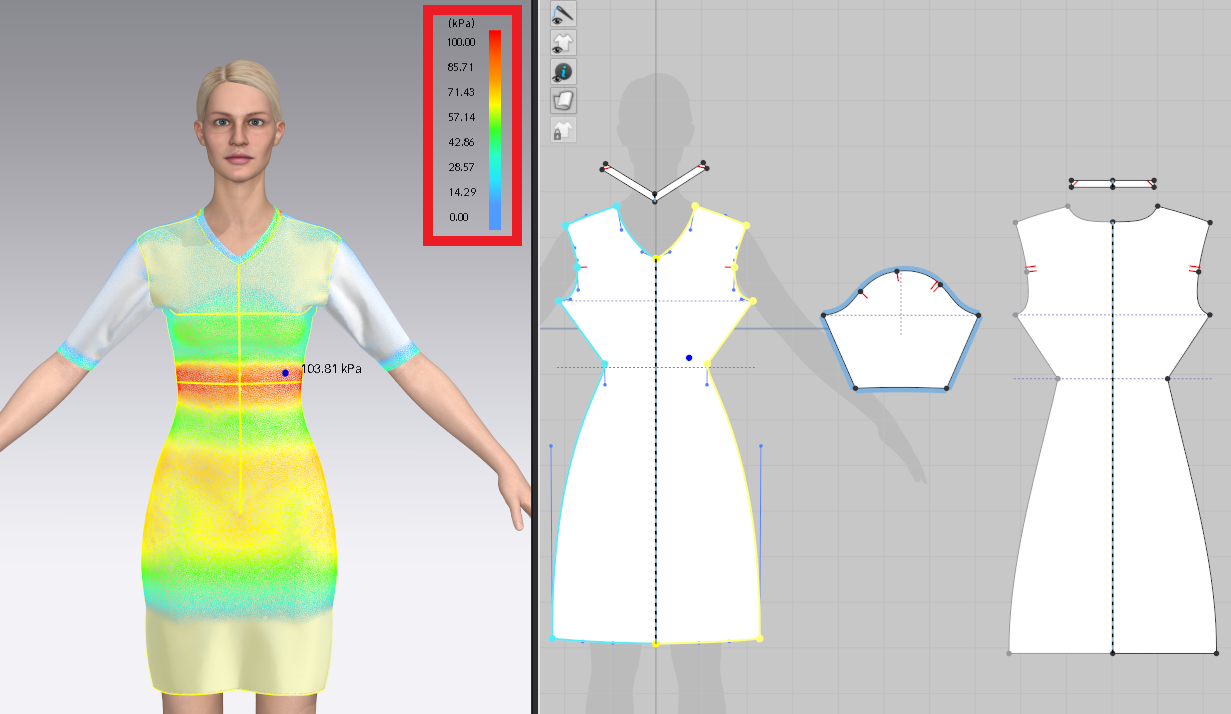
Stress Map shows how much pressure is in the fabric per section resulting from a tight-fitting garment. So users can see how much stress value from an avatar is applying to a garment.
You can refer to the colour to preview the stress value initially. Blue means zero stress (0.00kPa) while red means the strongest stress (100kPa).
When clicking on a point of a garment, the kPa value of the exact location appears. A higher kPa value means the stronger stress is applied from avatar to garment, and vice versa.
Here is an example: The waist part is in Red colour and 103.81 kPa is showed when user is pointing that part. So you can realize the waist part is quite tight for the avatar and you may need to double-check that part and modify the 2D patterns if needed.
Stain Map shows how much the garment is stretched when being worn. So users can see the distortion rate from 2D patterns to 3D patterns (garment) on avatar.
You can refer to the colour to preview the distortion rate initially. Blue means 100% of the distortion rate, which means no distortion and keep the original pattern stretch. And Red means 120% of the distortion rate.
When clicking on a point of a garment, the percentage of distortion of the exact location appears. A higher percentage value means more distortion between 2D patterns and the 3D patterns (garment) on avatar, and vice versa.
Here is an example: you can see the distortion rate is 119.11% in the image below. Then you can calculate the difference by 119.11% - 100% = 19.11%. At last, you can according to the distortion rate then modify the 2D patterns if needed.

To find out more about Garment Fit maps, please see the Garment Fit Map Guide: https://support.clo3d.com/hc/en-us/articles/360052622933-CLO-Garment-Fit-Maps-Guide
Thank you.
1 -
Huh - There's a dedicated PDF guide?
I missed that handy link in the online manual !
https://support.clo3d.com/hc/en-us/articles/360000436368-Garment-Fit-Maps
Maybe that is where the link might also be placed, under the 'Manual' topic?
Or in the related topics to the side menu ?
https://support.clo3d.com/hc/en-us/articles/115012227287-Strain-Map
" ...obscure content that cannot be readily found is - no information, for the un-informed ..." > I read that in my 'crystal-ball' I would have needed to consult to find that handy bit of information burrowed deep in the online help but certainly not linked in the manual.
0 -
Hi ottoline,
Thanks for your feedback.
To find out more about fit checking, please access CLO Help Center and enter the key wordings. Then you will find the manual and the related articles to know more about the topic.

To review specific manual, such as the manual of Fit Checking. Please access CLO Help Center > Lesson > References > CLO Garment Fit Maps Guide. You can also check out the manuals on other topics there.
 0
0
Comments