PC Tecnical Especification

Dear all,
can someone give me an inch about the tecnical especification of a pc who runs clo 3d in a fluid form with 5 particles in simulation normal mode??!, PLEASE!!!
I always have headches trying to make some small details and the mesh just explodes and such,and work in slow motion, just sucks, don`t get mad about my words, i jus love Clo but... no in slow motion, is just insane working like this.
Pd. I dont whant to work in gpu,
Specifications PC
Microprocessor AMD Ryzen 9 9000x
64 gb ram
nvidia 2080 rtx ti
3 Tb of hard disk
-
Make sure your simulation settings include all your cores for CPU. I can't assure that even a 32 cores Threadripper will make this simulate seamless at a particle distance of 5.
One way you could test this is to hire a virtual server with 72 cores and install Windows 10, download CLO and try simulating there. If you see that the simulation is fast enough, then you should upgrade to Threadripper.
https://azure.microsoft.com/en-us/blog/fv2-vms-are-now-available-the-fastest-vms-on-azure/
P
0 -
Can you run CLO3D outside of a personal license on a virtual server ? Perhaps best to keep that sat on your own PC.
If your mesh is exploding that means you potentially have some settings wrong.
The items to check off are:
Workflow - don't use 5mm particle distance when doing general pattern development. The recommended particle distance is 20 mm when editing patterns and doing sewing assembly work.
Simulation mode - when you have finished editing patterns > move into the beauty stage of the project + garment drape, posing the garment assembly where you assign patterns smaller particle distance. Freeze patterns as you work and ensure there are no additional attributes on pattern pieces like layers or hidden pattern pieces, or unbalanced pressure, scene wind applied to pattern pieces. Then pose your avatar and garment at 20mm into the finished position > then lower the particle distance to 5mm and set the simulation mode from normal to a finer time-step > eg: Simulation complete or Simulation complete (non linear)
Check default simulation presets - check that you do not have older presets (with the same name) sitting in the default folder, from a previous install. There should only be one of each type from the drop down list in the property editor. If you have two with the same name check you are using the latest dated preset for that mode.
Make sure seam types and pattern /fold angles are correct - patterns can be assigned edge data that conflicts with the cloths draped position under assembly. This may present itself as a rolled edge whereby the fabric collision cannot simulate into the position dictated by the attribute you have assigned to a pattern piece. Most obvious is when a cloth pattern jitters. Roll through your seam assignments and make sure they are correct, that check will often resolve most assembly issues.
Pattern attribute build up - If you have flipped normal's on a pattern mirror or created a symmetrical pattern , or cloned under , then over , these are all attributes that may now sit on a pattern piece sometimes need to be re-checked or cleaned up (purged) in assembly. If I get a problematic pattern I will often break it's symmetry or re-assign attributes to see if that gets rid of the collision sim fault. Often I have left on something on the pattern piece that is causing this - eg: opposite seam angles that need to be reset or layer order error. Check you don't have hidden props, the floor or other hidden avatars in the way of a cloth sim. It does happen within a scene.
Create a new custom preset - You can create your own custom simulation presets to fit your workflow, for example to dampen down cloth behavior.
Check your graphics cards mode - Settings > user settings > use VBO's (vertex buffer objects)
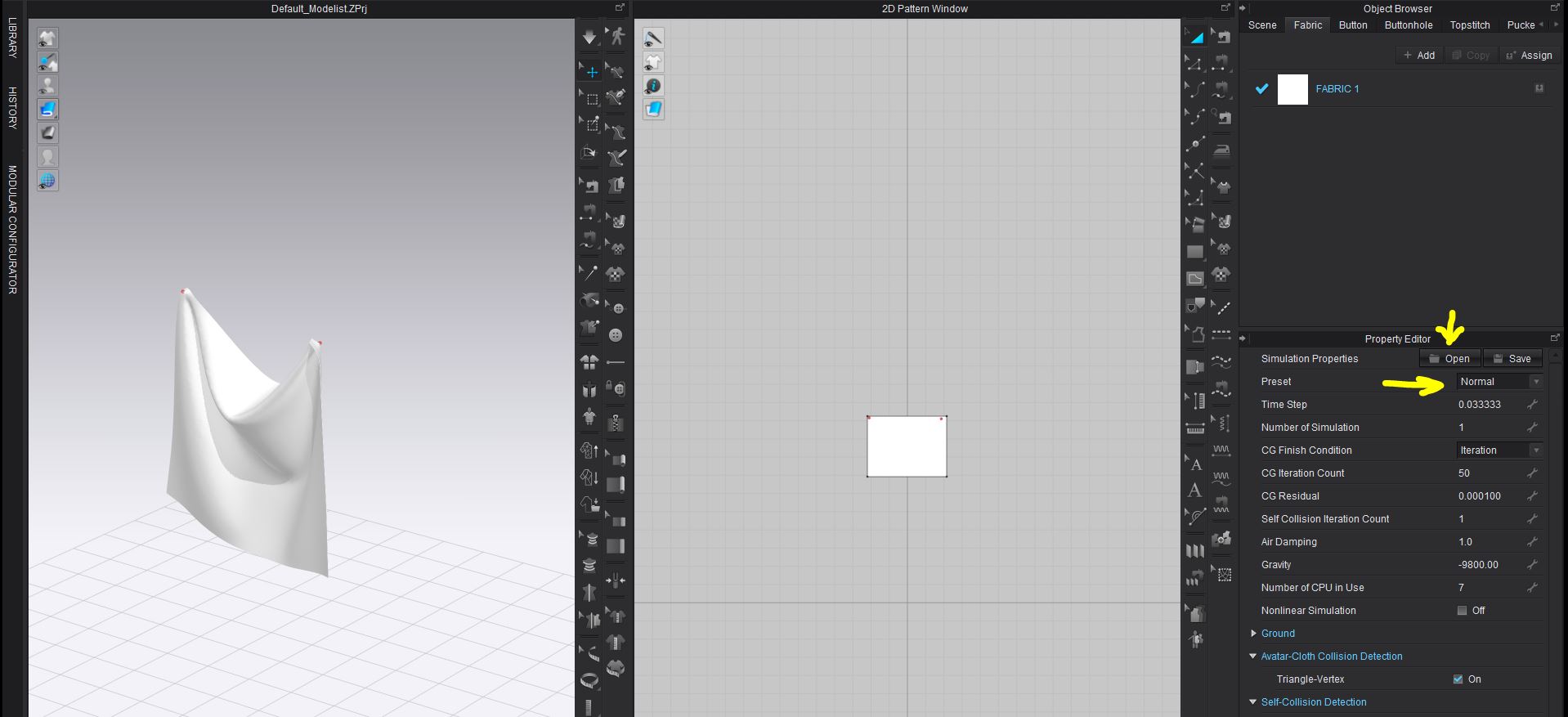
When I am drafting and editing 2D patterns I typically work at 100mm particle distance, GPU sim so I get no sync delay. When I sew seams > I stay at that distance and when I move patterns to avatar arrangement points the same particle distance. When all my patterns are arranged around the avatar I save a history state and also up-issue the project file. I then move to 20 mm particle distance and GPU simulate the garment down for fit. Carry out any new pattern edits, check all seams and stitch angles > and then save another history state on preliminary draped assembly. I then move into posing CPU normal sim > animate the avatar and garment into the finished pose at 20mm particle distance > tweak any pattern layer jitter checking edge seams and collision offset > save another history state > now I switch off or freeze what I don't need > then I gear down to 5mm CPU sim tweaking the assembly as I work. At this point I might add adjust trim add in pucker, or shirring, tweak button and stitching. My final sim is with all patterns on and all layers switched back to zero with CPU sim complete (non linear).
TIP: with cloth simulation you might find it pays to test how many dedicated CPU's you assign to the app. I find that I get good performance with fewer CPU cores assigned. This is due to how I have my system configured to load balance out across the administrative tasks with other apps I have open as I work. So this is down to workstation setup and each individuals preferred mix of apps they may bridge into as they work digitally.Sometimes less is more for cloth collision apps like CLO3D.
0 -
@ottoline good point you got there about licensing. In order to clarify for other interested users:
1. It is not called personal license, but CLO Individual License. You can use it on multiple computers as long as it is not used simultaneously (floating license). Check link:
https://support.clo3d.com/hc/en-us/articles/115013366908-Can-I-use-my-license-on-multiple-devices-
2. If you use virtual servers, you can install a copy of Windows 10, which is not a server OS and use it as a Workstation, so I don't see any issues there either.
I actually think is a very good way of testing hardware without having to buy it, and it will cost only a few dollars to test. Rates start below $1 per hour up to advanced servers for $16 an hour.
I use it as render farms with Linux and command line rendering for Cycles.
P
0
Comments