Simulation too slow

Hello,
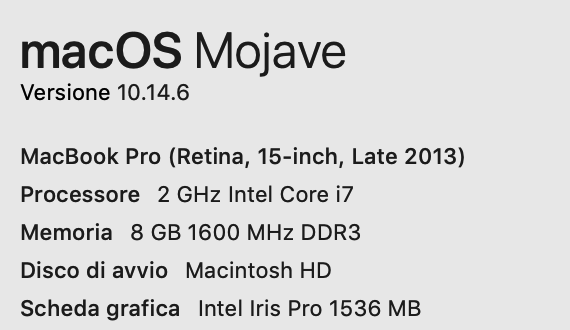
I am new to Clo3d and created a simple dress which worked well when I increased the resolution and used the render window. Then I created a more complex jacket, which does not work in higher resolution, as the program does not finalise the process when pressing the double arrow simulation button. I guess I am doing something wrong, but I cannot figure out where the bug is. When I press the simulation double arrow button, the 3D garment keeps appearing as on the img I attach below. I also attach the information about my Mac , in case it has something to do with the simulation problem.
I followed all the steps as on the "Beginner's Guide to CLO Part 4 Materials & Presentation: Presentation (Lesson 5)", and double checked my settings in the hi-res window.
Hope you can help me with this,
Many thanks in advance

-
sarabi, certainly there is no bug here, but simply lack of experience with CLO. My suggestion is that before going into doing the Complete Simulation (with the two red arrows) you get a stable simulation with a higher particle distance (maybe 10 to 15 mm) making sure you have enabled the correct layering with set sublayers or using the layers feature. Then, you can try to improve the draping by reducing the particle distance and using the complete simulation.
0 -
Many thanks for your help Pablo, I will try doing what you suggest.
0
评论