Female avatar size issue

Dear Community,
I'm having trouble with the female avatar and I need your help.
For my work I need an avatar with "Model" similar sizes ( 84 bust / 59 waist / 89 hip, height 180 cm ).
Of course, I've used the Avatar Editor before, but it always looks unshapely in the end. I've often started to build a block library and had to start all over again
because my own custom edited avatar just doesn't work out.
It would be ideal to have a measure set that is also consistent for the CLO3D Avatar Editor, like the Alvanon measures. The smallest Alvanon size would absolutely be ok,
but it refers to a height of 166 cm and I need about 180 cm to 182 cm.
Does anyone here have an idea or know other resources?
Many greetings
-
It's quite easy to adjust the avatars into a custom size, but you need to perhaps start with the right process as there is a definite approach to take when creating custom avatar sizes.
One of the main issues with adjusting avatars, is that you don't leap into manually adjusting each value manually one at a time. You need to take a progressive approach to shaping. So that is usually the 1st error that people make. Any database that drives human shape is driven by ergonomic rules. And body shape is governed by the 'frame' size and the relational proportions (ratios) for each limb or body part that sit in any relational database. So when you change height you should immediately start with choosing those body points (HPS) and scaling (in general) for the avatar as a 1st step. That will automatically push the algorithm to search for a nearby body frame ratio from the database that statistically fits within 'norms'. At that point (basic measures) you should start to refine the shaping, bust, waist, hips and then move onto the limb,torso sizes. One very important measure to set is the torso length, which effects posture, which is governed by the HPS and the crotch. Many people that sit outside the basic norms of 50 percentile 'average' will push the relational data to shift away from the basic fit curves, which is what also happen in Alvanon's digital software product. So unfortunately there needs to be some instruction on what approach to take when making a custom avatar otherwise it can quickly become a mess as the algorithm starts to chase all manner of manual adjustments.
I maybe need to do a few videos to show you how easy this is to do, but know with the right approach you can get almost any shape and size in a few minutes.
Try starting with getting the basic body size with the fewest measures to scale. Then work on the HPS and crotch heights, then basic girths of bust waist hip. And only when you have those in place move to adjusting the leg girth, then finally the arm girth and then arm length. Hopefully that will get you closer until I have time to run of some videos.


It's always good to see size alongside each other, as that gives the important context that it missing in most of the avatar tools where you only see one person at a time.
CLO3D is absolutely amazing for bashing out this visual work. And make the alvanon service offering look pretty pedestrian by comparison for a digital design workflow, so for me the new CLO3D avatar editor toolset with vray render is swish. I love it's visual flexibility, a great app, and not really pushed enough.

Vray in CLO3D allows you to quickly jazz up those boring avatar visuals
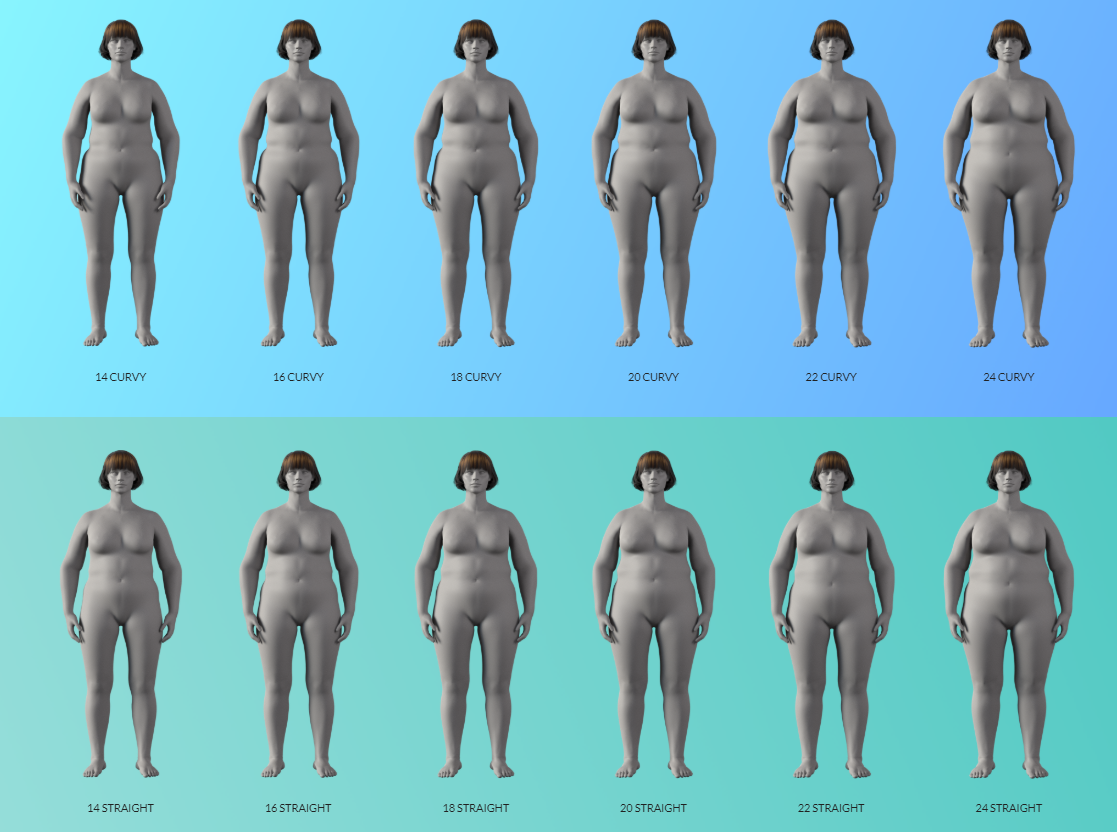


 0
0 -
Hello Ottoline,
thanks for your great answer. It helped me to understand the mechanics behind the Avatar Editor and in general it's an interesting topic, without doubt the Avatar Editor by CLO3D is very good.
What also bothers me about the female Alvanon measurements is that they all have a hip dip.
But yes please keep us informed when you create a video on the topic. I'll attach a picture of the Avatar I made. It worked much better now. The legs seem a bit too slim and it would be good to have a bit more bust, but when I work on it again, everything gets deformed.
If I create a straight skirt for this avatar, following a simple pattern, which always works in "reality", the fit is not good at first in CLO3D. I have to make the darts longer and bigger time and again and take out a lot more of the width, as it has been actually calculated. So it sometimes ends up in eternal work on the pattern, which is my real problem - I don't know anymore if it's because of an incorrect avatar or because of the pattern itself. With a own and fast edited avatar I just "do not feel secure".
Sorry if I'm mixing up themes here, but in principle I find it difficult to create a straight/fitted skirt pattern in CLO3D, even with the standard avatar, because of the hip dip or because of the big measurement difference between waist and hip of the standard avatar.
0 -
Hello ifashion,
You can always take an avatar out into a modelling software and alter it slightly to get the shape you want and then create a morph. This can be done using a free application like blender or Hexagon. You can also reverse engineer an realworld manikin into a CLO3D avatar using photogrammetry (simple phone camera will do this) and use their new tool for fitting an avatar to a scan surface that has been re-calibrated. I should also do a tutorial on that as well, as it's a process that takes about an hour to get some of your old tailoring formers into digital 3D assets with accuracy.
0 -
Thanks a lot for your help! I will doublecheck all your tips. Have a nice holiday :)
0 -
Hello,ottoline,
I have a similar question about avatar size.
Avatar shoulder width is very important when fitting outerwear.
Therefore, I want to specify the shoulder width of the avatar.What is the order of setting shoulder width dimensions
In the above avatar size adjustment process?0 -
ottoline Do you find CLO is just as good in creating avatars as DAZ?
0 -
They are very different things in many respects. Yes you can make an avatar in DAZ and there is the measure-metrics toolset for tapes but what it lacks is the database of garment sized avatars, with a relatively simple editing tool to adjust those avatars to the clothing (ISO manikin standards). So although DAZ has a wide selection of characters, and they have a measurement addon it is incumbent on YOU doing the rest of the work to get avatars that meet clothing standards. And that can be a lot of additional work if you were tasked with making DAZ avatars to fit clothing standards. It would easily be tens of thousands of dollars work to bring the avatar sizing into a similar level of dimensional accuracy as already found in CLO3D. So yes you can use DAZ but why for clothing manikins ? That would maybe be a waste of time, and effort.
CLO3D's avatar editor and library database of calibrated avatars/mannequins act as a leaping off point that would otherwise cost a lot of effort to simply repeat with other tools. You could use Alvanon - but again why use that costly resource if you have adjustable digital mannequins inside CLO3D that are just as good (or better). That would be my 1st question thrown back at you.And in CLO3D you can scan a manikin and place that surface in CLO3D to make a digital equivalent - which gives you tailoring parity with what you might have as hardware assets on the shop floor.
If you simply want to render a garment onto a digital avatar that looks better, well you don't need complex sizing measures to figure that out. That is where knowing when to drop the digital mannequin (for garment development) and pick up a character visual house model comes in. They are not the same thing - in fact they are radically different as they serve entirely different digital needs. And many people are getting confused on why and when to drop the digital mannequin and pick up a render model (avatar) character. When doing your production use the manikin to get the garments fit correct > when doing final renders for marketing use a visually styled house model avatar at roughly the size you would when using a real world model. What this means is, re-drape the clothing and pose the model for fashion shoot shots and don't use a clothing development mannequin. Once you get your mind over that simple hurdle - that they should never be one-in-the-same it becomes a two step process. And then yes you could use any styled render ready character avatar to wear your digital clothes - the only requirement is that they have roughly the bust waist hips and height measurements needed to fit the garment - they don't need to be completely measured like the development mannequin.
0
评论