Tack close to avatar

I am designing lingerie and so need the garments to fit as close to the avatar as possible. I have used tack to avatar but there is a slight gap between the pattern and avatar. See the image attached of the underwire under the breast.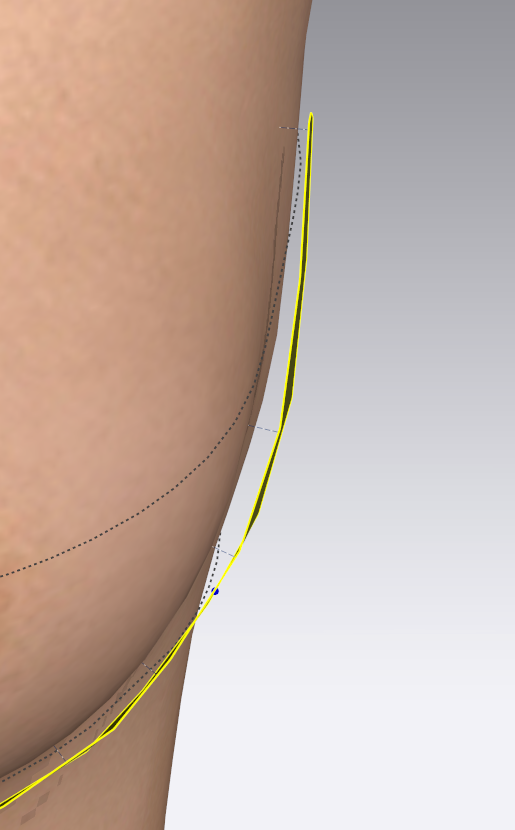
-
Hi coo17508244. The garment is sitting away from the Avatar because of Skin Offset. If you click on the avatar then go to the Avatars Property Editor you will see Skin Offset (it is like an invisible force filed protecting the avatar from colliding with the garment) You can reduce this to 2 or 1 to bring the garment in closer the the Avatar.
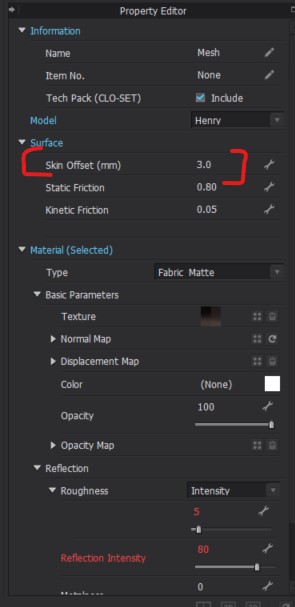
Or you can also wait till you are done creating the garment and then when you Selects the Hi-Res button in the 3D tool bar it will reduce the skin offset to Zero as well and bring your garment particle distance to 5
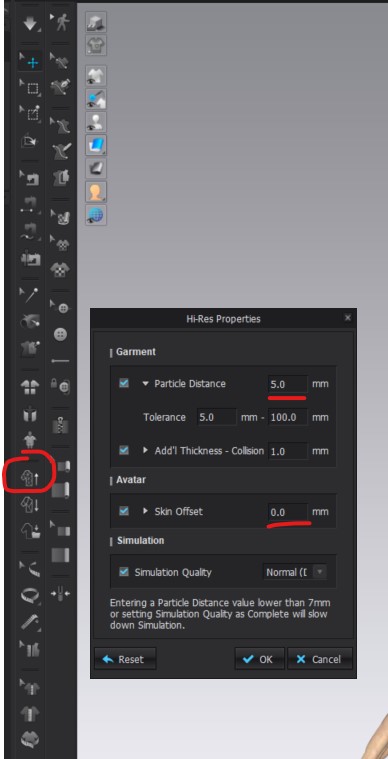
This way you will not need to tac your garment to the avatar unless you have a strap slipping or something like that
We Hope this helps!
0
댓글