Socks under sneakers

Hi all,
I'm really hoping someone can help me here.
There must be a way to make socks stay underneath the shoes in CLO. I have tried setting the layer of the socks to -1, I've tried pinning the socks to the avatar. and I've tried changing the skin offset of the avatar and the shoes. But when I simulate the socks begin pushing out from beneath the shoe. has anyone worked out either a correct way to do this or a workaround within the programme (as in not using other software).
This would really help me and I'm sure countless others out if this can be fixed.
Thanks
-
HI cameron
There are a few ways to add socks underneath the shoes in CLO. But this will be more of a work around then having the sock actually sit underneath the shoe. Layering that you mentioned will not work since layering works with garments and the Shoe is an OBJ.
-Opt 1 : Create a custom shoe/sock OBJ. When you create the custom show also include the sock as part of the OBJ. This way the sock and shoe are 1 solid object together.-Opt 2 : Add only the visual part of the sock, remove all non visual pattern pieces. In this case removing all parts of the sock pattern past where the shoe ends. You can then use the Basic Circumference Measurement (Avatar) Tool to draw a line around the upper calf of the avatar and ankle of the avatar. Once those lines are drawn on you can use the Attach to Measure (Avatar) Tool to attach the edges of pattern pieces to the avatar so the sock will stay in place. This should give you the look of a sock but without the collision issues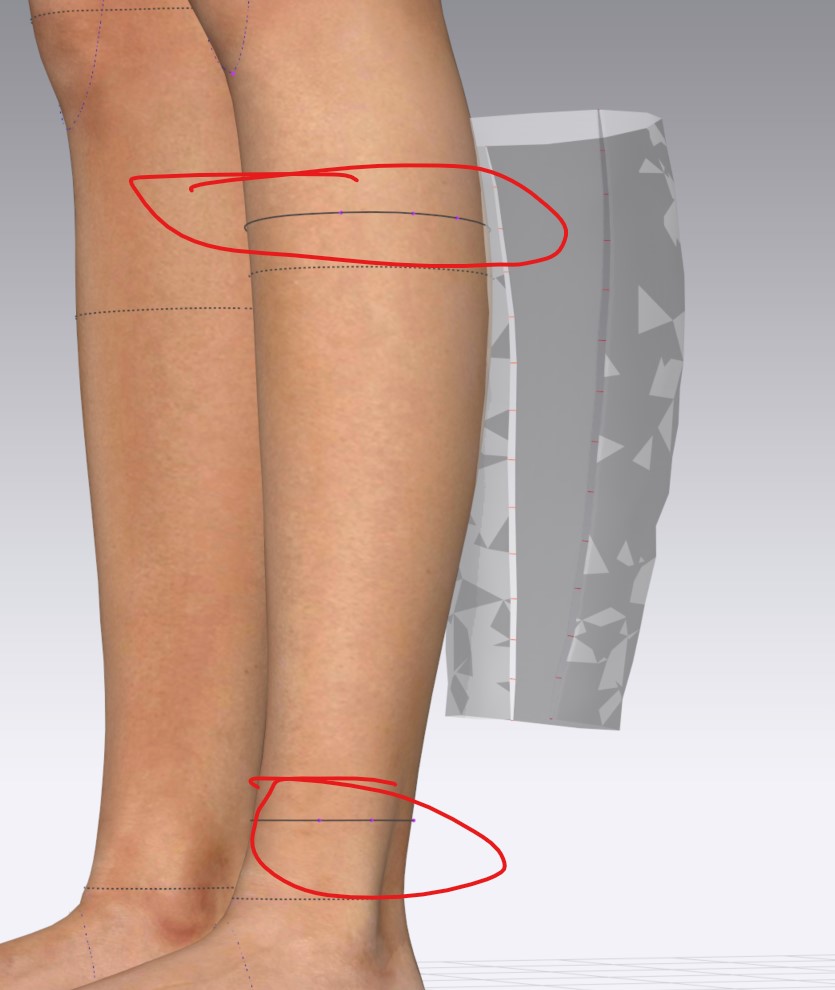
 We hope this helps and please let us know if you have any further questions1
 -
Was wondering about this and just found out that you can delete the shoes and hair of the avatars. I'd divide the socks into 2 parts and just simulate with just the feet. Once you're done you can freeze the bottom part that's covered by the shoes and re-import the shoes again.
1
댓글