How to get stockings underneath shoes in Clo3D?

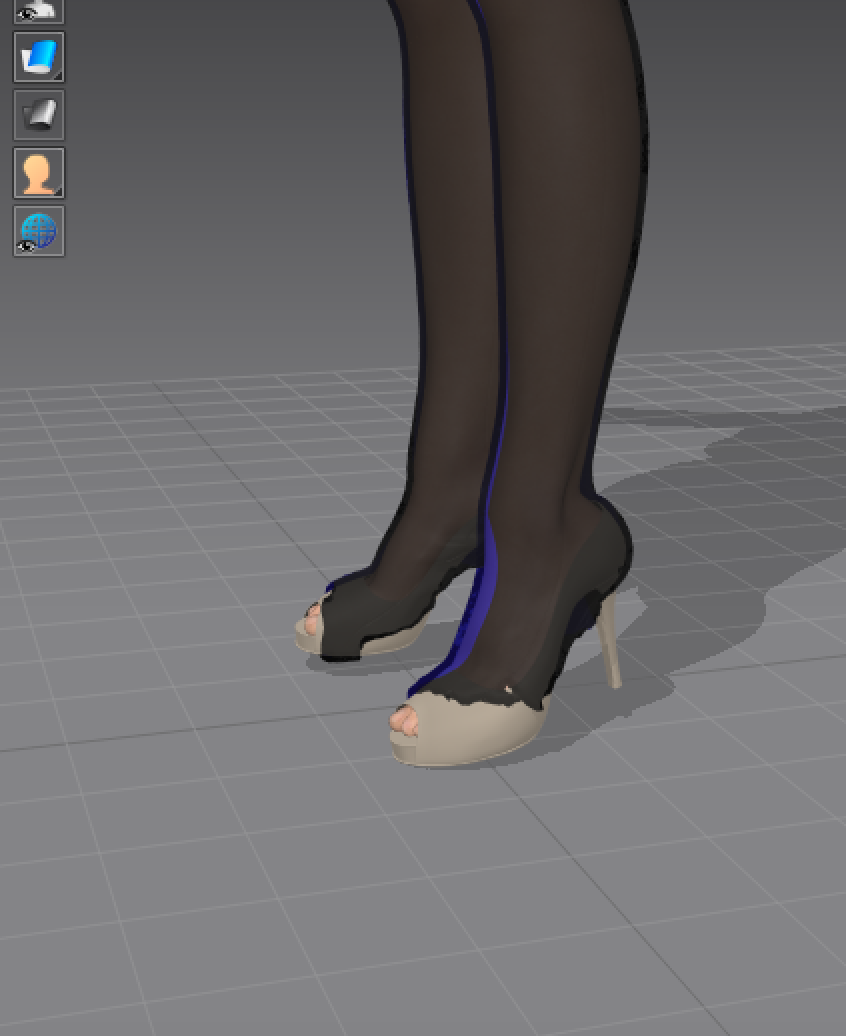
Hi, I am trying to make my shoes go overtop my stockings in clo and I am having no luck. Can anyone please help.
-
Set the avatars mesh offset distance down to 0.5 - 1mm (the default is 3mm). Then re-simulate the stocking so it's closer to the leg surfaces. This will affect how the garment simulates so you need to decide on your preferred skin offset for the avatar. Set the stocking to layer 0 or even try layer -1.
Then freeze the stocking once it has simulated cleanly (without shoes) - you may need to make sure there is no poke through with the avatar. You may need to then include a pin surface for those stocking surface areas under the shoe so they stay put. Then load the shoes onto the model.
As the shoes are a prop item if the stocking is still colliding or there is poke through, try scaling the shoes slightly up using the scale-gizmo feature so the shoe surfaces are clear of the stocking underneath.
0
댓글