Some trouble with Trace as a pattern tool

Hello,
I've drafted a pattern from scratch, mainly with the intern polygon tool and the add point/split line tool. I am now trying to trace it as a pattern by selecting the lines with the trace tool, then right-clicking and chosing "Trace as a pattern", the first option but you can see on the screenshots, it won't work either I select the dart inside or not. Could you help me please?
Thanks a lot!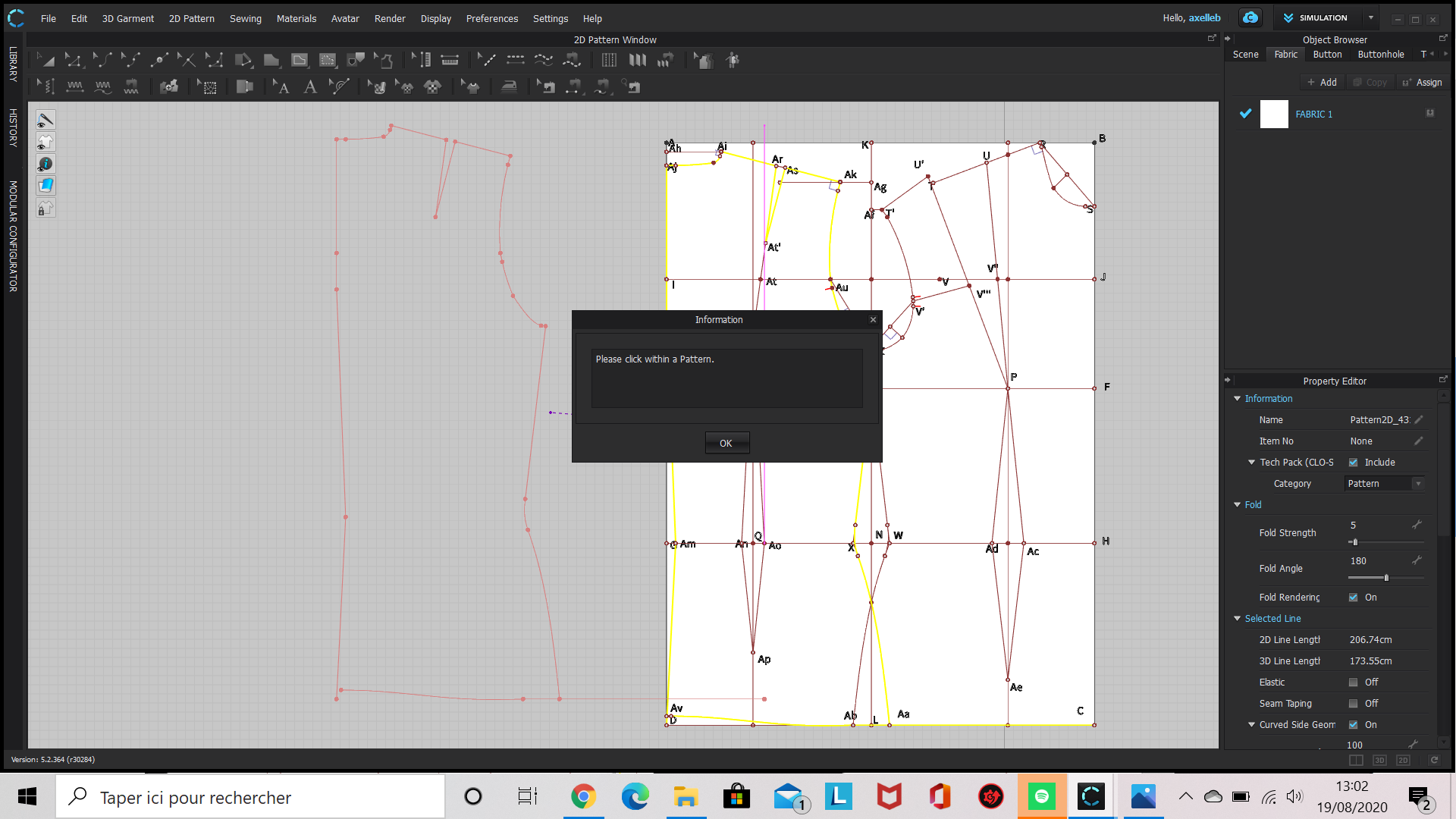

-
axelleb, just ansewered to your other question.
If you use the trace tool to create a new pattern the perimeter must be closed. As you see, the message says that you have copied an open path that can only be pasted as internal shape inside a pattern even you have chose "trace as pattern" from the menu.The Clo 2d part is quite good but doesn't have all the funcions of a 2d cad, like Lectra or others.
I have to say that Clo has improved a lot and a pattern can be create from scatch.Daniele
0 -
Axelleb, as Daniele mentions you have to have closed shapes in order to create a pattern. Yours are clearly not closed. You could close the shapes or export to Illustrator and close them there and re-import to CLO. If you have access to a CAD pattern software these tasks are better done there. I use share.padsystem.com to complement CLO in pattern making.
0 -
Okay, I see. Thank you for your answers!
0
댓글