How to message wrinkles locally and creating double-sided stitches

Greetings,
I made my first backpack in clo and fairly happy w/ it, but would like to know if there's a way of locally reducing wrinkles during Simulation. Is it possible to create a soft edged mask over frozen areas (like PShop quick mask) so that certain wrinkled areas can be smoothed out w/ the hand tool during Simulation. I've tried freezing areas during Simulation but not getting enough control, and then other areas get deformed that I don't want altered. I've set Gravity to 0 that helps a bit. Can the Hand tool be enlarged during Simulation for better "pulling/pushing" during Simulation? Also, is it possible to give stitches on both sides of these straps- I've activated Double Sided but that didn't help. Any advice is appreciated, thanks!
-
Hi, I can try to solidify a piece when you're are satisfied with a result. With that function, you can control how rigid the piece must be.
Another way is to use a more rigid fabric setup for certain parts
About the topstitches is not so clear what you mean.
If you have a double piece you have to put the topstitch on each pattern. Maybe you want to have a slight sinking real effect. to do so draw an internal line in each pattern where the topstitch is placed and sew together these internal lines. To be sure the topstitch is in the correct position put it on the internal line with offset 0.
Hope this helps you.
Daniele.
0 -
Thank you,
I assigned the fabric the more rigid leather preset and then froze some areas that were OK and then ran Sim. I also added seam taping to some parts which also helped. For the top stitching, I wanted the stitching to appear on both sides of the black straps but I'm guessing thats not possible due to the normals, so I guess I have to duplicate the straps and sew them together, unless someone has a different suggestion
0 -
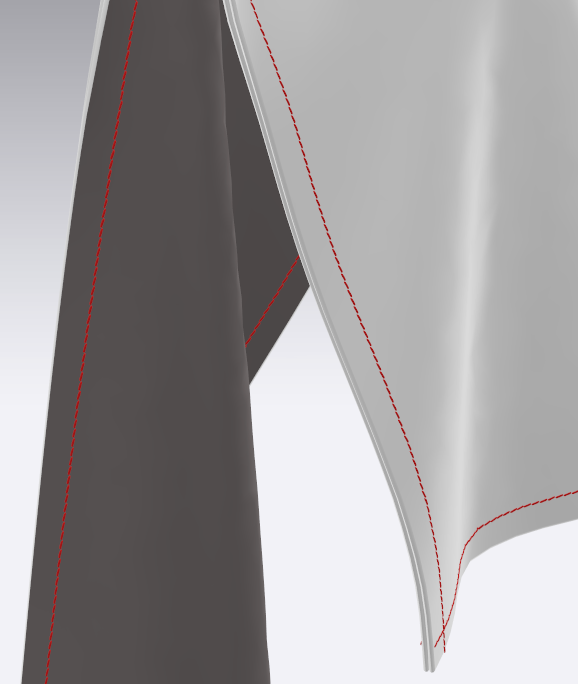
If you have one layer and choose for the topstitch in the property panel Configuration Face> both, the topstitch must be shoved in both side.
The double side effect doesn't affect the topstitch.In picture you can see a regtangle with the double side and also a tickness of 2mm. and the topstitch is showed in both side.
Note with the simulation active the topstitches are not showed at all.Daniele.
 0
0 -
Thanks again,
I will try those settings and see what happens
0
댓글