use of Cloud 3D

My trial days are going to over in few days. Before purchasing the software, I would like to know if I can use my user ID in Mac as well as in my windows laptop. I ve 2 laptop and I frequently use the both as per the situation.
Thnx to reply on the same.
Rgds,
SK
-
There is an automated signin and signout process within CLO3D license system so when you shut down the app on one hardware device you can then open that same licensed user on another device by logging into your online license account. However it relies on the user ensuring they do this process between devices so that only one licensed user is active (logged in) at a time otherwise it will block two apps being used at the same time.
So you can load the software application onto two different hardware devices, but you can only ever use one active login in to the user license server at a time.
So as long as you adhere to using the automated online deactivate license in the settings menu when switching between laptops you should be okay. That does mean you need internet access for both devices.
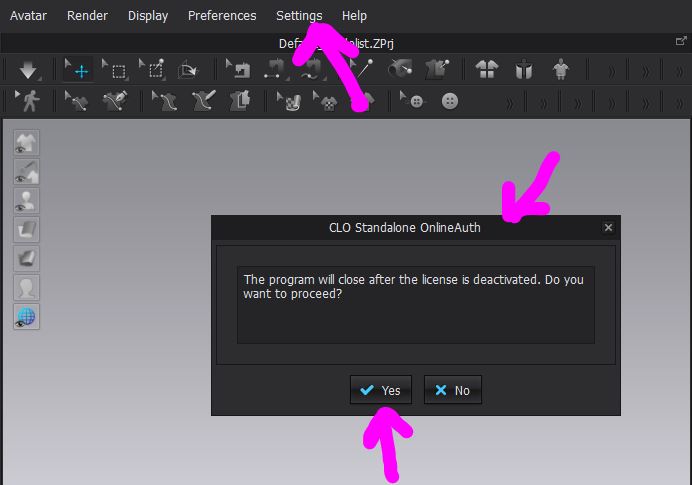
One thing to bear in mind, is that before you remove the CLO3D software off a hardware device (laptop), (if you use two computers) you should always deactivate the licensed user on that device before you carry out the uninstalling the software. Otherwise the license server could detect 2 active licenses on different hardware. This is a common error people make when they switch between hardware's and upgrade software - they simply forget to deactivate the license BEFORE they uninstall software. In that case you need to then message CLO3D so they can check your license, servers side and manually reset it for you when cleared.
0 -
Thank you so much for the input... I have purchased the software.. Thnx again.
0 -
Enjoy
0
댓글