undesired fabric overlay effect

Hey,
I purchased this outfit (zpac) in the MD store and have some issues with the fabric of the jeans. When I open the outfit with the clo software, it looks alright (picture 1).
After using the clo3d API to fit the garment to my personal model, I get an obj with a kind of washed out overlay effect (picture 2).
I don't understand where this effect is coming from and how to get rid of it. There seems to be a pattern in the 2D window of clo (picture 3, brown pattern on front and back of jeans), but I can't get rid of it or find a fabric associated with the washed out effect.
Your help is much appreciated!
Johannes
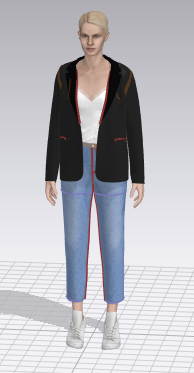
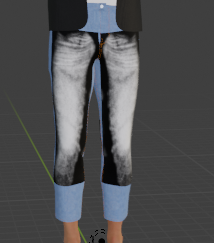

-
Hi Johannes. Definitely there is a graphic in the original ZPAC file. You can see the rectangles on top of the patterns in Pic 3.
Most likely they are graphics that are not being shown. You need to get rid of those prior to working with the API.
Using the Graphic Select/Move Tool click and delete the rectangles.
https://support.clo3d.com/hc/en-us/articles/360013309573-Select-Move-Graphic
P
1 -
Great, I could select the graphic after choosing the "transform graphic" option.
Thanks a lot! :-)
0 -
MD has a slightly different UV texture mapping system to CLO3D as it can use UDIM (more than one texture map and scale). So when you import a garment made in a later version of MD (7.5 and above) , you may need to adjust any texture maps that were intended to be used at a slightly different scale and UV position on that garment mesh model.
0
댓글