I can't import OBJ as a trim

Hello,
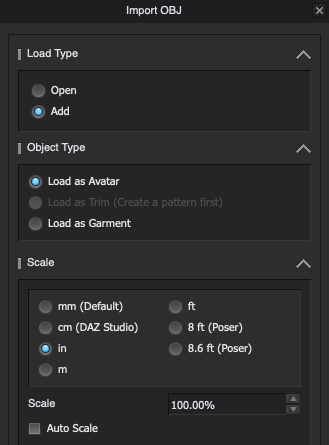
I am trying to re-size some shoes that I got on Turbosquid. I have an obj and fbx file of it. I read that in order to resize an obj I have to import it as a trim, but I don't get the option to import as a trim (see attached).
Am I missing something? how else can I resize an obj or fbx file.
Thanks for you help in advance :)
-
Hey Nati. I'm not sure why you are not able to import as Trim. Can you please share the OBJ and FBX files to test it later today?
For now you can Scale the as an avatar to reduce or increase the size, but it will be a trial and error process, as it is only scaled during import and then fixed.
Pablo
0 -
Hi nati, ottoline is right. as you can see from your screenshot, the option is greyed out if there isn't at least one piece of pattern in the scene. (that is what create a pattern first means. Even a small rectangle is enough!)
Try it out.
0
댓글