How can I change the color of an imported graphic in clo?

...When I add it as graphic from an .ai file for example.
I designed something, get feedback from somone and now need to change the color of the elements of the imported graphic. The feedback giving person wants to keep the composition of the graphic, just the color should change.
in this case I dont want to reopen the artwork in Illustrator, adjust it and import it again into the clo project file. I want to adjust it straight away in clo! How?
Thank you very much for every help.
regards
-
Hi Kkuhle,
There are two things you can do, based on the complexity of the graphic.
If it's a basic logo or only has one color, you can change the color directly in CLO.
Examples:

In CLO, use the Edit Graphic tool to click on your graphic:

In the Property Editor, first click on Desaturate. Then you can change the color by clicking the little swatch and choosing whatever colors you want.
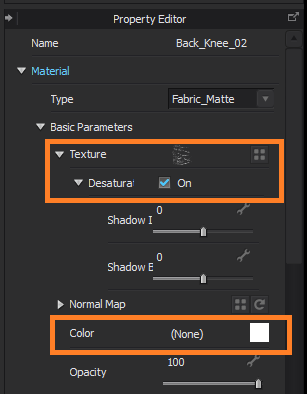
If the graphic is complicated or has multiple colors, I would suggest changing the colors in Illustrator, but you don't need to re-import the graphic. CLO has automatic refresh, so once you finish editing the graphic in Illustrator, just save it again (keep the same name, format, and location) and then in CLO, hit the F5 key to see the updated changes.
Examples:
 1
1
댓글