Polygonal effect in the rendered fabric

Hello,
I have a dissatisfied customer because when I have the finished garment and I render it, the mesh of the garment looks polygonized. I understand that it will be because it is adjusted to the avatar, but anyway, I need it to be smooth and not look so unreal. I think I already asked this question and I didn't get an answer. Please, I need to solve this as soon as possible. I'm attaching picture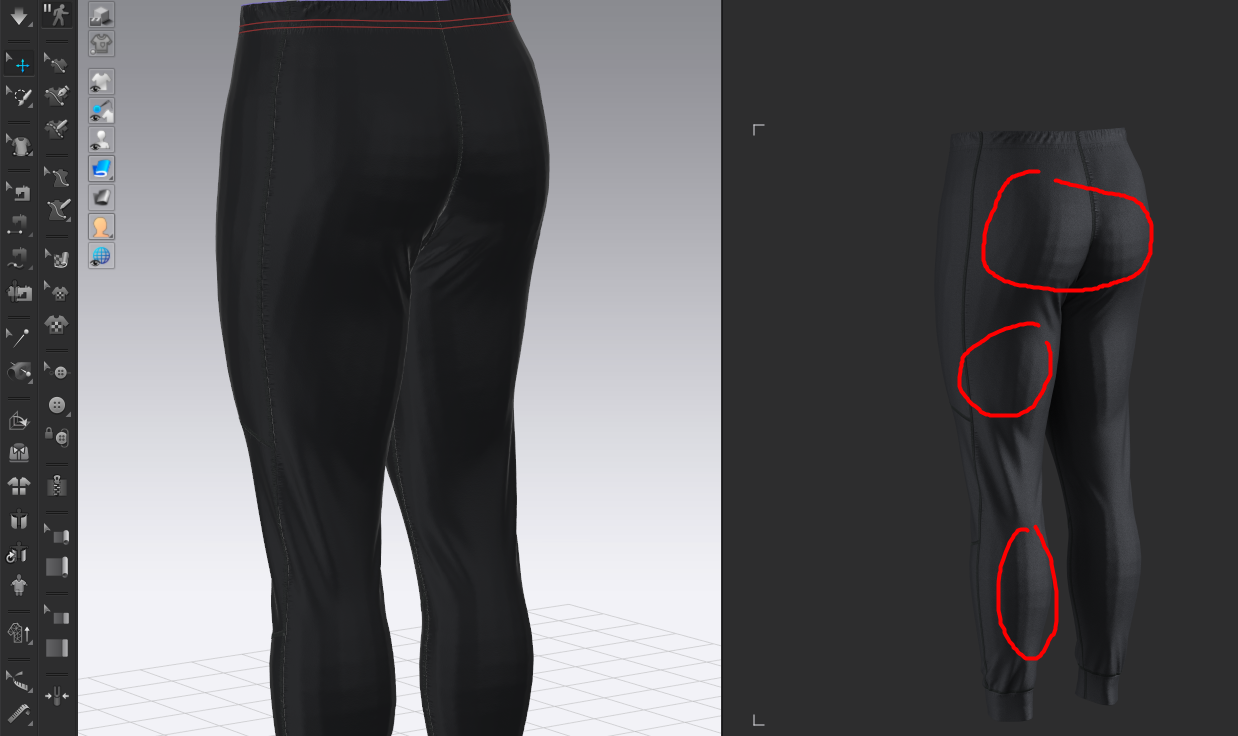 .
.
Thank you.
Victor.
-
It does not look like we have any previous posts from you about this issue before. But we do have several posts about this subject.
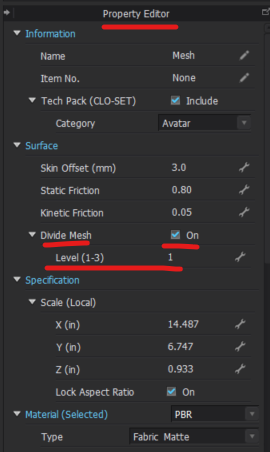
Currently with CLO you cannot divide the Mesh of a CLO avatar as is. But if you have the garment in a finished pose you can take the Avatar in the Pose > Export as an OBJ > Bring the OBJ Avatar back into CLO (delete the old avatar) > You can now select the OBJ avatar and go to the Property Editor and Divide Mesh to be smaller
 0
0 -
virtuallytrendy - We alos recommend checking out our Official CLO Discord where many CLO3D artists and freelancers go to post for help and share lots of their tips & Tricks
https://support.clo3d.com/hc/en-us/articles/7814962429977-How-can-I-join-CLO-Discord-
0 -
Thank you very much. I have already solved it with your instructions.
Regards.
Victor.
0
댓글