How to export sewing seams from Clo to Keyshot???

Hello, Clo Experts,
Does anyone know how to export Clo models to Keyshot yet maintaining the sewing seams? As you can see in the below images, sewing seams on the garment are very clear when I render in Clo, but when I exported the garment to Keyshot, you can barely see the sewing seams. Can someone help? Your comments are much appreciated.


-
Hi Weiyingk
What you see as seams in CLO are simply a normal map applied to the outline of the patterns. Unfortunately CLO can't export the baked normal maps. You will have to recreate the effect in Keyshot by texture painting a height map and then baking the normal map. It is a long subject and you can find a lot of information about that.
You either can create a height map for the seams using the exported UV Map from CLO and adding some darker lines on the seams on a grey 126 file. A darker value will indicate Keyshot that there is indent in that part of the mesh. The other alternative is to manually paint those height indents on the seams in Substance Painter or any other 3D painter (Blender has that feature too).
Check the bag below. I exported it from CLO to Blender and using texture paint I was able to recreate the seamlines on a height map.

 1
1 -
weiyingk, check out https://maverickrender.com/indie/
1 -
Thank you guys, I really appreciate your feedbacks!
@ottoline I'm trying out your method. What "Realtime Bridge" did you use to transfer the files from Clo to Blender??? I can't figure this out. Please let me know. Thank you!!
0 -
Check out this thread where MD and poser users discuss it at length and then the resultant > MD7 to poser bridge that's been kicking around for some time by one MD user who has plugged straight into an app. Same deal really - look to how they approached it. And there was also a maya bridge app addon for MD - that did quads bridging to MD, that is the same type of thing - about a year ago. Both are free so try them out.
0 -
weiyingk, if you are into the hundreds or thousands of colorways and fabric scans then you should definitely invest in automating the process.
If you're not, then there might be some manual exporting procedures. I'm trying to decode ottoline's comments to try and help you do this in Blender. Are you proficient with Blender?
Without using a custom made script, you can export the OBJ from CLO and then using the modifiers' stack add a solidify and a bevel modifier to get the seamlines. Again, you need to understand what is that you are doing with blender, because now, you are not using textures to create the indents, but actual geometry.
Let me know how much you know about Blender.
There are some other tricks discussed here:
0 -
ottoline thank you very much for the tips! I've checked all the links out. Some information are over my head now since I'm pretty new to 3D, but I'm going to try those out at some point. Clo is actually the first 3D program I learned and I've also used Daz and Keyshot (beginner level). My main focus is fashion design and my goal is to create realistic looking garments. I was mesmerizing over this guy's work I followed (examples below). As far as I know, he only uses Clo to model the garment and Keyshot for rendering and somehow the seams on the garments are so clear. I was wondering if there's any quicker way to go about this that doesn't require using other 3D software. But thanks again, I really appreciate your help. I will keep working on getting this resolved.
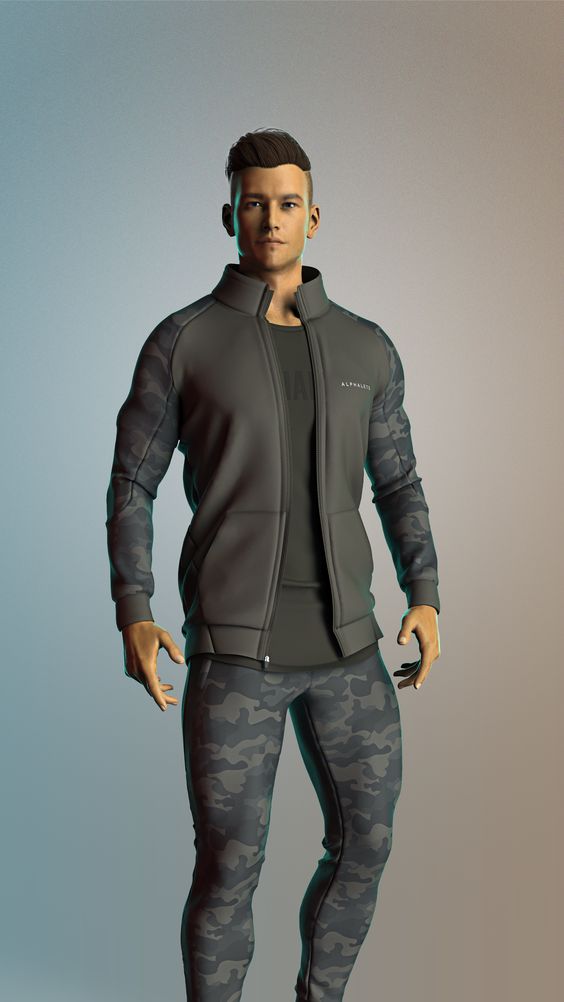
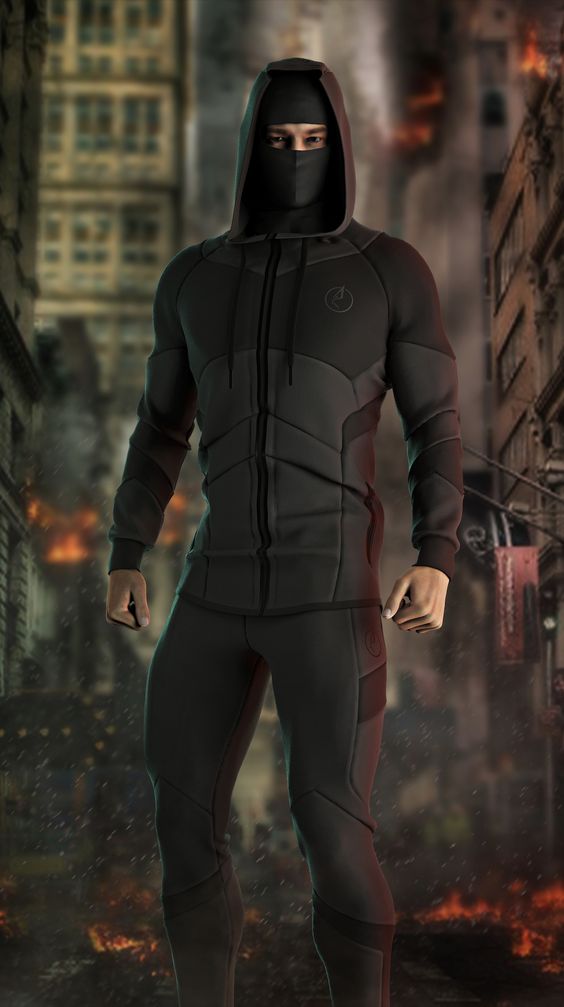 0
0 -
Ottoline, your posts are always interesting, sometimes too much that they become not useful unless you go and learn many other things. I guess that is what happened on this post.
I do find your proposal great, although not the only way to achieve what is the topic of this post. I stand by my solution for situations where you don't have a custom script to bridge between software.
Another thing: no need to get on the offensive.
"Do it in future in that order and perhaps you can benefit from my knowledge, that I give freely > so you don't have to do so much thinking for yourself."
I will always think for myself!
I supported your proposal because I think it can work and because the user said he/she was going to follow your suggestion, which is pretty impossible without a lot of more documentation and learning. I was trying to help him/her.
Let's keep our little feud going on as long as it benefits users from different points of view without getting offensive.
P
1 -
pablo.quintana thank you very much for your reply! No, I'm not familiar with Blender at all. I've downloaded it and watched a couple of tutorials and that's about it. Do you know if Blender addon like SketchFab would work in this situation? I'm gonna try the modifier stack out after I learn more about Blender (have lots of tutorials to watch now...). I actually tried the method from your link-- changing fold angles in Clo, but it doesn't seem to work out. I've also adjusted the intensity and thickness under 3D Seamline in Clo and that didn't work either. But again, really appreciate your feedback. I was wondering if there's any quick way of making the seam lines clear just by using Clo and Keyshot? Since the two 3D fashion designers I followed (Fitt Design, Janis Sne) seem to only use Clo and Keyshot to create their designs and they looked fantastic (examples below).
https://www.pinterest.com/fittdesign/concept-sportswear/
https://www.clo3d.com/clollab/janissne/portfolio/459
0 -
ottoline I will definitely try Maverick out after reading your comments and since it has 30 days free trial! Thank you! You and pablo.quintana are obviously all pros in the 3D field. I greatly appreciate help from you guys! I will post an update when I find the solution.
0 -
Hey weiyingk. I don't think either solutions (texture painting or adding modifiers to then bake textures) will work directly from CLO to Keyshot. You'll have to use an intermediate more powerful software in the middle. Could it be Substance Painter or Blender for texture painting or Blender (or any number of other ones out there) to apply modifiers to a thin mesh like ottoline suggested.
I actually did a quick test and the Blender route with modifiers can work pretty good to add seamlines. Again, you'd need to know what you are doing. Below is an example of one mesh exported thin from CLO3D to Blender and then to the left the same mesh with the modifiers Solidify and Bevel applied on the seam lines.
As ottoline suggested, Keyshot is more on the plug-and-play arena of rendering without modeling or more comprehensive texturing tools.

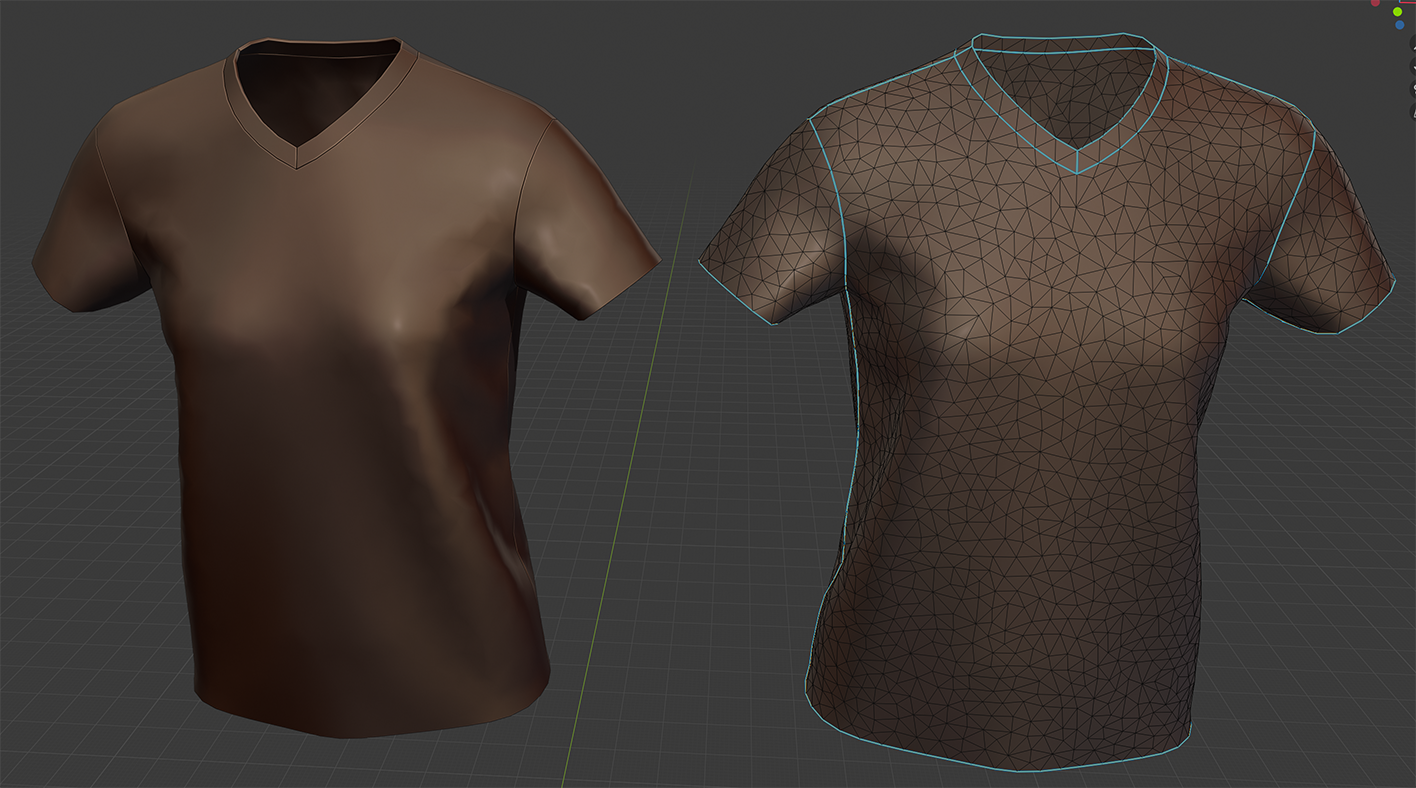 1
1 -
pablo.quintana thank you! Your demo looks great!! I will definitely try this method out when I get more familiar with Blender. Much appreciated!
0
Commentaires