Modular Avatar Size/Measurements

Hi all and CLO team,
Does anyone have information regarding the measurements/sizing of the modular avatars?
For example, are the men's modular avatars created off the same US_ASTM_Male_T_38_Default.avs file? In which case, I can extract the correct measurements off of the default (non-modular) avatars.
The modular avatars look to be similar to the default avatars, however, I am unable to confirm this definitively.
Thank you!
-
You can export a table of measures from any default model and explore the dimensions in an excel spread sheet for comparisons.
0 -
I'm aware of extracting an active model's measurements via Avatar > Avatar Editor > Save, however, when trying this on a modular avatar, I receive a message stating "No size data available to edit". Please see image below:
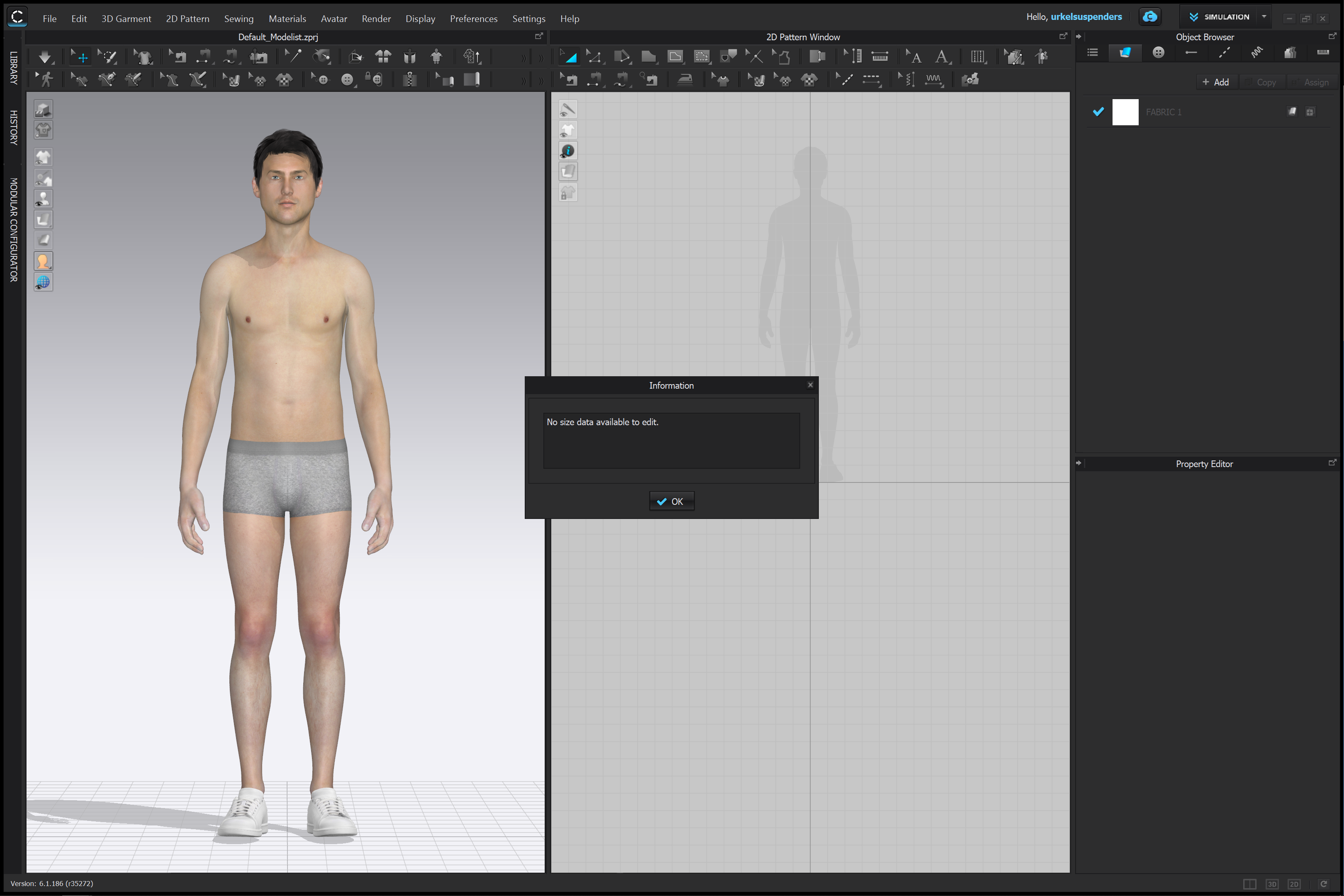
Thus, will Admin be able to chime in and verify which default size the modular avatar is, or am I able to extract the measurements through another method?
Thank you!
0 -
You need to appreciate how the avatar attribute structure works in context to the 3D model, rig and database editing and measure elements, I suggest you read >> https://support.clo3d.com/hc/en-us/articles/360052611653-CLO-Avatar-Editor-Guide
to get a more complete picture on where the default start character model fits into the binding of the model to the database + editor. Those start models are agnostic character rigs (unbound).
0
Comments