metal has white bord

Dear clo community,
I have a problem. when I export my bag as gltf or obj, my metal trims ( I had made them in Fusion 360 and I had imported them to CLO) have this kind of white bord, I would like to know if some one have a solution ?
thanks 🙏 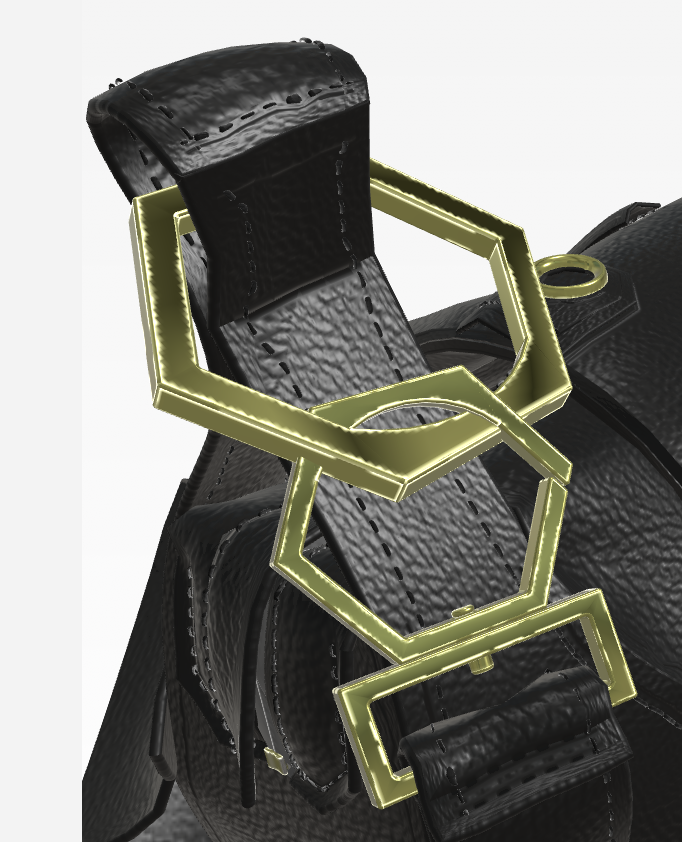
-
If you created all the fitting in Fusion and exported from there that is where you were wrong, you need some extra steps in mesh editing or topography for those models with normal weight issues at edge surfaces, this happens as the mesh quality from solids models into surface models (.ply, .obj, .fbx) will create a triangulated mesh interpolation of the solid that will generally have some tri-mesh or quad normal issues at all corners.
You need to take the model into a CG surface editing application like Autodesk Max or Blender etc and clean up the mesh mesh model normal's at all corners. This can be done by changing the mesh and editing (eg: quad mesh and bevels modifiers or normal modifiers) but you might also want to redo all your models using clean quad re-topology with quads in Max or clean up the mesh so there are no triangles at edges on your model so mesh with complex poles don't make metallic surface materials render as irregular weighted normals that shift the light/reflection in odd directions.
1 -
thank you ottoline for your answer!😊
0
Comments