Problem while using Add Dart feature

every time i try to create a dart from a straight line or a curve line
the same window appear (as shown in fig.)
thanks, appreciate your help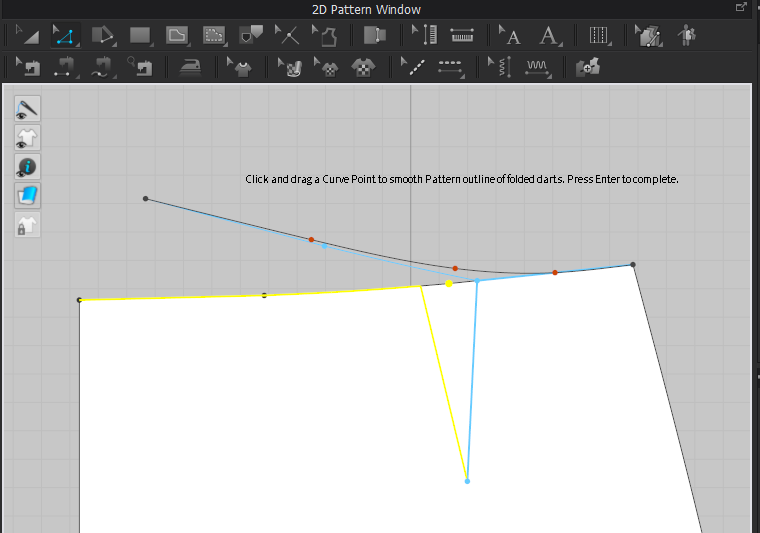
-
Official comment
@hansa We will gladly help you with your issue if you could describe it here with screenshots or post your video so it can be viewed directly not downloaded.
-
Hi scofty, as you can read in the message, it appears to show how the line is when the dart is folded/sewn and help to eventually adjust the curve points if needed.
When you hit ok or enter it disappear and the ( adjustment,if done, will be applied)Daniele
0 -
The problem is that I don't want to drag or smooth my curve (it's already at the position that I wanted to be)
I just want to make a dart without editing the curvature or position of the line
Which I couldn't do
Also in the tutorial regarding darts,when creating a dart this msg (as shown in fig.) doesn't show up
And the dart just done automatically
Maybe I missed something there but I really couldn't see it
Appreciate your help
And thanks again
0 -
Hi scofty. CLO 6.0 added the dart truing option most recently. Which many people like, but if you do not want the dart to change your simply hit enter to finish the function and then after use your Edit Curve Pint tool to remove the curve points that CLO just added. This should return the line to its original shape
0 -
I will say that after trying to create a dart numerous times with this feature showing up, I did click "enter" and my dart stayed. My lower armhole cure however, converted to a straight line regardless of how many curve points I had in the line so I had to re-shape it. I didn't like that because I had my original armhole curve just the way I wanted it. I do like the "trued" dart though.
0 -
Hello, I have different question with the same topic; the link is here for only 30days: https://ufile.io/4et3xua6
0 -
Okay, this is it: https://youtu.be/cGMqDfuBHPY
0 -
hansa Thank you. That was very easy and helpful. The dart tool you are using is available on a SEGMENT POINT. You would need to either add a Segment Point or Convert a Curve Point to a Segment Point.
1 -
Thank you. Still do not get it because the point is segment and you can either make it convert a Curve point. Afterall, I made a new method how to make equal darts in my own (not right) way. There are link: https://youtu.be/GiDxw9Qcrak
0 -
hello!
fisheye dart Is not working and its not returning to the hole
how can I make a simple fisheye dart
I attached the picture
 1
1
Comments