top stitch problems while rendering

Hey there!
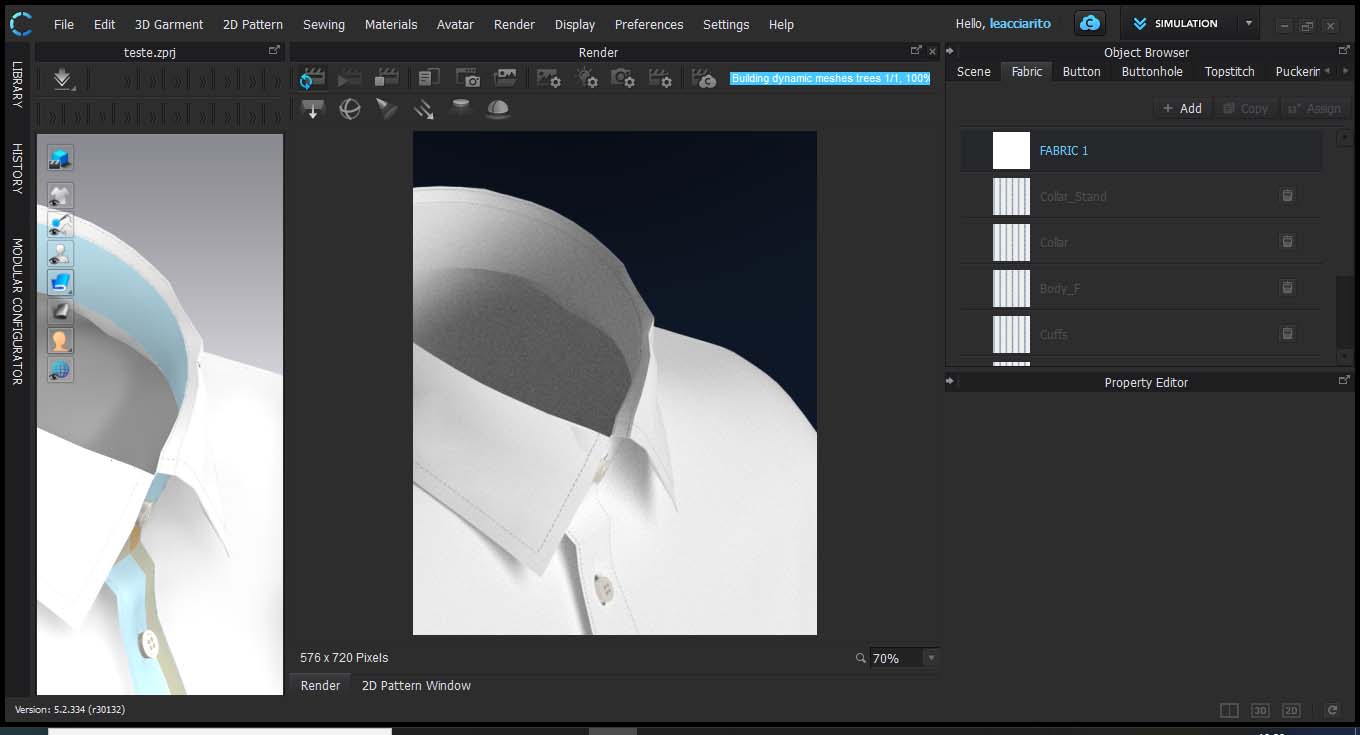
I'm facing some problems with render view. On my 3D view its everything ok but when i activated the render it looked like my garment is not sewed... there is a sort of gap between the patterns and i really dont know why. I could see that it is happening in all the parts with topstitched. Someone could help me, please?
Thanks !

-
Leacciarito, to diagnose the problem, can you try deleting the fabric's texture and using a default white and repeating the render?
0 -
Hi Pablo!
Using the default fabric it works...Any advise? I will remake the fabric file and than i will share the result!

 0
0 -
CHECKLIST:
Make sure that ALL your seam >Sewing line types are correct, so that the additional collision distance does not factor into the seam junction. If this is not set to the right type you can get gaps presenting if you render as thin view, as opposed to thick model view in vray.

Also ensure on your pattern piece that the additional offset collision distance is set correctly for the type of pattern to pattern seam transition you want.

Finally > Check you have displacement off for that new fabric > ref : your 1st image) check this default value in the property editor. You need to ensure there is no displacement map (distance) assigned to the texture for that fabric or that you do not manually type in a value, a shirt fabric has literally no displacement or micron level displacement at most, it is generally better to use the normal map or a bump map (as apposed to a displacement map) to indicate textile surface changes for such fine shirt fabrics.
 0
0 -
Hi Ottoline!
Thanks a lot for this tips! In the end, was the displacement map. I added a file that i didn't supposed to...
0
Comments