Trial version of Clo3d

Hello, I just downloaded free trial version couple days ago and tried few things out that I learned from tutorial videos... and this made me wonder if Free Trial version is the same with normal paid program...? It could totally be me being a super beginner but I can't seem to be able to find some of the keys and functions on my screen while I see them on tutorial videos. For example, I'm curious why my fabrics on center body (like vest part) on 2D window is not separated as left and right parts and I cannot separate it to work with Gizmo.
Also, I see Polygon but no square or circle icon on my 2D pattern window... please help and much thank you!!!
-
Hi boseonkwon,
I quite sure there's no difference from the trial version to the paid version.
About your question about separating the right-left side. Without a picture, I'll try to guess. Probably the pattern has the unfold symmetric editing applied. Remove that pèroperty and then you can cut the pieces wherever you want.
Last question. I think by default the program has the group tool on. go to the user setting and uncheck the group tools box. ( look at the image)Take note that if a tool has a little arrow on the right_bottom corner it means that there are more opinions for that tool. You have just to click and stay for a second on the icon and you'll see the others.
I hope this helps you to solve your problems.
Best.
Daniele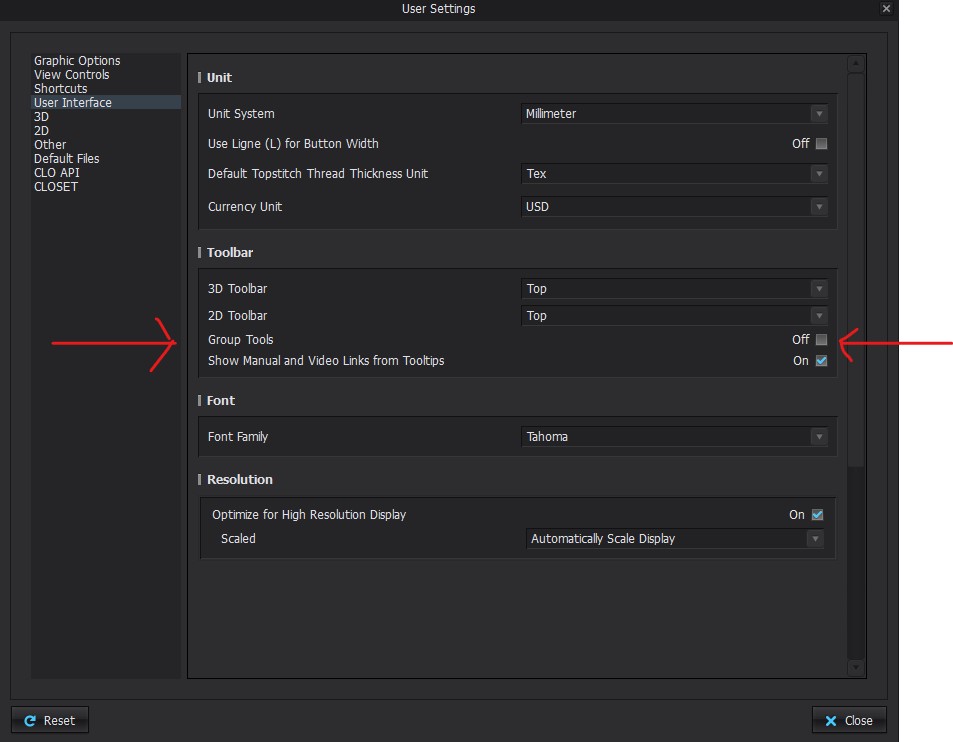 0
0
Comments