Grading Anomalies

Hi there,
(Finally) figured out how the grading process works ...
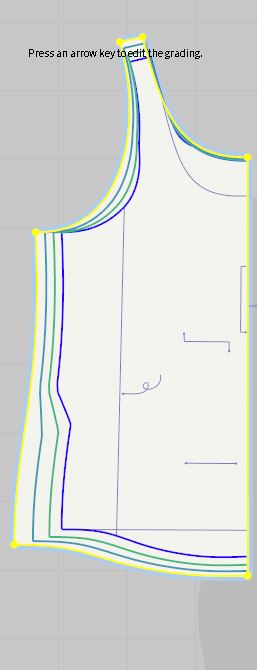
But I do see some strange things happening ... some of the lines do not copy the base size curves (see image)
I have checked to see if there are any curve points in those lines (thinking that might cause the strange curvature) but there are none.
It does not seem to affect the fabric once a different size is chosen as then the wonky lines move to the unused sizes ... weird
Any idea what is causing this and is there a fix?
(btw it would be lovely if one could move the sizes in a particular order (I started with M and later added S and XS and am trying to figure out how to move those now to the top of the list)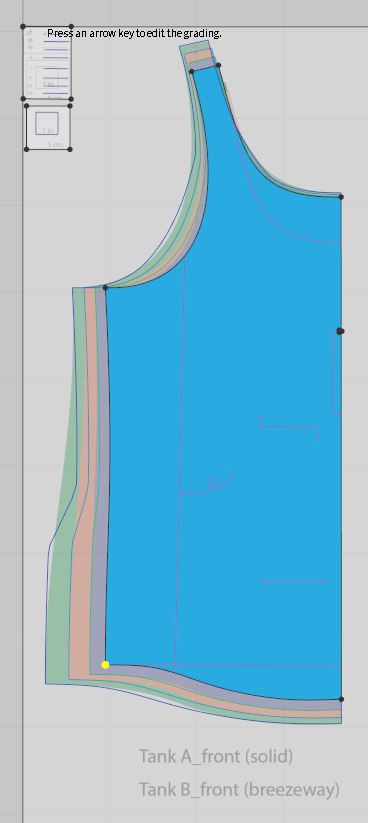
-
Hi again,
Sorry, I answered your other grading question first and it looks like I was too late to help, but I'm glad you could figure it out!
Does your curve have Curve Points on it or is it a Bezier Curve (with the handles)? The grading should be smooth if your curve is made with curve points, so you could try converting the line to have curve points (Edit Pattern tool > right click on line > Convert to Curve Point) where the jagged grading is happening and the grading will smooth. I'll report this as a bug with the grading though, since it should automatically be smooth no matter what type of line you use.
Let me know if that helps!
Anh
0 -
Hi Ahn, the first thing I checked was to see if there where Bezier points and there are none ... all had been converted to curve point before I started the grading.
They are imports from illustrator, perhaps If I where to trace the pattern natively in CLO3D versus importing .ai, it would give better results ...I'll give that a try and report back :)
UPDATE:
After tracing the pattern in CLO and then grading it I am still seeing the same line wonkyness happening :(
1
Comments