History - 3D State and when to use and how it works

Hi CLO3D experts/CLO support team
Good day to all.
I am doing 3D works in a company, the Buyer requirements are below
- Render a dresses in different poses to check drape and fit (T-Pose/A-Pose/Hand Down/Arms Raise/Legs Bent Pose etc etc) and render images Front/Back/Side for each pose.
I did following
- After Draping the dress in A-pose I took images for 4 custom views and save the file as ZPRG.
- next step is - change pose, resimulate / Adjust the drapes etc., etc., and I render images and I did for all required poses.
then I close the file without saving. After 2 or more days again I get request to have same dress with different texture.
I have to do it again for all poses, this way it is time consuming.
I Tried different approach to save time. From A-Pose - do all required poses and save each pose as a different 3D STATE (History Pane/Panel)
and saved the file, when I reopen the same file the saved 3D STATE not found. Is this option works for poses or what is the real work flow for 3D STATE and when to use this option
Require your help in this regard.
Thanks
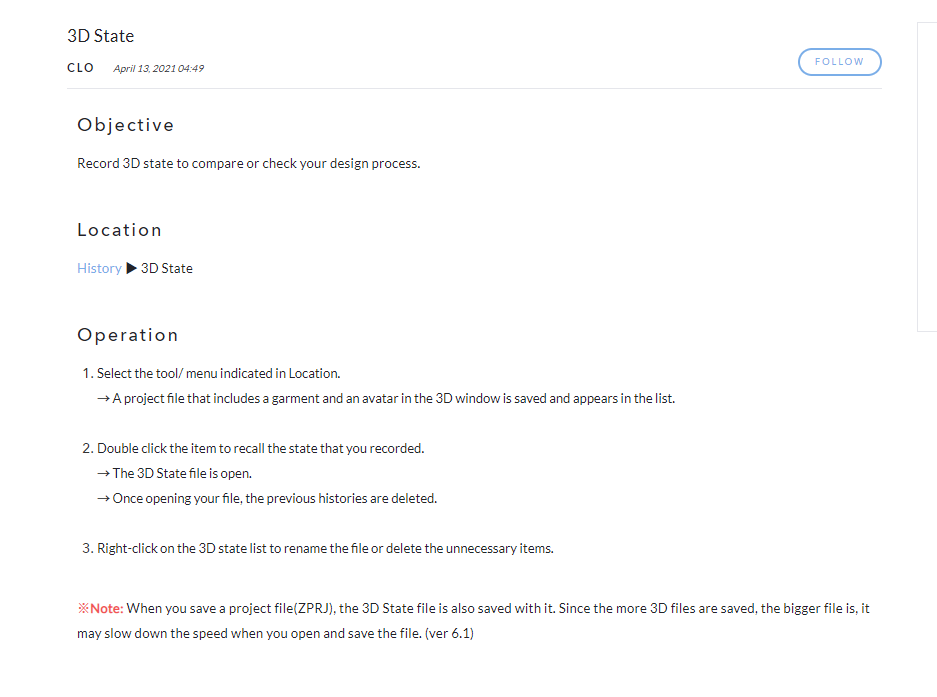
As per manual for 3D STAGE
-
正式評論
guptatsg This is a feature that is part of CLO v 6.1. Are you using the 6.1 Beta currently?
-
Hi CLO Support team
Thanks for your fast reply and understood this feature is in 6.1 version
Presently using clo ver is 6.0.534, Awaiting buyer side confirmation to upgrade latest version to 6.0.594.
will you please update the manual under what circumstances and what are the saving features like Pattern modification, pose change, fabric change, texture change etc can be saved in 3D STATE
Thanks
0 -
guptatsg When you save a 3D State, a new project file is saved out with all changes made at that point. That project can then be opened through the 3D State option in the History.
0
評論