HOW TO GRADE A SIZE DOWN

Hi CLO community,
How do I add a graded size down?
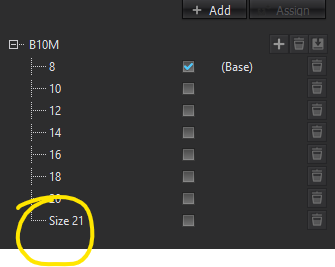
The add new defaults to a new larger size - see below.
How do I add a smaller size (in this case a size 6)
0
-
Hi sharna, when a new size(Size 21) is added in B10M size group, it will be ordered at the bottom within object browser no matter it is larger or smaller than the base size. And Size 21 can still be graded in smaller size by property editor when the grading point is selected with 'edit grading' tool. For the next time, please make sure the number of size is confirmed before grading and the sizes are added in ascending order within object browser. The order of sizes cannot be changed after grading.
 0
0
評論