Seam allowance on darts

Hi,
New to Clo 3d and currently learning. For some reason when I try to edit seam allowance on dart I am unable to select just the dart point and it constantly selects either segment, so I cannot fix the dart cap. Is this a bug? I understand it was an issue that was fixed... I am using the latest version of Clo on Windows. Thanks!
-
Hi lilu24690. When making the dart did you use the dart tool? Some of the seam allowance tools for darts will only be accessible if you used that tool.
1 -
Thanks for your reply!
I created the dart with 'right click' and 'add dart'. Will it only work if I use dart tool?
0 -
That is the correct tool. Once you have added the dart with the R-click you can then add seam allowance with the Seam Allowance Tool (this can be done by marqueeing over the entire pattern or just the area that you want to add seam allowance to). Once the general seam allowance is added you can use the Seam Allowance Tool to select the Segment Point inside of the dart. This will give you the normal 6 Seam allowance Intersection options in the Property Editor as well as 2 additional Dart Cap options that will only be seen when using the R-Click Add dart feature. I have added a visual below for reference.
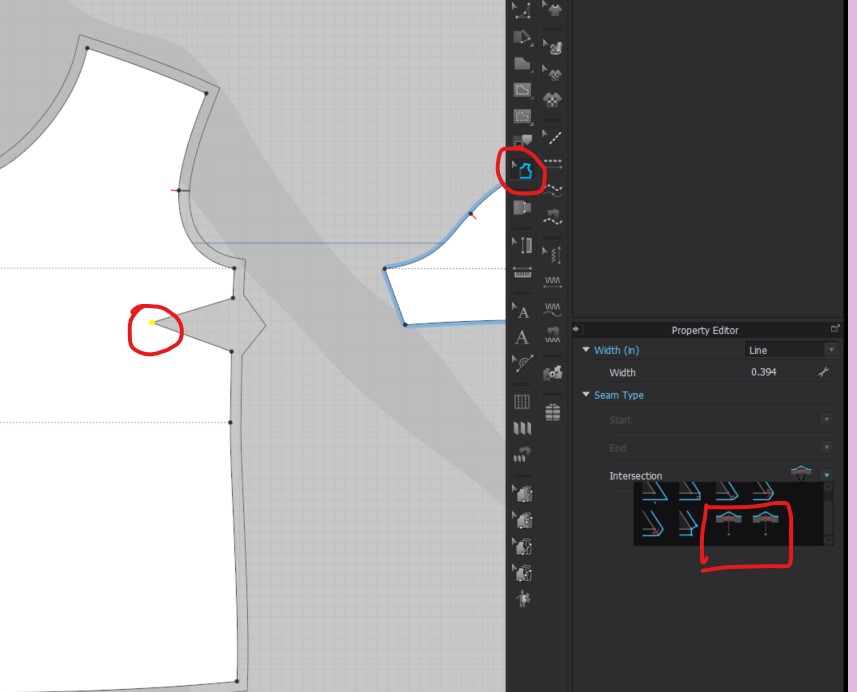 0
0 -
Thank you CLO Designers for the explanation!
0
評論