Problem with the waist measurement of avatar FV2- Feifei.avt.

Good afternoon,
I have a problem with the waist measurement of the avatar FV2-Feifei.avt.
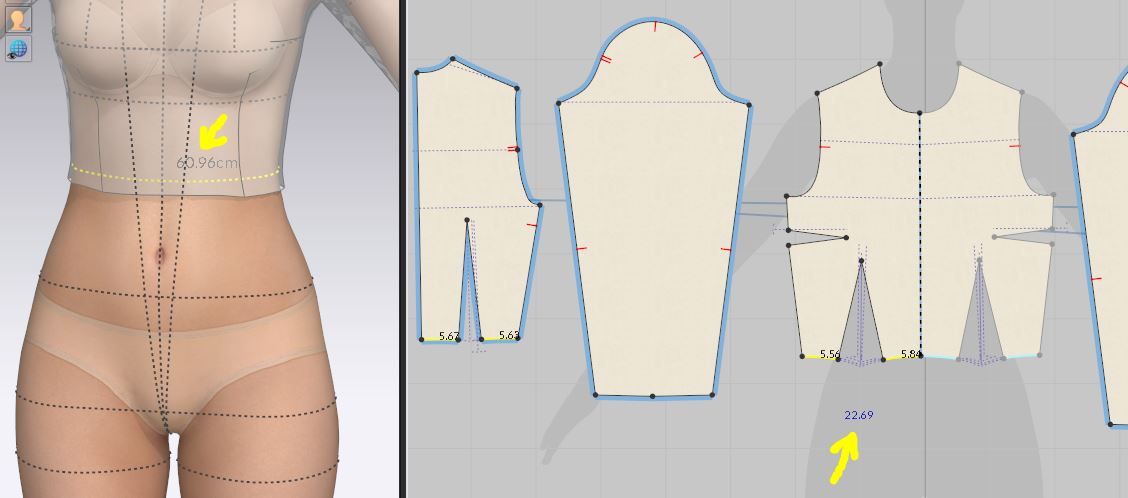
Using the “Edit Tape Measure (avatar)” tool, feifei's waist circumference is 60.96 cm. This measurement does not correspond to the waist contour of the base pattern made by me for this avatar. My base pattern has a waist circumference of 45.38 cm and surprisingly it is still loose, when it shouldn't be since there is a difference of aprox15 cm.
I don't know if I'm doing something wrong
 .
.
I have asked other users and they also have the same thing as me.
Thank you very much for your help
-
If your base pattern is smaller than the waist eg: 5.67cm x 8 = approx 45.36cm and the waist measures 61cm this immediately implies the base block garment is not designed to fit the waist as 45 cm is extremely small for a garment block waist. This means you have likely made your base garment block incorrectly it should be approx 61cm divided by 8 = 7.6cm . Doing some simple quick approximate maths. This then tells you that your pattern block base total waist measure should be roughly 7.6cm at the base of the dart on the waistline as opposed to what you show 5.67cm.
If it is fitting visually loose after simulation by 15cm this is hard to tell from you image above, as you would need to show a picture of this. From what you show it looks like you have a pattern under stress of 15cm. Which means the fabric is being stretched 15cm because you created your based pattern with too small a waist.
In the 3D viewport you can change the rendering view to strain/stress (color) and it will show in red if the garment is under strain. I suspect that is your problem and you need to adjust the waist dimension of your block base pattern accordingly in that measurement area. Make sure you have not accidentally scaled your base pattern down during your drafting development, as that may be what you might have done at some point in editing because such a small waist measure is unusual on any adult female block pattern.
0 -
While you have the four segments selected, look at their 2D and 3D length in the Property Editor (also the corresponding symmetric line length). The 2D length should be 22.69 cm, but I think the 3D length will show something greater than the half waist, 30.5cm (the 3D symmetric length should be greater than 60.96). This means the fabric is stretching to accommodate the waist.
0 -
Hi.
How can I activate the guides of the body measurements? Thank you.
0 -
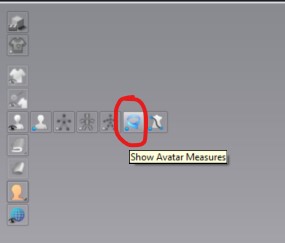
Hi sebastianrbnt. You can turn on the Avatar measurements in the 3D Toggle menu
There are also Avatar measurement tools in the 3D tool bar
 0
0 -
I have the same problem .. the avatar waist is ~80 cm.
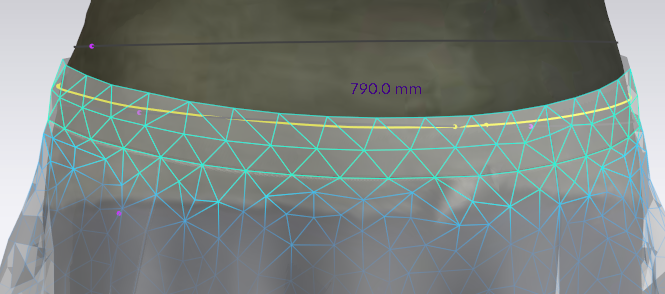
While for the waist band of the skirt to stick to the body of the avatar, it should be 67 cm ! If I make the waist band 80 cm, the skirt slides off of the avatar.
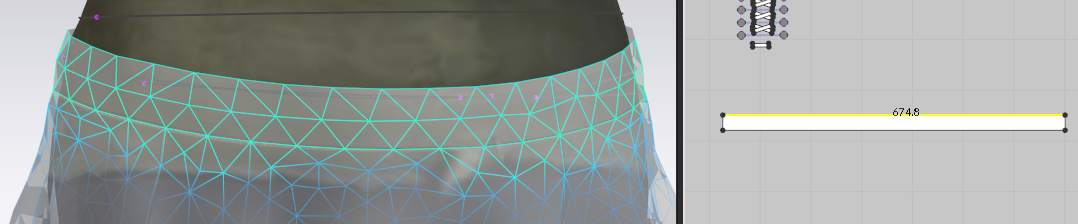
From the image above you can see that the waist band is not under stress.
0 -
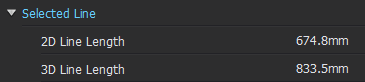
Actually, the 2D and 3D length are different by about 10 cm ! I will be thankful if you let me know how this can be resolved. The waist band does not seems to be under a lot of stress.
 0
0 -
Hi yehex77691. The original post was only about the waist measurement. But you are bringing in the fit maps? Can you explain or give further information about what you are tryin to resolve?
For fabric, what fabric is currently applied to your pattern pieces? This might be why you see no stress. If it is the default fabric it is very stretchy.
0 -
Thank you for the advice. It indeed was the stretchy fabric. I changed it, and it seems to be better now.
0
評論