Avatar Editor – Understanding the algorithm

Hello,
I would like to achieve a smooth and proportional grading in height and width from size 34 up to size 50.
Therefore I've made a test run in order to understand the algorithm behind the avatar editor.
According to the manual’s point on accuracy I’ve set the height to ‘inseam’ and altered the inseam length in steps of 0,5 inches and the chest circumference in steps of 2 inches. Those were the only values I’ve set, because I wanted to make sure not to interfere with the algorithm. The values were as follows:
Inseam / Chest
30,5 / 34
31,0 / 36
31,5 / 38
32,0 / 40
32,5 / 42
33,0 / 44
33,5 / 46
34,0 / 48
34,5 / 50
The attached gif animation shows all avatars from the side with the according values.
Most of them were growing more or less smoothly, except for size 38 were the posture changes. The pelvis shifts forward and the gluteal area downwards. If you take a look at the waist, the hip and the calf lines you can see irregular jumps during the animation in almost all sizes.
I also realized that the CLO standard size 40 differs from the algorithm. The algorithm won’t create the CLO standard size 40, even if the values for chest and height match.
In order to get a smooth grading I typed all measurements into an excel sheet and compared the size differences. Then I calculated an average value for each measurement to be set. Unfortunately a smooth growing from size to size wasn’t possible because minor deviations would lead to a posture change. Even wrist, elbow and knee measurements can have a dramatic effect on the posture.
I do understand that real life people all have individual shapes and postures but for digital avatars I would like to have a neutral and average set of sizes, smoothly growing, without posture changes.
Are there other ways to achieve that?
Thanks a lot :-)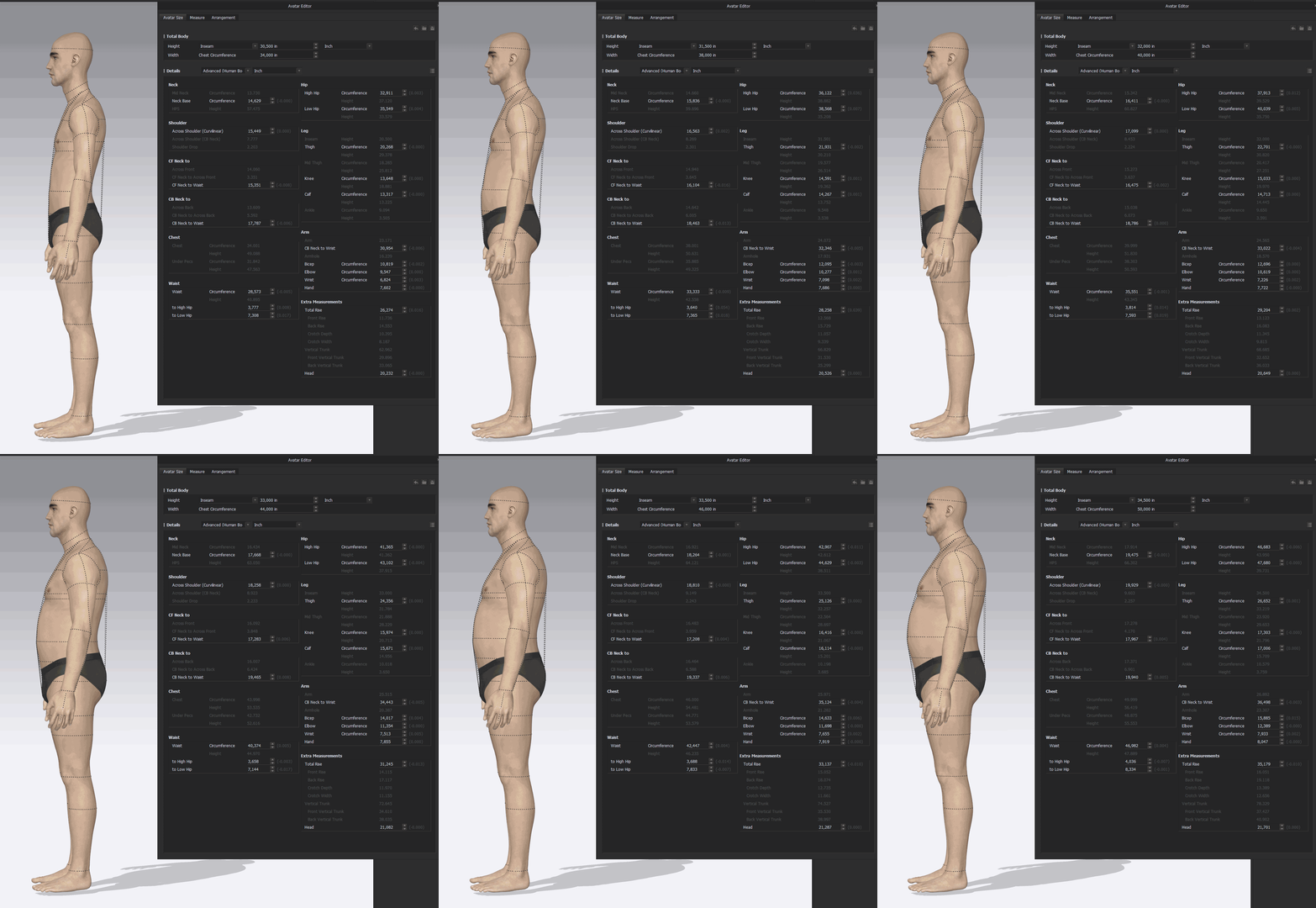
-
The problem gets bigger when I try to make the avatars more athletic. This is becoming an issue for the industry since more people spend a lot of time at the gym. Massive shoulders, arms and legs but a small waist. I would really appreciate to get to know the algorithm better in order to have more control over the result :-)
Maybe a solution for the future could be to divide the editor in different sections: A preset area where height, size and body type can be set (skinny / musclular / obese), followed by an area for posture adjustments (hollow back, shoulder drop, front-back-width ratio, etc). Finally a mask for specific measurements such as additional arm lengths etc, but without changing the general posture anymore. Smaller sizes could be shorter and normal or taller but skinny, bigger sizes could be taller, and normal or shorter but muscular/obese. All these values could be mixed to a certain level. A silhouette of a picture could be used behind the avatar to achieve an individual shape (just like the avatar silhouette is being used in the 2D window as a reference for the pattern).
A size range could be achieved by setting up the smallest and the biggest size and then automatically interpolating a desired amount of sizes in between... How can I help to develop this?
0
評論