Problem with fabric layers pulling through each other and not maintaining their layer orders

Hello everyone..... I'm currently drawing a sketch creating a weighted wrist band but I'm experiencing some problems with the fabric layers not maintaining their order and position.
I have a base fabric band around my avatars wrist complete with 'weights' I've created stitched to it. These weights were made from flat fabric shapes that I've increased the 'Physical Property - thickness' to 7.00(mm) to give depth and shape to them. All this sits nicely around the wrist however when I try to put a final fabric layer on top of all this to cover the weights and finish the band it simply pulls straight through the weights as if they were not there and the top fabric layer sits directly on the bottom layer of the band.
I've tried:
a) using a 1 piece panel for the base & top of the wristband, then folding with the 'fold arrangement' tool,
b) simply stitching the top layer over the weights,
c) super imposing the top layer over the weights,
d) all the above and adding pressure to the top layer trying to blow it out over the weights,
e) changing the fabric layer order in the property editor.
But unfortunately so far nothing seems to work.
Does anyone know how I can make the fabric behave realistically and not pull through each other......
Many thanks
-
Hi marktnbp,
Thank you for your question. If I understand correctly you want the top layer to sit above the 'weights'. In this case, I would select the 'weights' pattern pieces and add the same amount of add'l thickness-collision as the physical property - thickness.
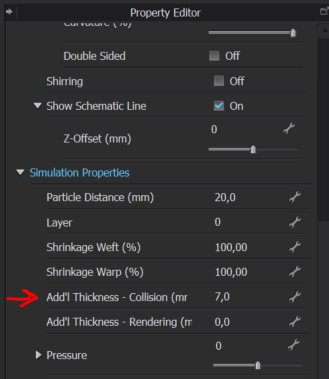
This add'l thickness-collision is a parameter that control the buffer of air in between 2 pattern pieces. It's always better if it correlates with the visual fabric thickness.
I hopes this helps!
Take care.
0
評論