Importing .objs and giving them gravity

I'm making a backpack and have modeled the strap buckles in Maya, but when I import them in, they don't respond to Simulation gravity unless I load them as Garments, but then they distort- they need to retain their ridgid quality. I've tried the default Buckle in Hardware and Trim but that has no gravity. So how do I get these buckles to have gravity as the backpack and straps fed through the buckles is simulated?
-
Teddyg, you have to import them as Trims and then glue them to any piece of fabric and then you can adjust the weight of the trim to have it be affected by gravity. With weight you can control how much gravity will affect them.
0 -
Thank you Pablo- I can't seem to add these buckles into the Trim Library- when I click on the "add" icon, it just puts the folder containing my Buckle .obj's as a separate folder. Also, when I look at the default Buckle in the Trim folder, it has an .trm prefix- does the .obj get converted to this .trm file format? Also, some of the buckles don't make contact w/ the back pack, but I'll try your suggestion if I can get these .objs into the Hardware and Trim folder. Can I attach a screen grab of what I'm making to show you what I've done so far? I'm new to Co but impressed by what it can do-Thanks!
1 -
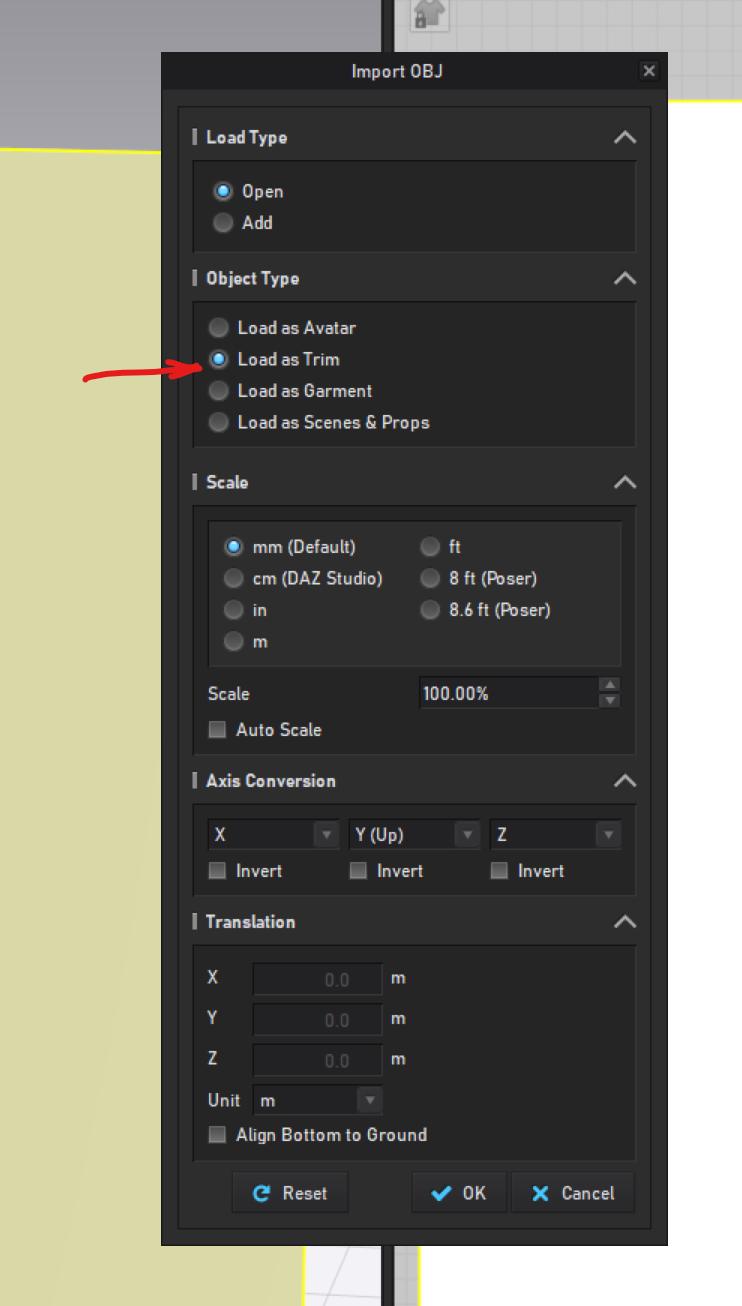
Teddy, you go to File>Import>OBJ and then you will get a dialog box where you select the OBJ file and then make sure you select Load as Trim. Once it is a trim you can select it and in the object browser you can glue it to a piece of fabric and then add weight to it.
 0
0 -
Thank you very much- I appreciate your help!
0
評論