CLOSET - How to remove a workroom?

I've been looking but couldn't find a way to remove a workroom in CLOSET. If, for example I created a workroom in the wrong brand or company, or made a typo, I cannot seem to remove it. This is very annoying and unintuitive. The faulty workroom will forever clutter that space, which seems strange. If you add something you should be able to delete it.
Is it just not possible? Is it something that will be integrated in the future?
-
same :(
0 -
Seems here that only the admin can delete a company, but since I am the admin I'm rather confused. I can't see the gear icon at all.
0 -
Same here
0 -
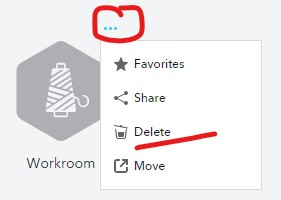
Hi bjorg. To delete a workroom hover over the Workroom Icon you wish to select > Select the three dot icon on the upper right hand corner of the icon> select delete from the drop down.
In order to delete the work room you must be an admin for the account. If you are not the admin you will not be able to delete.
 0
0
評論