Grading not working properly when DXF exported from Optitex is loaded into CLO3D

Hello CLO team,
recently we were evaluating a workflow that takes patterns from Optitex into CLO3D and found a substantial issue related to the grading.
The process was straightforward:
1) Create patterns in OPTITEX
2) Export them into DXF/RUL files
3) Import the files into CLO3D.
I was provided with the already made DXF/RUL files as well as with Adobe Illustrator file containing the same patterns.
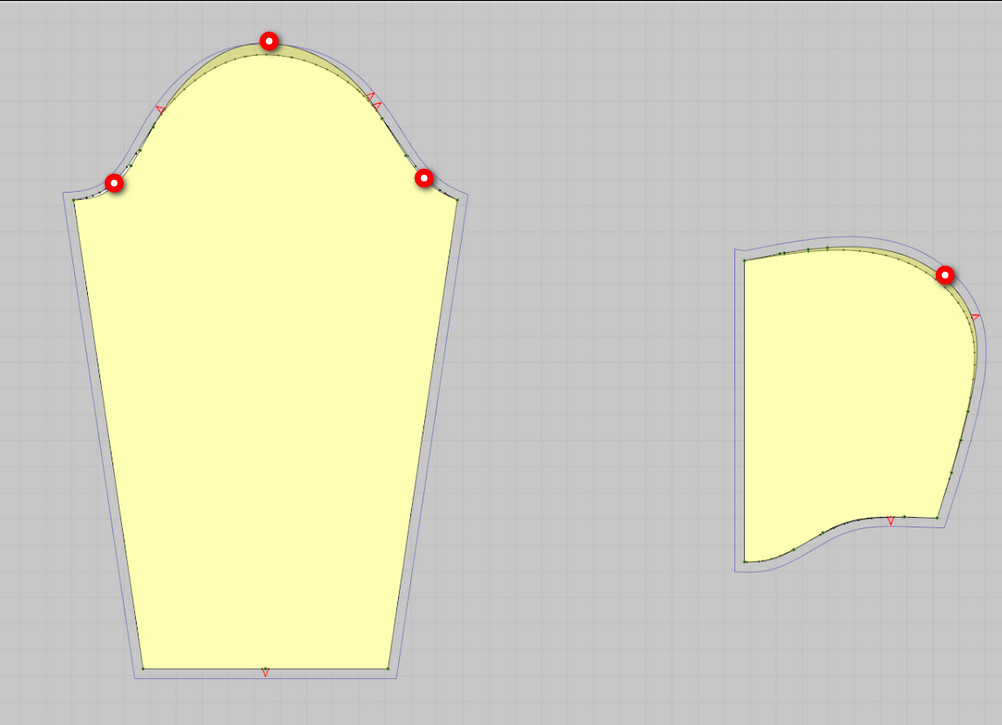
We imported DXF/RUL files into the CLO3D and also imported the curves from the AI file. For the base size that what used in Optitex, the CLO3D showed matching pattern parts between those imported from DXF/RUL and AI. However, for the other sizes, there is a significant deviation between the graded pattern and the corresponding patterns imported from AI.
Also, we noticed that in Optitex and in CLO3D, the grading points started to differ.
To make sure it is not a lousy export from Optitex, we asked the pattern maker to import back into Optitex the same DXF/RUL files. The imported and original patterns had a 100% match inside Optitex.
I have attached a couple of screenshots that show the difference in the sleeve curve around the shoulder, and in the curves of the hood. We observd same behavior with other patterns where there are curved parts.
I have posted the files onto Google Drive for you do see this behavior for yourselves.
https://drive.google.com/drive/folders/1XyPzZ2HQzvhTjl8OXv8HajU9--e0FmYA?usp=sharing
-
Hello dshepel. I had similar issues in the past importing patterns made in Accumark. We never managed an 100% issue free export/import into CLO. There was alway one had to fix.
I see that you are getting a big deviation in the basic shape of the sleeve or hood. I also see that these are not very complex patterns, so the risk of getting a distorted sewn product seems low given the tolerance and forgiveness that stretchy fabric have.
Now, here are somethings for you to try:
1. Export without seam allowance. You will not need it in CLO. Only issue is that you most likely will lose the notches.
2. Go through another program. Take your DXF/RUL files and import them into PAD System (padsystem.com) and then re-export to CLO. This works as the export algorithms are not always created equal.
Let me know how did it go and I might be able to help you further.
Pablo
0 -
I noticed that the distortion is on a curved line. Base points in place. Apparently programs have a different algorithm for calculating intermediate curve points. To minimize this bug, add base points on the ground at the extremum of the curve before exporting. Perhaps this will help.
 0
0 -
Thank you very much. I'll try it soon.
0
評論