Problem with seams when sewing one piece on top of another

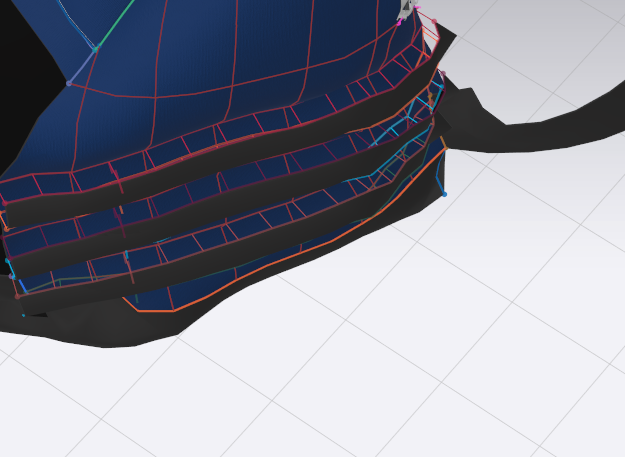
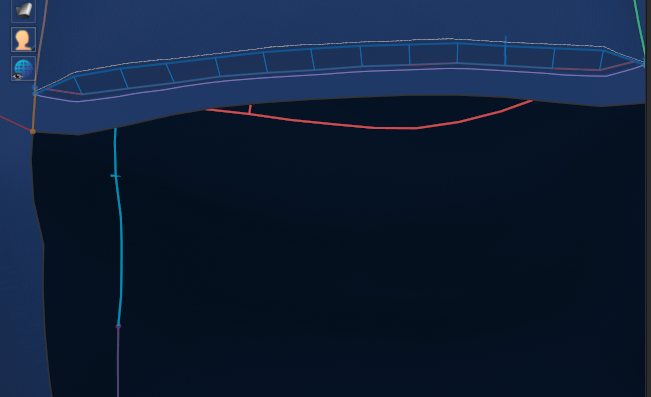
I'm new to CLO, so hopefully I'm missing something easy. I'm trying to design a backpack, and in situations where I am layering one piece on top of another (like for a pocket or on some straps I'm on the side, the seams aren't pulling tight when I simulate. There's a gap and the thread is exposed. I can't figure out what setting I might need to change. I'm using some heavy canvas fabric if that makes a difference.
Any help is greatly appreciated. Thank you!
Straps on side of bag:
Base of pocket on front of bag:
-
正式评论
mhenrick Thanks for your question. Let's check a few things;
- In your 3D window, in the Toggle Menu, is your Fabric on Thick Textured Surface?
- What Fabric are you using?
- If you select those 3 pattern pieces and look in the Property Editor, under Simulation Properties what is Add'l Thickness Collision set at? It should be no larger than 2.5
- Is there a hidden human Avatar in the project?
-
Thanks for your response. The blue fabric is cotton canvas, and the dark gray straps are nylon fabric. I adjusted some of the properties of the fabric in an attempt to stiffen them up. Perhaps maybe that is some of my issue. The thick textured surface is not on in the 3D window. Collision is set to 2.5, and there is a hidden human avatar in the 3d window.
Thanks for your help!
0 -
I looked a little more closely and the additional thickness settings were off on some of the pieces. When I adjusted them down as you suggested that seemed to do the trick. The threads are still a little visible, but not so bad. Thanks!
0
评论