Push detail through layers, adding chicago screws and assemble seamless bag

Hello community and the Clo team,
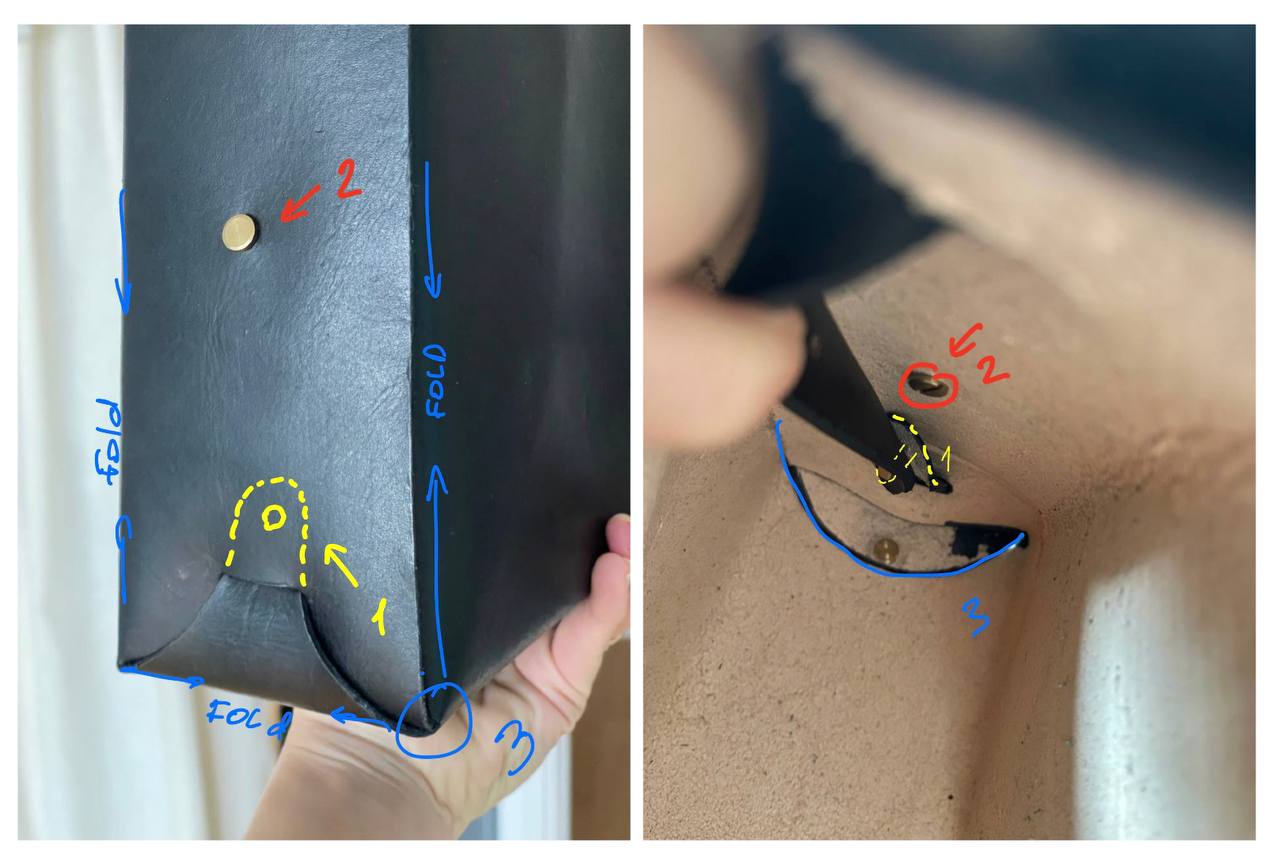
I work with a bag made seamlessly and trying to model it in Clo. I have three questions and hope for your help and expertise. Please see photos attached.
1. How do i get part number 1 through the two layers of leather? The simulation makes the parts wobble and it's like the mesh is trying to push the part out of the holes. What settings should i look at to make this part go through the holes smoothly?
2. The side panels are attached to each other with screws. I couldn't find any in the clo. Is there any way to replace them or is it better to just connect them together with the tuck tool and add screws in a third party program?
3. What do i need to do to make this bag without stitches, exactly as in the original. Now i first bend the parts and try to put them together in the right order but in the simulation the half round bottom goes through the previous layer although it should slip down between the previous side wall and the bottom.
Really hoping for your tips,
Maria
-
Figured out questions 1&3, but still struggling with chicago screws alternatives. Any tips?
0
评论