How to segregate / extract graded pattern pieces size by size

Hi,
I want to segregate graded pattern size by size, the reason behind that is the nesting of the pattern, my customer want each size nesting separately but CLO only allowing by either full graded pattern nesting or only base size nesting.. How I can extract pieces and than later can nest size by size separately??
I tried to trace after changing base size but it does not work, and remain same graded as it before..
Here few screenshot for your reference and easy understanding:


- One more question can I remove my pattern outline and used Seam line as my pattern line only.. Because customers get bit confused at time to which line we will follow for fabric cutting.. I tried my best to uncheck pattern outline box but seems likes it set by default and cannot be uncheck.. Please give me any suggestion how i can get rid of this.. Here below screenshot for your easy reference


I am looking forward to your prompt response and highly appreciate your help line services..
Thanks and have good day
Best Regards,
Umair Awan
-
Anybody have solution, please let me know because clo team is not responding.
0 -
Hi umairawan. For the first part of your question we are looking into this and we let you know as soon as we have an answer
Fir the second part when you are exporting you wants to Check Seam Allowance and Uncheck Pattern Outline. See below for reference.
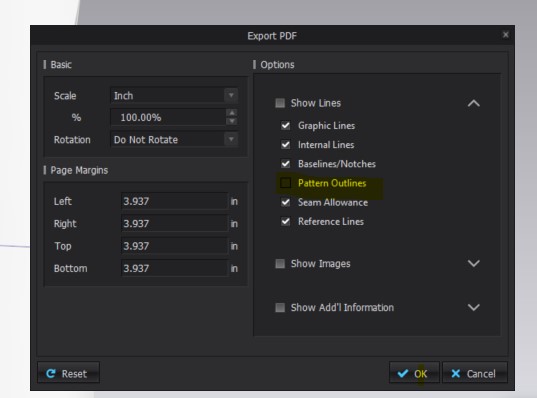 0
0 -
Hi umairawan. At this time you cannot extract sizes from the graded nest, but you can switch sizes, export a DXF of each size, then import into the same file. Or bring the file into Adobe Ai or Ps and edit the layout there.
But we have put in a feature request to our developers for the future..
0 -
Hi,
Thanks for your answer..
That uncheck option is not working while exporting into plt file, I need to export my patterns into plt file so that customer can run directly on his plotter, if export them into pdf I wonder they won't be compatible with plotter. Please check again and let me know.
Noted on 2nd comment with many thanks. For time being I can do it manually using illustrator, but hope to have that on CLO very soon..
0 -
Hi umairawan. Apologies your earlier screenshot showed export PDF and not PLT. You can uncheck Pattern outlines for a PDF export. But not for PLT. I have reached out about future development for this option.
Thank you
0
评论