GARMENT COLLISION WITH AVATAR SHOES - OBJ AVATAR

I have imported a avatar + shoes from daz3d as an obj file and now I am fitting the garment onto this avatar.
However, the left shoe is colliding with the pants at the bottom. I have tried to increase the skin offset and also the collision thickness to the pants but nothing is working :(.
I don't understand why this is only happening on one side of the avatar??
also just to note, the shoes show up as different colours in the 3D window but when I render they are normal. 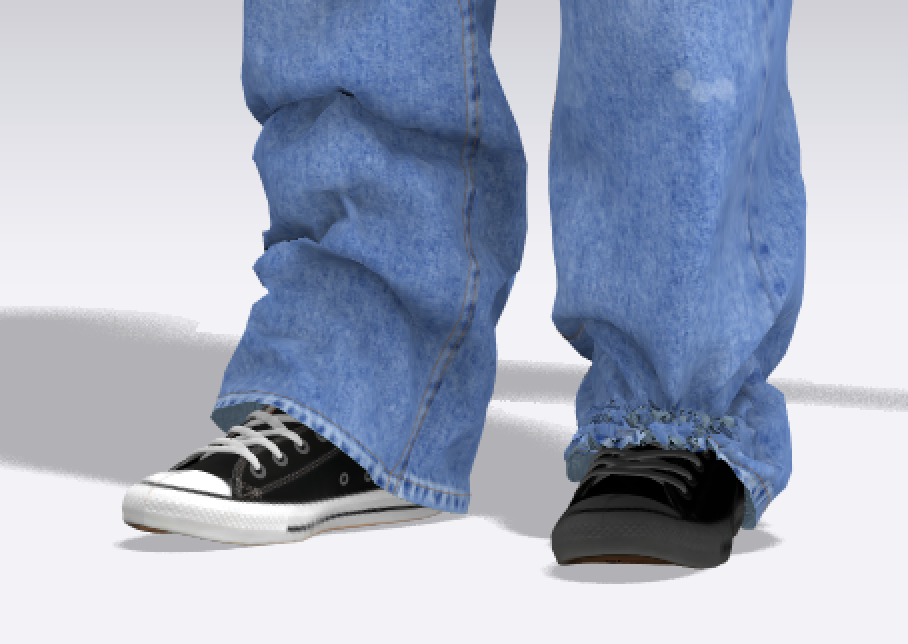
-
Hi. We think the normal map of the "grey" shoe may be flipped causing the skin offset to be inverted. Have you tried to Flip Normal in the 3D window? Please let us know if that works or if we can be of further assistance
1 -
Yes it's flipped shoe 'sole' surfaces. As in > like a burger (and not fried fish) by 'flippy'
You could also make sure you switch the CLO3D simulation to CPU for a better final simulation pass. You might need to flip the normal's on your model outside of CLO3D (in DAZ) before you import in.
🙄
1
评论