Renders Stopping before finishing

My renders seem to be stopping before finishing, but its very random.
I got a PC build specific to the CLO highly recommended specs, so I'm not sure what could be causing this issue. Could it be the hardware? If so, what is most likely?
Example - I recorded a simulation catwalk animation, then rendered it using GPU CUDA (CLO recommended graphics card). It stopped rendering on the 5th frame. So I recorded simulation again and began rendering, this time it stopped on 34th frame. I tried rendering two more times using this recording and it stopped on the 34th frame each time. It is very random and I have no idea why it's stopping. Any ideas?
-
This is likely due to the render time being set to stop after a specific period. The number of frames rendered is varying possibly due to the difference in render time per frame within a set time allocation - so if you tweak the render quality or change the HDRI that likely changes the number of rays being rendered making the number of frames you get in a period change.
Which is why I suggest you look at >Render > render setting > your total render time > Max,Render Time (min) the default is usually 20 min. Then also look at your Noise thresh hold and change that to suit your medium. Run a few frames test render first (don't do the whole thing) - you can also change the quality and add in CPU to support the GPU.
So try tweaking these settings and see how you go. Other factors to consider are the final screen frame size and dpi you are rendering > so make sure you also set that to the size you intend to make the video at, and not something else eg screen res 72dpi verse print res 300dpi.
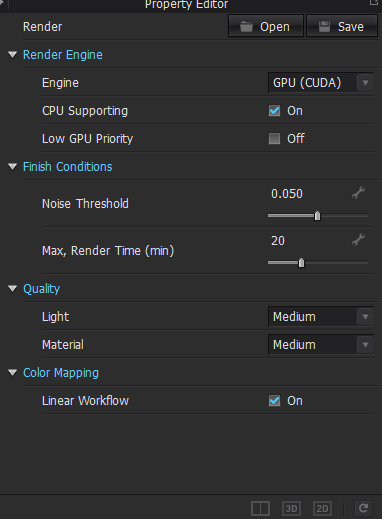
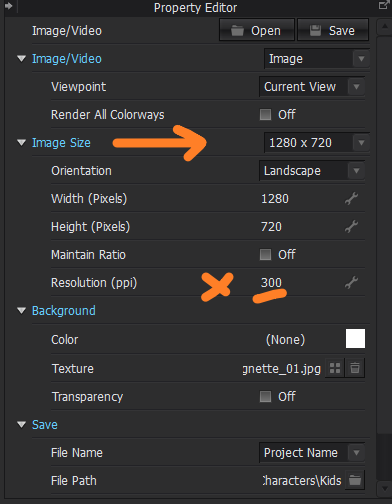

Hope that helps. You need to perhaps check all these default settings and change them to better fit your video media needs for this render job.
Good luck.
0
评论