OBJ pulls garment down even though OBJ weight is set to 0 in property editor

Hi, I'm new to this and using a trial version of Clo, but I'm struggling with OBJs imported as trims. I have glued a cube OBJ to a sleeve but when I simulate it pulls the sleeve to the ground quite dramatically. (See photos). The weight of the OBJ
is set to 0 - is there another weight setting or gravity setting I should alter?
Less crucially, I'm also having issues with copying and pasting OBJs - I find that if I resize one they all change? Is there a way to unlink them or alter them individually?
I am also finding that I can't apply fabric to my OBJs with any visual change even when rendered. At first it looks like the fabric has been applied but nothing looks different when rendering (unless I alter all the parameters in property editor to recreate the surface look).
Is there an easier way to make a solid object that won't merge with it's surrounding fabrics? I have tried using 'additional thickness rendering' values to make a cube but the sides aren't solid enough not to collide with other fabrics...
Any advice you can offer would be very much appreciated. These maybe obvious things to you but I'm teaching myself and can't find much about handling OBJs other than creating them.
Thanks.
Ed
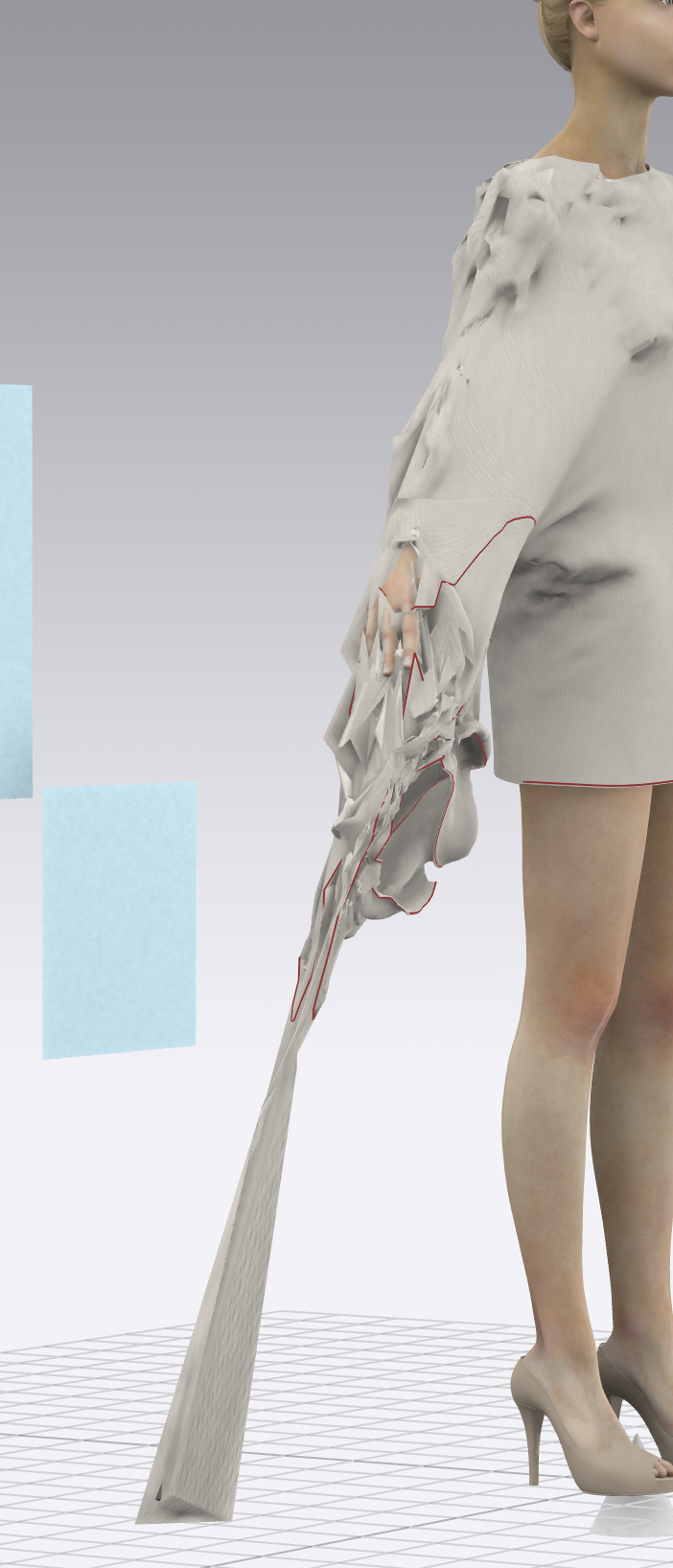

-
I've solved some of that by reducing the original OBJ to a smaller size which seemed to stop the pulling down. I do need to find a way to make the OBJ solid so other fabrics don't go through it, but I also need to attach it to the main body somehow? Importing as scene/props might work if I could attach it somehow but there is no glue option with this method. Can anyone advise? Thanks.
0
评论