Hardware trim collision and gravity

Hello!
I am currently sewing a messenger bag and have tried adding hardware trims - like buckles and swivels and I am constantly running into problems with their collision and how gravity affects them. I figured out that in order to place a buckle on a piece of leather that wraps around it and gets stitched to the bag, the best way to go is to use the "glue" option, which works well enough and simulates well.
Then I tried two things in order to attach the bag strap to the buckle: first I stitched a swivel to it's end and all looked well until the swivel had to attach to the buckle. If collision is working then the bag stays in space, as if pulled by the "frozen" buckles, and if it isn't- the two metal parts act like they don't have collision.
The second thing I tried is to give up on the swivel and stitch the shoulder strap directly to the buckle attached to the bag. Unfortunately, I can't "glue" the metal part to both pieces of leather - in order for the simulation to work properly, the unglued strap will not "collide" with the metal and fall off. If I remove the glue altogether and rely only on collision, the straps interact well with the buckle, but it stays frozen in space and does not get affected by gravity.
The question is basically how do I make the buckle work - fall down to gravity, in collision mode, aka when it's not glued to the fabric?
Any help is greatly appreciated!
ps Both the buckle and the swivel are from the Clo official store in Clo-set and automatically get uploaded as trims.
-
Hi marvelouseli
For Trims that you want to interact with more than one pattern piece you will want to add them as an avatar instead of a trim. You can take a .trm file > Select in 3D > Go to File - Export - OBJ Selected > Save as an OBJ and then re import as an Avatar.
OBJ Avatars do no have the Glue bottle, so you will have to move with the gizmo. But you will be able to wrap multiple pattern pieces around the Buckle. You can find a video HERE of a buckle being created and used as an OBH avatar for example
0 -
Thank you for this answer. I tried it, but the issue with gravity still remains - it doesn't move together with the piece and rather keeps it "frozen" in space. I guess the workaround this is to stitch it in the very end when the garment is in its final pose and wouldn't work with animation.
*In the attached picture it might look like the avatar is on the ground, but it's floating in space.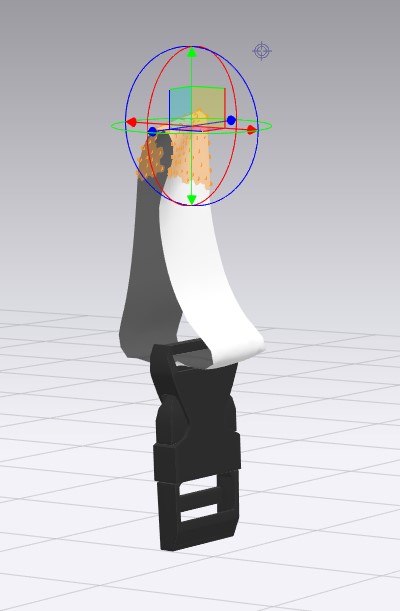 0
0 -
Hi marvelouseli
You are correct. If you Add an OBJ as an avatar it will remail stationary and not be affected by gravity. Most people who add hardware like buckles add them at the very end. Also currently with CLO, CLO will only animate the Avatar and not the OBJ "Avatar" Trim which will stay in place.
You can also try to add as a trim > Glue into place > Then R-Click Select unglue > Go to property editor and add Collision. it will then react with gravity, but you will need to place very carefully
0
评论