Why does the belt keep turning yellowish green?

I have the belt set to black, but it keeps turning yellow-green all the time.
Where do I set it to remove the yellow-green color?

-
hi, thats because you changed the layer of the pattern to 1.(which means it would be arraged on the outer part than other patterns.)
in order to change it back to normal color, click the pattern, go to property editor and change the layer back to 0!
hope this helps!
1 -
hi, thats because you changed the layer of the belt pattern to 1.(which means it would be arraged on the outer part than other patterns.)
in order to change it back to normal color, click the pattern, go to property editor and change the layer back to 0!
hope this helps!
1 -
Thank you for your response.
Where is the layer property editor?0 -
HI kawamai. The Layering feature can be found in the Property Editor. Select the pattern you wish to bring back to "0" and go the the Property Editor and change Layer from 1 to 0. See below image for reference
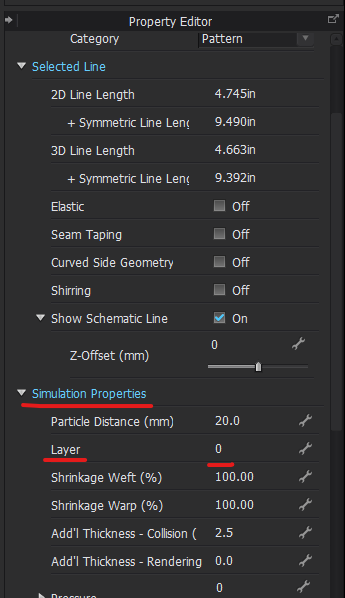 1
1 -
Thank you so much, You've been very helpful!
I was able to solve the problem.
0
评论