Inaccurate Waist Level height on Avatar

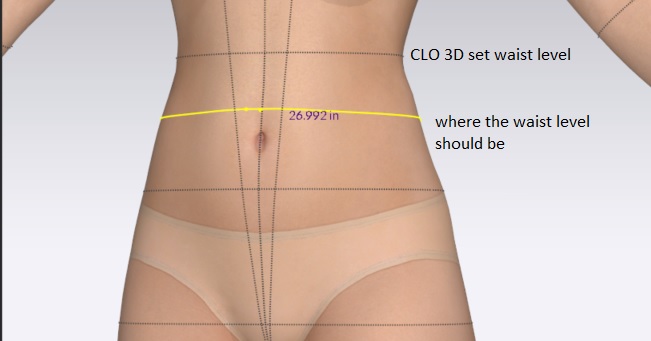
I want to address an issue that I think CLO 3D should look to fix. Typically, waist measurements are about 1 inch above the belly button. In CLO 3D, the waist measurement level is almost 4 inches above the belly button. This adds an extra step to customizing waist measurements on an avatar. To match my dress form/model's waist measurement to the (actual) waist on my avatar, I have to set a measuring tape around the (actual) waist, adjust the waist measurement (the waist set by CLO 3D) and change it until the measured (actual) waist is to my desired measurement. I am sure there is some reason why the waist level is so high, and I'd love to know why, but I still think the waist level measurement needs to be changed to the right level.
-
Hi mehtabh
Our avatars take measurements from ASTM sizing and dress forms. The waist is traditionally measured from the most narrow part of the torse.
If you need to add additional or different waist measurements you can always add them as you have shown above and then save out this avatar to be used again with those measurements already there as a custom measurement avatar.
Hope this helps and thank you for understanding
0 -
I agree with mehtabh, this waist level is way off. I'm an apparel designer/developer by profession and what mehtabh is saying is that 1" above belly button IS the standard narrowest point. I venture to say ASTM is correct, but CLO developers have misapplied said standard at the wrong level on the avatar. This can be tested by actually editing the avatar. All other points extrapolate nicely using the built in parametrics UNTIL you get to the waist measurement. At that point the body shape distorts to something unreal if you enter in an actual number. I'm leaving it out for now, but CLO should check again on this issue, the math isn't correct.
0
Comentários