kalıp bulma

merhaba yeni kullanıcıyım.bir kalıp çizdim kaydet dedim avatarı çağırdım.kaydet dedim ve o aşamadan sonra kaydettiğim kalıbı açınca sadece boş avatar çıkıyor kalıbım çıkmıyor.kalıbımı nasıl bulabilirim. ?
-
When you save you have a number of modes that you can use.
You can save an entire project .zprj which include the avatar + garment + trim + props + pattern.
You can save just the avatar to the library as a new file name and as an .avt file > which means you need to find that avatar you saved in the library and load it if you want it in your next project. And within an avatar you can also change the custom measures in the avatar editor tool and just save out a size file that can be dragged and dropped onto a CLO3D standard base character avatar to make it that new custom size.
You can save a garment .zpac which just saves the garment but no avatar or props.
You can save just the pattern .zpac
So dependent on what you want to keep as a common item in your library you can save in many ways.
0 -
anlıyorum ancak kalıbı çağırdığımda sadece boş avatar geliyor kalıp gelmiyor
0 -
Sultan123, I suggest you write in English so more people can benefit of your comments/questions and that they are searchable in the future. Let's keep the forum open to everybody that wants to learn about CLO.
0 -
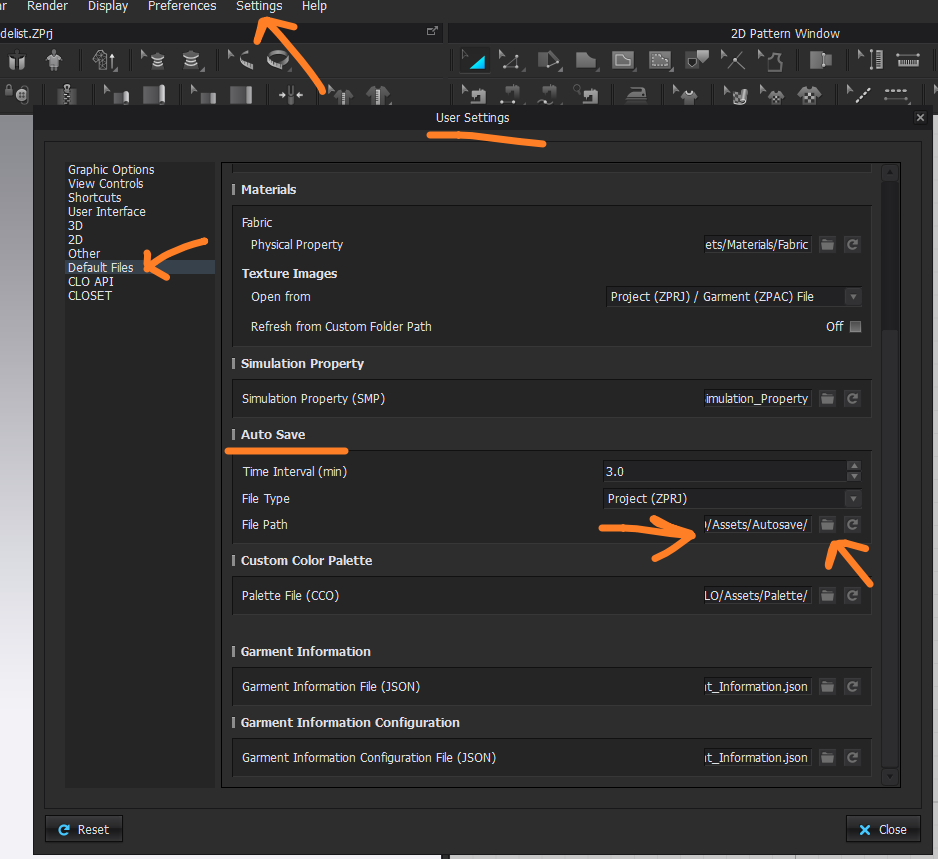
CLO3D has an autosave function you could look in that folder to see if you project was saved.
 0
0
Comentários