Very High End System for quick render times

I wanted to configure a really high end system for a friend who wants very quick render times. I was thinking the following system:
-AMD Threadripper 3990X (64 core / 128 threads)
-64GB (4x16) CL16 (16-19-19-39) DDR4 memory
-TUF RTX3090 (24GB)
-Samsung 980 PRO 1TB M.2 SSD
This will be about an 8000 euro system but before spending this money I would like to know some things:
-Can Clo3D use all 128 threads (for rendering, simulation, etc) or is it limited to a maximum (like 32 or 64 threads)?
-Can Clo3D use the GPU efficiently and would it be faster on the GPU to render then on the CPU? Are there advantages to rendering on the CPU instead of the GPU
-Is the Viewport experience (which is not always the best on high core count CPU's compared to lower core count high clock CPU's) able to use the CPU or GPU fully to have a good viewport experience or would this machine be better off as a render only machine, and use another high clock CPU computer for that
-How does memory speed and bandwith affect the perormance? I gathered the quantity is not that important
-Is there a benchmark of sorts available to gauge how fast a machine would be with certain Clo3D tasks?
I'm looking forward to your experiences and feedback
-
This is a delicate topic, especially if you are planning on spending that much.
My first question is: how much money is your friend going to make out of using CLO? This is because, of course you will get higher simulating and rendering with specs like these, but are these worth the investment. If your friend is a professional making good money with this, and the time spent on CLO has to be drastically reduced to increase income, then, yes, go for it.
So many things to consider here.
0 -
She works professionally as a freelance and has been using a MSI Core i9-9880H laptop with 32GB of RAM and an RTX2070.
Render times are way too long on this laptop, and time is money so yes for her the price for this system is justified as long as Clo3D is able to make good use of this hardware.
So the only things to consider here are the performance related questions:
-Can Clo3D use all 128 threads (for rendering, simulation, etc) or is it limited to a maximum (like 32 or 64 threads)?
-Can Clo3D use the GPU efficiently and would it be faster on the GPU to render then on the CPU? Are there advantages to rendering on the CPU instead of the GPU
-Is the Viewport experience (which is not always the best on high core count CPU's compared to lower core count high clock CPU's) able to use the CPU or GPU fully to have a good viewport experience or would this machine be better off as a render only machine, and use another high clock CPU computer for that
-How does memory speed and bandwidth affect the performance? I gathered the quantity is not that important
-Is there a benchmark of sorts available to gauge how fast a machine would be with certain Clo3D tasks?
Or is there somewhere we can find this information, because the recommended system specs are very low and give no idea how efficiently it can run on high end hardware. If it can use it we will buy it, if not we have to know what the limits of this program are.Many thanks for the feedback :)
0 -
You'll have to define "way too long". With those specs, she should be having a very good performance. In the simulation department, I don't think she can get too much out of 128 cores, not because the CPU isn't faster, but how much can she move ahead even if simulation occurs in a blink of an eye? I trust that as a professional she can knows how to work with CLO in terms of using low particle distance for assembly and only high poly count when doing final simulation.
As for rendering, maybe she can chop off some minutes of the rendering, but maybe she needs a rendering farm solution to really have an impact if you compare to her current setup.
I hope some other experienced users here (I hear Vad uses Threadripper too) can chime in. I would hold on to that purchase for the moment,
P
0 -
She told me like an hour or so for the renders. Just to be clear I never used Clo3D, I'm just the computer guy ;) She just asked me for a blazing fast system that could get through renders way faster then that i9-9880H laptop can. So I don't know what she's rendering or what complexity or settings she uses. She has been using it for some time so I suppose she knows the program.
I will check with her and get more info about what specifically is being rendered and if adjusting the settings are an option.
Thanks for the feedback
0 -
So I got some more info:
She renders still frames (2500x3500 pixels) for different views and those take about 20 minutes per still. Particle distance is 3. This is necessary because there is very fine detail which is not visible at higher particle distances.
But I have some additional questions related to rendering:
-Can you render in a render queue and leave that running during the night to render a whole bunch of stills whith different settings?
-Rendering should be possible on the CPU as well as the GPU. There should be a setting to select the render engine (CPU or GPU) but it was missing. Is this dependent on the license (in this case 1 person business license)?
-If you let your machine render, can you work in the viewport at the same time on a fast machine like this or is it impossible to do anything else during rendering?Many thanks for the answers
0 -
There is other info I found out by searching this forum:
-Apparently the used render engine is V-Ray since version 4.0.0 of Clo3D. Which is good news because V-Ray is not thread limited and should be able to use all 128 threads
-The reason her still renders take 20 minutes is that I found out that this is the default max render time Clo3D uses the stop the program from rendering forever. So it probably means that if there was no 20 min limit the renders would probably take even longer. And it also means that if the 3990x is theoretically about 10x faster than the 9880H it will take more then 2 minutes but rather like say 10 minutes if this 3990 can complete the render within the 20 min time limit
-I also saw on this forum that people claim GPU renders do finish a bit quicker then CPU renders, they do not fully use the GPU (those post were for version 4.2 or so). I hope version 6.0 does GPU rendering even better.
The 8000 euro system has been ordered btw, so we will be doing some tests once it's ready. But I would appreciate if I could get some more info on the render questions mentioned here and above.
Many thanks0 -
I also found in a PDF on Nvidia's site that Clo3D only supports 'Single GPU / Single Node', while many other applications support Multi-GPU.
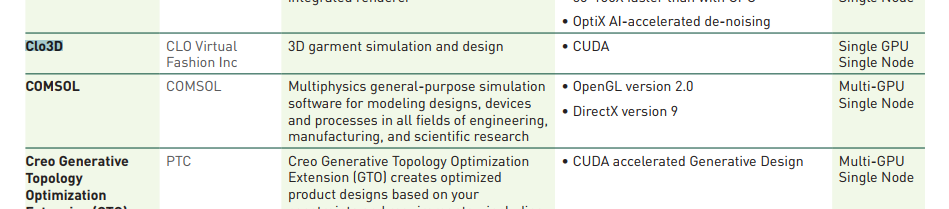
that is very disappointing as some users here have said it does support multiple GPU's.
1 -
I find this topic exciting aswell. At home I have an Intel i7 12700k + RTX 3070Ti which rendered an animation with 130 images at 1920x1080 / 72dpi in about 50 minutes each.
Yesterday I was in university with an i9, Titan RTX and wanted to render 360 degree turntable in 1080x720 / 72dpi and even on this very good machine and even more reduced settings plus CPU supporting the GPU(Cuda) it took +-60 minutes to render.
I know this has a lot to do with the render/light settings, particle distance, vertex count etc....but I thought to myself: Could it be that the Clo-Software is limiting the rendertimes somehow? I mean simulation times are okay and fluent depending on the Outfit lets say but rendertimes I expected it to be faster...
What would the most ideal machine look like when we are talking about high single Corespeed and Single GPU?
CPU: Xeon? i9? Epyc/Threadripper?
GPU: 3090? Quadro?
RAM: 32? 64? 128?0 -
V-Ray can use the CPU to run CUDA code together with the GPU.
But the GPU is a lot faster. So my recommendation is:-Get the fastest single card GPU you can get like a RTX3090 or RTX4090 (Don't get the Ti versions or Quadro cards, they're overpriced compared to the performance offered). With 24GB video card memory you have ample room for hi-res textures.
-Get a decent CPU. Like a 16 core Ryzen 5950X or 7950X to get a good viewport experience. I helps with rendering as well but like I said, the GPU is much more important. Getting a Xeon or Epyc is just a waste of money. If you want a system that also serves for programs that DO support multi GPU (like Cinema 4D) I would recommend a 32 core Threadripper 5975WX. That gives you 128 PCIe lanes so all cards have full 16x bandwidth. On 'consumer' Ryzen or Intel systems you're only able to run one card at full bandwidth. But the WRX80 platform is a professional platform so quite expensive. I wouldn't recommend getting the 64 core 5995WX unless you're going for CPU render only.
-Clo is not that memory intensive but getting less then 32GB might not be recommended if you want to use Hi-res textures. DDR4-3600 is the sweet spot. CL14 if you can afford it. Spending more on faster memory probably won't give you much return on investment.
I hope that was helpful ;)1 -
thanks that was very good advice!
0
Comentários