Neck print

Hi all,
I am having trouble with the neck print. I am making a t-shirt, which is having the branding inside as a neck print instead of a label.
But when I start to render, the neck print disappears from the inside and is instead visible on the outside of the back piece.
What I did:
I placed the neck print as a graphic on the back piece, flipped the graphic horizontally, and chose ‘Back’ under ‘Graphic Configuration’ (property window), and then it appeared inside in the 3D window.
But on the rendered picture, the graphic is on the outside.
What am I doing wrong?
-
Hi dyrholm!
Can you check that you're on Thick Textured Surface? You may have to stop the preview and then restart it in the Render window after you switch to that view.
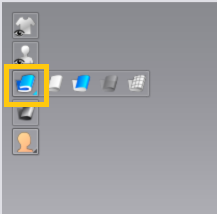
See if that works?
1 -
Hi Anh,
Yes, that works - thank you!
Can you also explain to me, what exactly this ‘thick textured surface’ setting is doing to the garment in clo? Just so I can understand the logical part in this.
0 -
Hi,
It doesn't do anything to the drape of the garment. It's just the different surface views you can have. Textured Surface hides the back/"wrong" side of the fabric, meaning you'll only see it as a dark gray color. It's useful for construction so you know if you're putting your garment together inside out or not. It also makes the fabric thin and helps you see what the mesh looks like (if you're used to 3D modeling software like Rhino or Maya).
Thick Textured Surface shows the full thickness of your fabric and the textures on both sides. If your textures look pixelated or your fabrics aren't the thickness they should be, just switch to this view and you're all set.
When you export your garments as 3D objects, you can also choose Thin or Thick in your settings too.
0 -
Okay, that makes sense.
Thank you for explaining!
0
Comentários