Flattening not default fabric

Hi,
When I use the flatten tool , the result is always the same although i change the physical property ( Weft, warp, shear...)
1. I would like to know if the flattening considers physical properties in the process (I think finite element) or just it is a geometric flatten?
2. If Clo uses these parameters how to change the values in order to flatten with different fabrics.
thanks
-
@steph170293, thanks for the question!
For now, only default fabric is applied to patterns newly created with the Flatten tool. It may be the reason why the changes in the physical properties don't seem to apply to the patterns.
I have forwarded this inquiry to our developer and he said he will add this feature in the future.
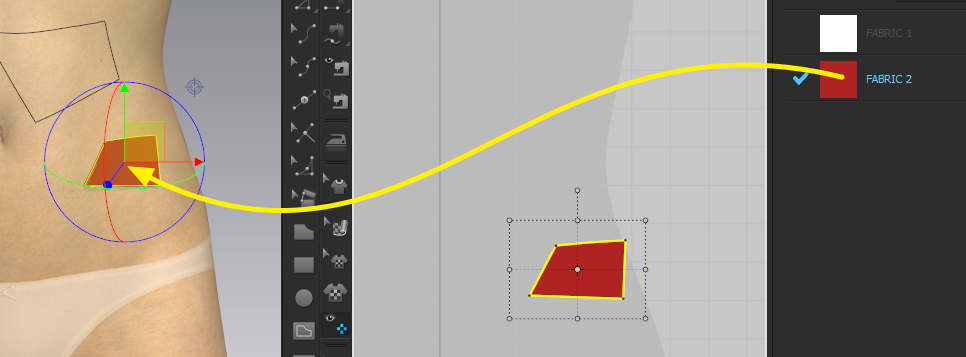
If you want to apply different fabrics to the flattened patterns, just drag and drop the fabric from the Object Browser :)
 0
0 -
Hi,
if in the future versions of CLO there will be the chance of changing the physical properties of default fabric, as you said,
my real question is: Will the flatten pattern result be different each time I change the default fabric properties? Can you please answer with a yes or no and then give me the explanation?Thank you so much.0 -
@steph170293,
It is "no" to your question :(
If you change the fabric properties of the default fabric, it will affect all patterns applied with the default fabric :) Hope this helps
0 -
Hi, I'm bringing back this question, because it is a year over and there is a new CLO version, Is there a way I could define a fabric (with different default fabric properties) and then create a flatten pattern with that new fabric?
thanks for your help!0
Comentários