AVATAR DISSAPEARS AFTER ADDING PDF/AI FILE

I am having the same trouble as others but the solutions offered do not help me. I am using the Trial version. I went to File > Import (add) > Adobe. The video will show that as soon as I import the file from AI the avatar screen changes and the avatar is no longer seen https://www.loom.com/share/b9056c268fd3405b9798ccab249676f4?sid=20d8fc98-910f-4b96-aa54-59f2dd89960a
-
Hi stewiemimi,
Unfortunately, the screen capture does not contain any visible submenus, therefore the steps taken cannot be analyzed, however, as soon as the pattern piece loads, the views in both 2D and 3D window change so that the X-/Y-axis and the ground become invisible. Therefore, I estimate that the pattern piece you are loading is so large it simply conceals the avatar still being there.
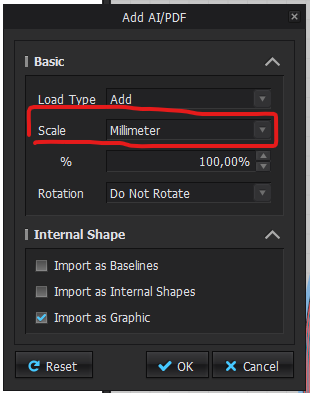
During import, please adjust the scale here into something smaller and see if it works then.
0
Comentários