Issue with Normal Map

My normal map seems to have extra lines on them. I don't know if they are old drafting lines or old fold lines. Is there a way to find out where the lines are coming from and turn them off?

-
Hi rjbeveridge ,
Can you provide a screenshot of your 2D window with all pattern pieces on your layout? Do you have any imported trims in your scene?
I need to see where this issue could come from.
I thank you!
0 -
I have the same issue. The lines come from the stitching. Here it is clear that they come from the pocket. The lines are not in a right place.
Maybe it is an error in UV map module.
I used both functions:
- reset uv to 2D arrangement
- fit all uv to 0-1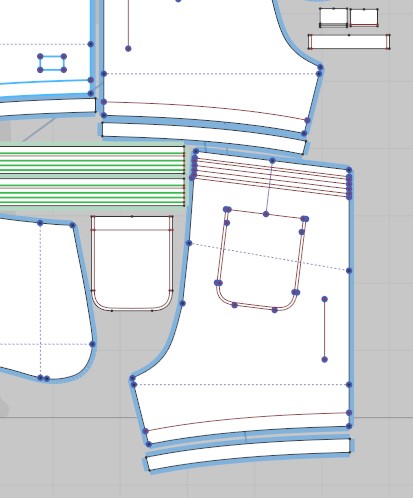
 0
0 -
Hi Marta,
Thanks for your post. This looks like exactly the same issue. I thought it may be to do with folding the fabric but the stitching makes sense.
It would be good to know if there was a way to switch off the normal map related to the stitching so it doesn't appear on the baked maps. Alternatively if there is a way to get the stitching in the correct position in the UV map module, as there is no way to move the stitch lines (in my file the are attached to random pattern pieces and cant be moved independently like a normal pattern piece can)
Feedback from the support team would be helpful as it seems like a glitch.
0 -
Hi rjbeveridge1. CLO is aware of this issue and currently working on the fix. :)
0 -
rjbeveridge1 for now I switch off the normal map on this stitching. You can do it when you select the stitch and change intensity to zero.
 0
0 -
I had the same issue, but then I updated my CLO to 7.0.528 version, and it is fixed.
0
コメント