Layers for layers

Hi, I've been working on a shirt, jacket, and pants for a character and after creating the jacket first I'm realizing I may have put myself in a corner.
Is it possible to put patterns onto hide-able layers like in 2D art programs, or do some other technique to temporarily get rid of the coat I made and create the shirt and pants without it interfering?
-
Hi phnme. It is possible to do this.
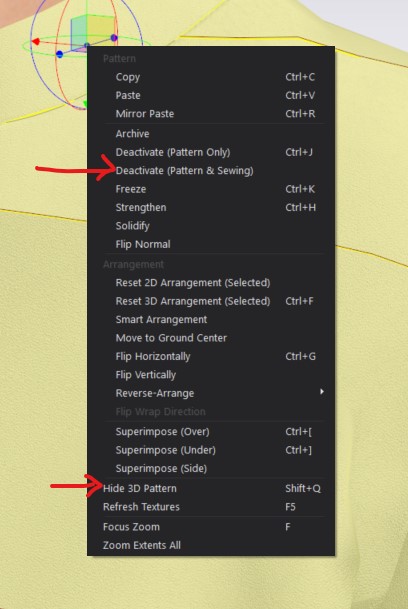
Start by first selecting all the pattern pieces that you wish to hide. Then in the 3D window R-Click on one of the pattern pieces. From there you can select Deactive Pattern and Sewing. This will change the pattern pieces to a sheer Blue. Then will no longer react to simulation or other pattern pieces. You can also R-click and select Hide 3D Pattern. The pieces will disappear, but can be brought back using the 3D toggle Show Garment once you are ready to bring them back.
In future I might suggest you make each garment in a separate file and then combine them into one master file later on for styling. Hope this helps!
0
コメント