Displacement/Opacity/Normal Maps not accepted

Hi!
I am trying to add maps and keep getting the below error. I have 1K, 2K & 64 versions and they all get rejected. I tried looking for answers on the CLO site but did not find anything. So I turn to the experts,as I am not in this area :) Thanks!
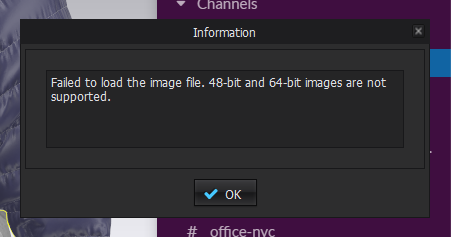
-
You should change the bit in photoshop and then upload. Image> mode> and choose another bit there 8, 16 or 32 , save and then upload.
0 -
pinareris thank you for your quick response! I purchased this material and it came as tif files. I tried to import them into PS and they do not allow it. (did I mention I'm not an expert in this area? ;)
0 -
hmm if you can not open in photoshop then the format probably is not tiff though..
0 -
Photoshop opens tiff.
then select
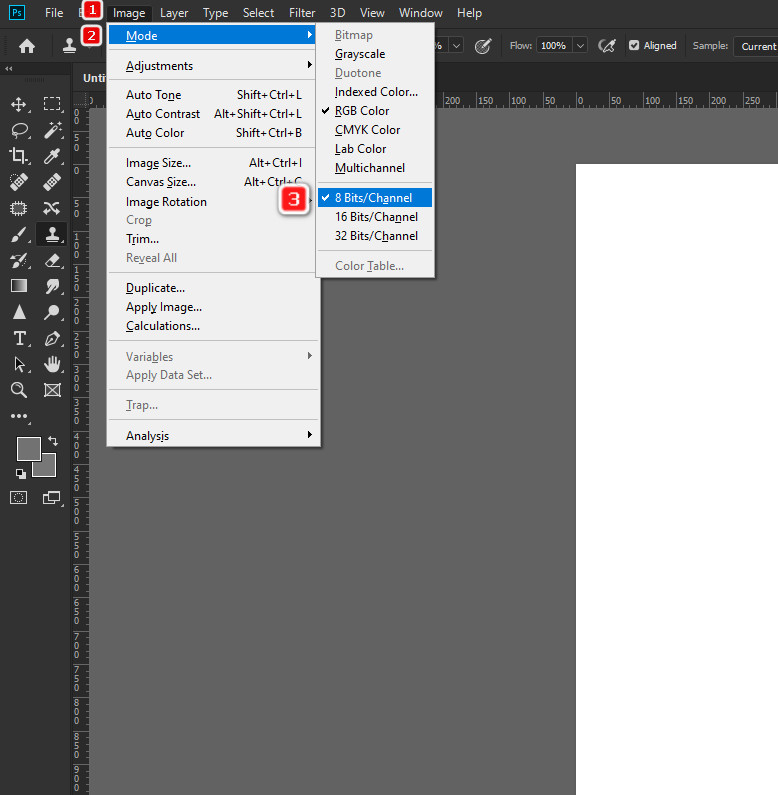 0
0 -
Clo cannot do support for 16 bits per channel. I requested this. We cannot answer, this is so that weak machines could work. Photoshop works on weak machines, even 32 bits per channel.
Normal maps and displacement by default worldwide except clos use 16 bits per channel. In clo only 8. From this can be seen a step on the textures using normals and displacement.
Those who sold the textures are not to blame. You need to change this in photoshop.
0 -
@pinar. (face palm emoji) I am ALSO new to a PC and I tried to drag the file into the PS icon. I just figured out that you don't do it that way. Thank you for your help!
0 -
cool, glad you can open it.
0
コメント